Tag: pin created

  • 180 ESL Conversation Starters and Questions (from Beginner to Pro)

    180 ESL Conversation Starters and Questions (from Beginner to Pro)

    Do you ever run out of ideas to keep your students speaking in English?
    These ESL conversation starters and ESL conversation questions will help you inspire fun, natural, and engaging discussions in class—no matter your students’ level.

    This list of 180 English conversation topics covers everything from everyday situations to creative “what if” questions, so you’ll always have something interesting to talk about. Use them as warm-ups, group activities, or full lessons to build fluency, confidence, and real-world communication skills.

    Whether you teach beginners or advanced learners, these speaking prompts will make your lessons more interactive and enjoyable—for both you and your students.

    Tip: Looking for more speaking practice? These pair perfectly with this list: our 120 Would You Rather questions for quick warm-ups, 12 fun speaking activities to get quieter classes talking, and conversation questions using conditionals if you want to work grammar into the discussion.

    Conversation Topics for Adults and Teens

    Adults and teens usually know more about advanced topics than children (politics, religion, etc.) That being said, knowing more on these topics doesn’t necessarily translate to being able to speak about these things easily so don’t assume they can do everything. Be aware of your student’s level and be prepared to reframe a question if they are struggling to understand. 

    Work

    • Where do you work?
    • Do you enjoy your job?
    • Do you use English for your job?
    • Tell me about your last job.
    • What do you think is the most difficult job in the world?
    • What do you think is the easiest job in the world?
    • Where would you work if you could pick any job?
    • Would you still work if you won the lottery?
    • Do you think robots will replace all the jobs in the future?
    • What kind of job should have the highest salary?

    In this post, you’ll get 20 topics and activities for Business English lessons.

    Music

    • Do you listen to music?
    • When did you start listening to music?
    • Do you play a musical instrument?
    • What do you think the future of music will be like?
    • If you could meet any musician, who would it be?
    • Why do people like music?
    • If you could erase a musical genre, which would it be?
    • Do you think musical success comes from working hard or luck?
    • What was the first album you bought?
    • Have you ever downloaded music illegally?

    Holidays

    • What is a holiday?
    • Do you often go on holiday?
    • Where did you last go on holiday?
    • Where would you like to go on holiday next?
    • Do you prefer relaxing or having an adventure on your holiday?
    • Is it weird to go on holiday by yourself?
    • What is the best food you’ve eaten while on holiday?
    • Can you imagine what holidays 500 years ago were like?
    • Would you like to go on holiday to space?
    • What do you think the future of the holidays will be like?

    Technology

    • What is technology?
    • What do you think of when you hear the word ‘technology’?
    • How has technology changed in the past?
    • How has technology changed your life?
    • Could you live without technology?
    • Find the full list of technology questions here

    Conversation Topics for Kids

    To engage a child in conversation, you have to enter their world. What is fun for them? What do they like to do? Using words/phrases like “wow”, “That sounds tasty”, “Awesome” can show you are listening to them and make things more fun which will get them saying more!

    Pets

    • Do you have a pet?
    • What do you think pets do in the day?
    • What do pets eat?
    • Are cats better or dogs?
    • What is the best name for a pet?
    • Would you like a pet spider?
    • Would you like to be an animal? Which one?
    • Why do we have pets?
    • Do you prefer cute or fun pets?
    • What is the best present for a pet?

    School

    • Do you like school?
    • What is your favorite subject?
    • What is your least favorite subject?
    • Who is your favorite teacher?
    • Why do people have to go to school?
    • Do you like homework?
    • What would you do if you were the headteacher?
    • How could schools be more fun?
    • How long are the summer holidays?
    • Can you learn and have fun at the same time?

    Movies

    • What is your favorite movie?
    • Who is your favorite character?
    • Who is your least favorite character?
    • Do you like Disney movies?
    • What was the last movie you saw at the cinema?
    • How often do you watch movies?
    • Do you wish you could live in a movie?
    • Why do you watch movies?
    • Do you prefer reading books or movies?
    • Do you watch any movies in English?

    Conversation Topics for Beginners

    Keeping the topics simple for beginners is a must at the start. Talking about their hobbies and family can help, as these are areas they may have already experience in talking about. If a student is really struggling, then giving them phrases to use such as “I like …” can help get the ball rolling.

    Food

    • What is your favorite food? Why do you like it?
    • Do you like to cook? What dishes can you make?
    • What foods are popular in your country?
    • Do you prefer eating at home or at restaurants? Why?
    • What is a typical breakfast in your home?
    • Have you ever tried food from another country? Did you like it?
    • Do you like spicy food? What spicy dishes have you tried?
    • What foods do you dislike? Why don’t you like them?
    • What is a traditional holiday food in your culture?
    • If you could only eat one food for the rest of your life, what would it be?

    Hobbies

    • What do you like to do?
    • Do you do any sports?
    • What types of movie do you like?
    • Do you play video games?
    • What do you usually do with friends?
    • Is learning English a hobby or work?
    • Do you have any unusual hobbies?
    • Do you have enough time for your hobbies?
    • What is a common hobby?
    • What do you think is a boring hobby?

    Family

    • Do you live with your family?
    • How many people are in your family?
    • Are you close with your family?
    • How often do you see your family?
    • What do you do with your family when you see them?
    • Is your family important to you?
    • Which is more important, friends or family?
    • Who is the weirdest person in your family?
    • Are families less important nowadays than in the past?
    • What would happen if we didn’t have families?

    Home

    • Where do you live?
    • What is there to do in your city?
    • What is your place like?
    • What is your neighbourhood like?
    • Are there any parks near where you live?
    • Have you ever lived elsewhere?
    • How many rooms does your place have?
    • If you moved, where would you like to live?
    • Would you prefer to live in the city or country?
    • Would you like to live abroad?

    Use information gap activities to help your students practice speaking: read our guide.

    Weird and Funny Conversation Starters

    Nobody wants to speak about the same mundane topics, especially if they’re an advanced student. Being able to mix it up is a great attribute to have as a teacher. Not only will you have memorable lessons with these conversation starters, but it will really test the ability of the students to think about topics they aren’t used to (instead of rolling off easy answers about familiar topics.)

    Fails

    • What’s the most epic fail you’ve ever witnessed in person?
    • Have you ever had a funny cooking fail? What happened, and how did it turn out?
    • What’s the most hilarious fashion fail you’ve ever seen or experienced?
    • Have you ever had a technology fail at the worst possible moment? What was the situation, and how did you handle it?
    • What’s the funniest sports fail you’ve ever seen, either in person or online?
    • Have you ever had a humorous translation fail when trying to communicate in a foreign language? What did you say, and what did you mean to say?
    • What’s the most amusing autocorrect fail you’ve ever experienced or seen?
    • Have you ever had a funny fail while trying to impress someone you liked? What happened, and how did they react?
    • What’s the most comical pet fail you’ve ever witnessed or heard about?
    • Have you ever had a hilarious DIY or home improvement fail? What went wrong, and how did you fix it?

    Zombie Apocalypse Plan

    • What is your zombie apocalypse plan?
    • Who would you take with you?
    • What would be your weapon of choice?
    • What would you do if a friend got bitten by a zombie?
    • What would you do if you got bitten by a zombie?
    • What food would you take with you?
    • Do you think governments should have a zombie apocalypse plan?
    • Do you think everyone should have a zombie apocalypse plan?
    • Is a zombie outbreak a likely scenario?
    • Why do you think there are so many movies and TV series based on zombies?

    Superpowers

    • If you could have a superpower, what would it be?
    • What do you think is the weirdest superpower in comic books?
    • Are some superpowers too powerful?
    • Would you like a superpower where you could turn things into gold by touching them?
    • What is the weakest superpower in a comic book?
    • Have we already seen every kind of superpower possible in a comic book?
    • Are there some people in the real world that have superpowers? (doctors etc)
    • Would you like a superpower where you could turn things into chocolate?
    • Would it be better to be super strong or super smart?
    • Would you like the power to travel through time?

    Magic Lamp

    • If you were granted 3 wishes, what would they be?
    • Is wishing for more wishes cheating?
    • Should there be any other rules for people granted wishes?
    • Have you seen any movies with a magic lamp?
    • Do you think there is a better object that could house a genie?
    • Why are we interested in stories of people having wishes?
    • Have any of your wishes come true in real life?
    • Do you make a wish when you blow out the candles on a cake?
    • Is it bad luck to tell someone what your wish is when blowing out the candles?
    • What other ways do people make wishes?

    Controversial Conversations Topics

    These are topics that you need to be careful with and use your judgement based on the student’s background. You need to wait until you know a student to find out what material is appropriate for them. That being said, If used correctly, then these can be really interesting and get the student thinking about “real issues”. 

    Technology and Society

    • Do you think social media has had a positive or negative impact on society? Why?
    • Should governments have the right to monitor citizens’ online activities for security purposes?
    • Is technology making people less social or more connected?
    • Do you believe that artificial intelligence will eventually take over many human jobs?
    • Should parents limit their children’s screen time and use of technology?
    • Is online privacy a fundamental human right, or should people accept less privacy in the digital age?
    • Do you think technology is making people smarter or more dependent on devices?
    • Should schools incorporate more technology in the classroom, or focus on traditional teaching methods?
    • Is the rise of fake news and misinformation on the internet a serious threat to democracy?
    • Do the benefits of technological advancement outweigh the potential negative consequences for society?

    Find more questions about social media and questions about technology here.

    Death Penalty

    • What do you think about the death penalty?
    • Do you know which countries still use the death penalty?
    • Why do you think some countries use the death penalty?
    • Do you know of any famous executions?
    • Should the death penalty be outlawed?
    • If we removed the death penalty then what punishment should replace it?
    • What is the most humane form of execution?
    • What would your “last meal” be?
    • Does the fear of the death penalty reduce crime?
    • How has execution changed over the years?

    Abortion

    • What is abortion?
    • Should abortion be legal?
    • Why do you think some people are “pro choice”?
    • Why do you think some people are “pro life”?
    • What do you think of abortion in cases where the baby was conceived due to rape?
    • What do you think of abortion in cases where the Mother’s life is in danger (due to being pregnant)?
    • Should the father “get a say” in the matter of abortion?
    • What advice would you give to a family member who was thinking of getting an abortion?
    • Should people be allowed to protest against abortion?
    • What do you think the future laws on abortion will be?

    Corruption

    • What is corruption?
    • Is there corruption in your country?
    • Why does corruption exist?
    • Would you consider taking a bribe?
    • Would you consider offering a bribe?
    • Are some types of corruption better than others?
    • Which countries have the most corruption?
    • Which countries have the least corruption?
    • Are there any stories of corruption that you can remember?
    • Is it possible to get rid of corruption entirely?

    Get a list of 110 “Would you rather” questions for your conversation lessons.

    Why Every Teacher Needs a List of Starters

    If you want to improve your student’s speaking ability, you need to master the art of conversation. You have to know how to get your students speaking, move the conversation forward, provide feedback and make it all feel natural. You also need engaging topics, and that is where this guide comes in.

    One of the problems that can face a teacher is knowing what to talk about. What do you do when you’ve finished talking about work, the weather and then realize that only 5 minutes have passed!

    This guide has everything you need to make sure you never run out of topics and most importantly, you always have something interesting to say.

    It is a good idea to pick a particular topic for a class (or even have your student pick if you want more engagement from them). Once you have that topic, then move through the questions, trying to get as much from each one as possible. 

    Browse our ESL teacher resources section for more tips and printable lesson materials.

    Additional Tips for Your Conversation Lessons

    Here are some additional tips to make sure your students are getting the most out of their conversation lessons and will be excited about coming back for more. Some of these will take time to internalize and get right but be aware of them and experiment to get them just right.

    Don’t feel like you have to stick rigidly to the list of conversation starters. If a question takes you down a different conversational thread then go with it. The important thing is that the student is talking, you can always return to “the script” later.

    Correcting a student immediately can often be useful, but in conversation, it can really kill the flow as well as a student’s confidence if done too often. A good idea is to make notes of any major problems and then mention them after a particular section instead. On top of this, try not to interrupt a student once they are speaking. For each answer, try to milk everything out of them that you can before you have “your turn to speak”.

    As well as the frequency of correction, consider the amount being corrected. Don’t feel like you have to correct EVERYTHING. Especially if a student is starting out and is a bit nervous. Pick a few problems areas and focus on that, if you mention too many things at once it can be overwhelming and can really lower a student’s confidence.

    Be strict when a student gives you short answers. If a student gives you an answer like “yes” then force more out of them with “yes… because” or “no… but”. The idea is to get them using the language more.

    Try to inject some personality when using these ESL conversation topics. It should feel more like a conversation rather than a robot giving an interview.

    Some students will struggle with certain subjects as they just don’t know enough about the topic. If it’s a bit of a challenge then push through but if they can’t even talk about a topic in their native language then it may be an idea to move on to another subject.

    Allowing a student to pick a topic can be a great way of engaging them more. This also has the added benefit of helping a younger student (such as a teenager) feel more empowered as they can make their own decisions.

    Get 18 statesman tips on giving great conversation for teens and adults in this post.

    Final Thoughts

    There you have it!

    All you need to make sure you never run out of things to say. Get these printed out as your go-to cheat sheets and bookmark this page so you can easily come back to them for future classes.

    Hopefully, these ESL conversation starters and questions will spark your own ideas for topics you can use in class. If you are teaching one-to-one, you could even write niche topics especially for that student’s interests (e.g skateboarding, knitting or chess).

    Remember, match the topics to the student’s level, keep it fun and once they start talking don’t get in the way!
  • Interactive Whiteboards in the Classroom: The Starter Guide

    Interactive Whiteboards in the Classroom: The Starter Guide

    With the rapid expansion of new technology, today’s schooling may seem easier than ever yet never more challenging. 

    On one hand, teachers and students can teach and study online anywhere and the progress of digital learning devices is skyrocketing. On the other hand, most teachers would agree that keeping students’ attention has never been harder. 

    The truth is, there’s no more room to connect with students if you insist on old-fashioned chalkboards and paper-based study materials. 

    Students nowadays live in a smart, connected world and receive information fast through digital services. Therefore, they expect to receive knowledge at school in the same way. Otherwise, they easily lose interest.

    You can use technology in multiple ways to simplify and improve your teaching methods while engaging students in fun, interactive lessons. Among the top and most practical ways to do this is using an interactive whiteboard in your classroom that will upgrade your standard text-based teaching.

    What Is an Interactive Whiteboard?

    The interactive whiteboard is also known as “smart whiteboard” or “electronic whiteboard”. It is a learning tool in the classroom that displays multimedia content from a computer onto a classroom board, so teachers and students can interact with the content on the screen using tools, digital pens or even fingers.

    You simply connect the computer to the internet, and you can access any information and use it while teaching. Interactive whiteboards also enable teachers to store data used in previous lessons and search through it when needed. All in all, these smartboards are a teacher’s treasure case.

    Both teachers and students can benefit from the interactive whiteboard in the classroom. The content can be shared and used during lessons, which simplify teachers’ work and motivates students to collaborate and interact.

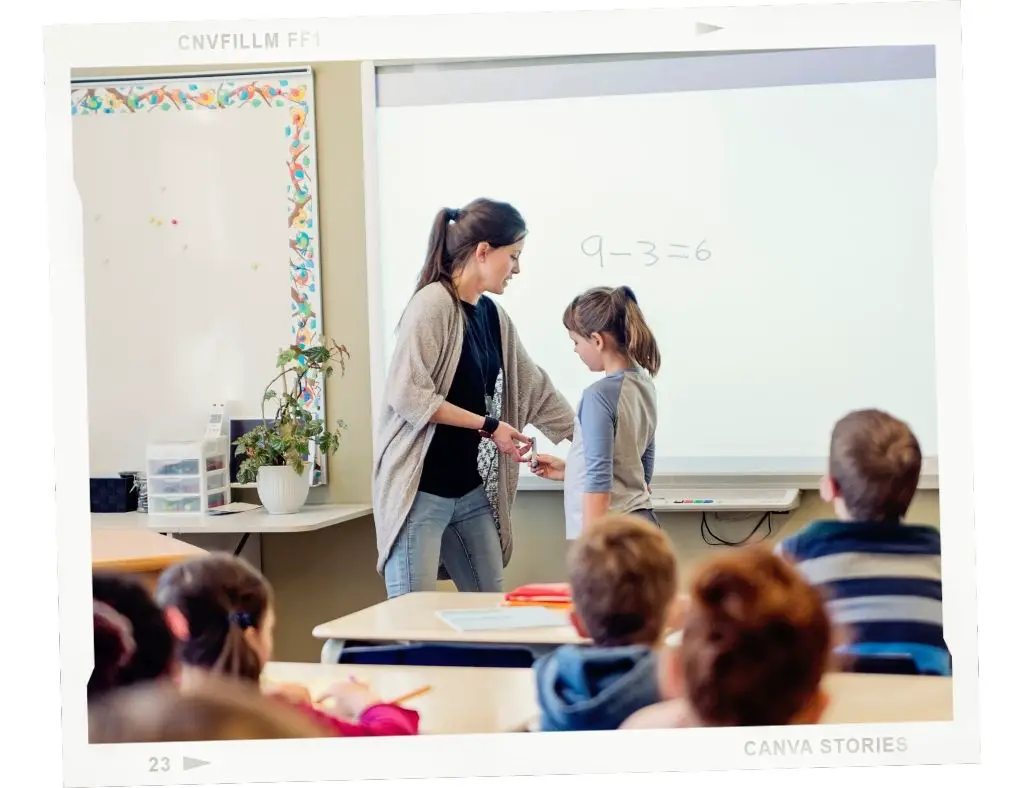
    A teacher and a student using an electronic whiteboard during a lesson.

    Also read: 7 easy tips on how to establish a hybrid classroom

    How Can Teachers Use Interactive Whiteboards In the Classroom

    The majority of teachers have reported seeing improvement in their students engagement and a more positive and livelier atmosphere since using this digital learning too. Nevertheless, many educators of different ages and levels of tech-savviness may find switching or frequently using the interactive smart whiteboard a bit tricky. 

    Although we’ve been using technology for over two decades, its exponential growth in the past several years might seem like a big leap when one needs to implement it daily in the classroom. According to my experience, the sooner, the better. 

    When they first brought me an interactive whiteboard in my classroom, I felt a bit unready to do a full switch. I instantly changed my mind when I saw the smiles on my students’ faces and when I saw just how simple and fun this tool was for me too. 

    There are so many ESL activities you can do using an interactive whiteboard. Games, quizzes, charades, karaoke shows, drawing… 

    Top 5 Activities for the Interactive Whiteboard in the Classroom

    These are my favorite activities:

    Disappearing Text 

    Write a sentence on the board, then instruct the students to say the whole sentence together out loud. 

    Then, erase a couple of words at the beginning and tell them to say the full sentence again.

    Keep on erasing words until the sentence is gone, but encourage students to say the complete sentence correctly.

    Walking/Running dictation

    Divide the class into 2 teams.

    Next, one student from each team approaches the teacher, who tells them a word or sentence from the lesson. Then, the students go back to the team and tell the word or sentence, and they have to write it on the board as quickly as possible.

    The first team who writes the correct word or sentence wins and gets a point.

    Read the full instructions on running dictations.

    Tic Tac Toe

    Divide students into two teams. Choose a grammar tense you want to practice.

    Draw a 4 x 4 grid on the interactive boards. Write a sentence in every square and leave a blank space for the verb. On the side write 13 verbs (one of them is extra).

    Instruct students to complete the sentence with the correct form of the verb. The first team who answers correctly gets a Tic Tac Toe.

    Pictionary

    Divide students into small teams.

    Make a list of vocabulary words you want to practice, and that are familiar to students. List the words separately on cards turned upside down and present the on the board.

    Invite a student to “draw” one word and show it to his team that has only 5 seconds to guess the word.

    Continue with the next teams, then pick a winner according to the number of points that each team has won. (1 correct guess = 1 point)

    Mixed-Up Sentences

    Divide students into two teams or more small teams.

    Make two separate columns on the board. Write jumbled sentences in the first column and leave the second column empty. Instruct students to race to make a correct sentence in a limited timeframe.

    Each team gets a point for each correct and fast answer. You can also do this activity as a test review to practice syntax.

    Find more activities here:

    Advantages and Disadvantages of Interactive Whiteboards for the Students

    Student involvement in the classroom would surely progress when students realize that teachers speak their language, i.e., fast and interactive information input. Therefore, interactive whiteboards contribute to building positive student experience in the classroom, however, just like any learning tool they have certain disadvantages when it comes to student learning.

    Let’s take a look at both the advantages and disadvantages of interactive whiteboards for the students:

    Advantages

    Students learn in different learning styles

    With the interactive whiteboard, teachers can support and encourage different styles of learning, i.e., visual, kinesthetic, and auditory.

    Students who are keen on visual learning would be able to draw, manipulate and present on the board, while the auditory learners will enjoy videos, songs and sound effects. The kinesthetic students can have physical interaction with the board that allows them to touch and move objects on the display.

    Enhances language learning

    The interactive smart board is especially effective for language classes. Language teachers usually combine the digital format of their teaching materials with the textbooks, so students can get multiple interaction with the language they are learning.

    Students can work with new vocabulary or grammar content by clicking, highlighting, watching dialogue videos, listening to pronunciation of words related to images and much more.

    Direct-from-source information remains available

    Another important benefit of interactive whiteboards in the classroom is that presentations during lessons can be recorded, saved, shared and used at any time when needed.

    Students can thus plan when to revise study material and be sure that they rely on correct information. This way, students feel more self-confident, motivated and focused.

    Storytelling

    According to research of educators, ESL students exposed to digital storytelling develop their English skills and progress fast. For young learners, for example, teachers can use comics and cartoons to introduce new vocabulary and grammar structures.

    Another practical and fun way to use storytelling in the classroom is with predictable storybooks or picture books with no text that you can change, adapt or upgrade together with your students’ ideas.

    More experienced students can write words or sentences and add to a story to finish it, or create a new one from scratch together with their classmates.

    Enhanced interaction in the classroom

    Smart interactive boards have a touchscreen that can be used by many students simultaneously. Teachers would be happy to see that their students turn into active participants in the lessons, communicating and enjoying the hands-on experience of learning.

    Disadvantages

    Negative impact on eye health

    No need to go any deeper, as it is clear that staring at any screen for a long time may have a negative impact on the eyesight. One of the best ways to avoid this is to limit the time of use of the interactive board and combine it parallelly with other activities that do not involve screen time.

    Risky when remote access by students is permitted

    To increase students’ engagement, many teachers allow their students to interact on the board through their personal computers. In one way, this can have a positive outcome, as students can share relevant data related to the curriculum.

    However, students often use their access to share inappropriate and irrelevant information on screen that may disrupt learning time.

    Technical problems

    Both teachers and students can use these boards only when the lighting in the classroom is appropriate. Inadequate lighting can make students’ reading experience unpleasant.

    Also, if the power goes out, or the computer collapses, the lesson material might disappear and it is likely that this will interrupt students focus and break the learning atmosphere.

    The Best Whiteboards for the Classroom? 

    Teachers can enhance their lessons by using the interactive whiteboards in various ways, incorporating a wide range of audiovisual material to have more motivated and engaged students. However, choosing an interactive whiteboard can be a bit challenging if you don’t know where to start from.

    Here are my top 2 suggestions:

    Samsung Flip 65 Inch 

    [amazon-button link=”https://www.amazon.com/Samsung-WM65R-Flipchart-Business-LH65WMRWBGCXZA/dp/B07WXZDCC9?crid=60QK5R3QTLFM&keywords=samsung%2Bflip%2B65%2Binch&qid=1653912076&refresh=1&sbo=RZvfv%2F%2FHxDF%2BO5021pAnSA%3D%3D&sprefix=Samsung%2BFlip%2B65%2Binch%2Caps%2C128&sr=8-3&th=1&linkCode=ll1&tag=jimmyeslus1-20&linkId=51c2c08a09706a2648a824431b6f5a02&language=en_US&ref_=as_li_ss_tl”]

    With its digital flip chart and screen size of 65 inches (1.65 m), this interactive whiteboard makes any room turn into a classroom.

    Samsung Flip 65 Inch includes a built-in Wi-Fi module and a built-in speaker that will enhance your presentations of various audiovisual teaching materials within your lessons.

    It has a rather large display, a temperature sensor and time and date memory which are practical for steady control of this learning tool and the data you want to save and classify.

    This interactive smartboard comes with two passive digital pens, a power cable and a touch out USB cable that you can use to connect to your computer or smartphone.

    Plus, you get a 3-year warranty with on-site pickup service during the warranty period.

    VIBE All-in-One Computer Interactive Whiteboard

    [amazon-button link=”https://www.amazon.com/Vibe-Interactive-Touchscreen-Collaboration-Whiteboard/dp/B081LPL772?crid=21GPPMOHWCPW8&keywords=Vibe+All-in-One+Computer+Interactive+Whiteboard&qid=1653912258&sprefix=vibe+all-in-one+computer+interactive+whiteboard%2Caps%2C145&sr=8-1-spons&psc=1&spLa=ZW5jcnlwdGVkUXVhbGlmaWVyPUEyOUZDMzY1R1MxWlI5JmVuY3J5cHRlZElkPUEwMzIyMzMyMzZZVzdEOUtXREhTNSZlbmNyeXB0ZWRBZElkPUEwMjcxNjQ4U0NIQTZLQUo3VU04JndpZGdldE5hbWU9c3BfYXRmJmFjdGlvbj1jbGlja1JlZGlyZWN0JmRvTm90TG9nQ2xpY2s9dHJ1ZQ%3D%3D&linkCode=ll1&tag=jimmyeslus1-20&linkId=346770ead3f3c082c6d6f2e649403f76&language=en_US&ref_=as_li_ss_tl”]

    This exceptional interactive board is designed to make teaching and learning experience a breeze. One of its main pros is the pen that you can use on the touchscreen, which looks natural and feels familiar like a marker on a regular whiteboard.

    Next, you can edit and share information with many people at the same time, either face-to-face in the classroom or while working remotely (ping, offline-online teachers!). 

    The size of the screen of the VIBE smart board is 55 inches (1.4 m). You can use various apps for teaching, as the board works with almost any of the teaching tools.

    Plus, you can store all of your necessary data in the VIBE Cloud in real time. So, you don’t have to worry about the whereabouts of your notes – they will all be stored and ready to use back and forth during lessons. Then, you can export the content to your cloud drive like Dropbox, Google Drive etc.

    The VIBE Smart Digital Whiteboard can be easily installed and has a thin and compact size that makes it convenient for any classroom.

    Also read: The 10 best laptops for teachers

    To Sum Up

    Using an interactive whiteboard in the classroom is beneficial for both teachers and students. This learning digital tool is rapidly taking over, so the sooner you catch up with the multiple ways to use it, the better the attention and motivation of your students.

  • ESL Job Interview Questions & Answers: Top 6

    ESL Job Interview Questions & Answers: Top 6

    Applying for ESL teaching jobs abroad isn’t very difficult. In fact, due to the high demand for ESL teachers around the world, it’s relatively easy to apply for jobs to teach English abroad – and get hired. So, why even bother preparing for an ESL teaching job interview?

    Well, as with anything in life, the initial time and effort you put into researching schools or organizations you want to work for, and preparing well to present yourself in a professional light can make a huge difference in your results.

    In this industry, you will need to separate the wheat from the chaff, so to speak. Once you’ve done that, you’ll realize that getting hired into top schools that pay the best salaries and benefits in the industry is competitive. Do you want to be hired by a bottom of the barrel employer, or a highly rewarding one?

    If you answered wisely, then you’ve probably figured out that you need to ace the interview with a top employer. In this guide, we discuss the top 6 ESL job interview questions and answers and other factors to consider.

    ESL Job Interview: The Top Questions & Answers

    How to Meet the TEFL Employers’ Expectations in the Job Interview

    Hiring practices in the ESL industry vary from one country to the next. Firstly, there are the basic qualifications teachers must have to be considered by employers.

    Next, there are the more nuanced aspects of being selected, such as how well your résumé is crafted, and the impression you give to prospective employers during the job interview, which can be as much about cultural expectations as it will be about your professional demeanor.

    So, while thinking about the types of questions you’ll be asked during the interview, also take some time to consider what are the cultural norms of the specific country and culture where you’re applying to work, when presenting yourself as the ideal candidate. This will help you tailor your responses and mannerisms during the interview to the expectations of those interviewing you.

    The majority of organizations that hire ESL teachers from abroad now conduct online video interviews. What that means is you can sit right at home and complete the interview in your favorite chair.

    What that doesn’t mean is you should show up to your interview wearing pajamas. Please do shower, shave, groom, and dress appropriately. Most cultures view teachers as carrying a certain amount of social responsibility, and that’s the type of person organizations want to hire.

    As well, the opportunity to teach English abroad is likely to be one that fills your mind with excitement about a new life experience in a foreign country. The organizations interviewing you, however, will almost always have an entirely different priority to yours.

    When preparing for an ESL teaching job interview, consider the organization’s priorities and why a foreign teacher is required. Whether the organization profits from offering English language lessons, the priority will almost always be to hire teachers who conduct themselves professionally, diplomatically, and respectfully.

    Although submitting your résumé is the first point of contact, and thus the first impression hiring organizations will receive from you, much of their decision to hire you will be the result of how you perform in the job interview.

    It isn’t just important to say the right things about yourself. It’s even more important to help organizations see that their goals in hiring a foreign ESL teacher can be accomplished by selecting you.

    Top 5 Questions Asked in ESL Teacher Job Interviews (and How to Answer them)

    Of course, questions asked during job interviews can differ from one organization to another, depending on each organization’s unique goals, needs, and expectations. What we’re going to do here is get you primed for the most important questions to prepare for, and how to answer them like a professional. These questions will almost certainly be among the questions you’ll be asked, and how you respond can make or break your chances of getting hired. 

    1. “Why do you want to teach English abroad in [name of country]?”

    This question (and variations of it) is your opportunity to demonstrate that you have made the effort to learn some important aspects of the country and its culture.

    Your response should be focused on demonstrating a genuine interest and appreciation for the country and culture, rather than be from a point of showing off your knowledge. If you can drill this genuine interest down to the actual city where you will be working in, your efforts should pay off.

    Most citizens of any country are proud of their heritage, and deeply appreciate when others show an authentic interest and desire to partake in it. Now, perhaps you’ve chosen to teach in a particular country or city because of the climate, beautiful beaches, or awesome nightlife. Maybe you’re motivated to save money or pay off your student loans. Keep these aspirations on the side, and remember: this is a job interview. It’s a job which pays a salary for work performed.

    Instead, to answer this question effectively, focus on:

    • What inspires you most about this country and its culture.
    • Its recent achievements as well as its opportunities to lead or excel in specific areas.
    • Unique challenges faced by ESL learners in this country or city and why it’s important for you to be a part of their journey to becoming more proficient in English.

    2. “Tell us about your teaching qualifications and experience.”

    To answer this question well, you first need to think about why the interviewer is asking it. The question seems obvious and straightforward enough, but there will potentially be other underlying reasons the interviewer will be listening for. Let’s examine what the interviewer will be listening for:

    • Are you a new or experienced ESL teacher?
    • Do your qualifications and experience relate closely to the type of students you will be teaching (e.g., age level, proficiency level, type of school, and teaching methodologies adopted by the school)?
    • Do you have the necessary skills and experience to manage a class of ESL learners effectively?
    • Can you be legally employed as a foreign teacher in the country, based on your qualifications?
    • Is your verbal and body language consistent with your qualifications and experience?

    You might be thinking: ‘Why doesn’t the interviewer just look at my résumé?‘ Here’s why: ESL teaching is a soft skill. You might have excellent qualifications, and you might have several years of teaching experience under your belt, but the interviewer is more interested in seeing the goods (you) than the packaging (your résumé).

    There may be other factors as well. Unfortunately, the ESL industry has been rife with people holding fake degrees and qualifications. There are TEFL certification courses sold online for $20 that you simply cannot fail. Think about this for a moment.

    If you were an administrator at a top paying school, is this the type of person you would want to hire? If you were a parent, is the type of teacher you would want your child learning from?

    Indeed, interviewers ask this question because they’re aware that they cannot rely on a candidate’s résumé alone. They need to see that your demeanor matches your stated qualifications and experience.

    So, how do you respond to this question in a way that is convincing?

    First, know who you will be teaching:

    • What is the age range of the students?
    • What is the general English proficiency level among students at this particular school? In this city? In the country?
    • What are unique challenges ESL learners experience in this country?
    • What is the school’s philosophy on learning, and what methodologies does it expect teachers to use in the classroom?
    • Is the curriculum provided by the school, or are you expected to develop and deliver tailored lessons?
    • Will you be the sole ESL teacher for your students, or is there a local ESL teacher/teaching assistant who will be teaching the students with you?

    Having this prior knowledge will require some upfront work on your part, but if the reward is worth the effort, then the upfront effort is necessary. Having a clear idea and picture of the environment you will be expected to teach in will also help you formulate your responses to this question in a manner that matches the school’s expectations.

    If you are an experienced ESL teacher, you can talk about your qualifications and experience in very specific contexts to how they are relevant to the school and the role.

    Rather than talking about having 5 years of ESL teaching experience, you can talk about your 3 years of experience teaching secondary school ESL learners using inquiry-based learning to engage them in English through questions and expressing their points of view about themes relevant to their lives or to society.

    If your students will be preparing to study in university, and need to prepare to take IELTS, you can talk about your 5 years of experience teaching IELTS speaking and writing and how you’ve helped your students improve their fluency as well as accomplish their academic or career goals. 

    What if you’ve just completed your TEFL certification and have no actual ESL teaching experience abroad?

    If this is you, then firstly, you can look at ESL teaching positions where experience isn’t necessary. But why not leverage the knowledge you gained through your TEFL certification?

    If you have earned a legitimate TEFL certification, you know that the course was difficult because you learned how to teach English to ESL learners. You can draw on this knowledge to formulate your response. You can elaborate on how your TEFL qualification has prepared you to teach young learners using a range of methodologies, including ones espoused by the school. You can also talk about your teaching practicum and what you learned during these practice hours.

    Chances are, you live in a country where people you know speak English as a second language, and you can talk about your experience living, studying, or working in diverse environments.

    3. “How will you motivate your students to learn English?”

    This is a broad question aimed at assessing your personality as an ESL teacher, how you manage a class, and how you interact with students. In simple English, the interviewer wants to know if you are a good teacher, and a good fit for the school and the students.

    What is a good teacher? By most descriptions, a good teacher is someone who can encourage a high level of student interaction and enjoyment. Learning English should be fun, students should be productive, and the teacher should be able to facilitate discussion or elicit responses from students.

    Of course, this is going to also be relevant to the age group of the students you will be teaching. Different approaches to motivation will be required for preschool learners and university students.

    Schools hiring ESL teachers want to be confident that you will be able to create and maintain student motivation for learning English. This is especially the case for ESL teachers working abroad, where it’s easy for student motivation to drop and for students to slip back into the comfort zone of their native language.

    Schools have a strong desire to see teachers who find creative ways to motivate students with their English, and help them become more fluent and confident with it.

    So, how can you answer this question like a boss? There are two very effective ways to give a convincing response:

    Firstly, if you are an experienced teacher, you can give distinct examples of how you have been able to create a fun and exciting atmosphere for learning English. For example, you can talk about a particular student who achieved an academic or career goal in large part due to elevating their English communication skills.

    If you’re just starting out as an ESL teacher, you can explain how you would motivate your students using specific methodologies you’ve learned and practiced as part of your TEFL training. You can also talk about your awareness of specific challenges ESL learners experience in that specific country and how you would work with students to overcome them.

    As an ESL teacher with no experience teaching abroad, it’s important to realize that many countries and cultures place a high level of importance on creating a fun environment, and sometimes more on the fun aspect than on learning English itself.

    So, in this context, interviewers want to know if you’re a fun teacher. The last thing they want is for students to say is that learning English isn’t fun. Make sure you incorporate the fun element into your response to this question if it’s expected.

    4. “How would you handle students who misbehave or distract other students?”

    This question does not always have a straightforward answer. Culture, student age, and the type of school will all influence how you manage classroom discipline, and therefore, how you should respond to this question.

    Cultural norms can be a big factor in how you deal with misbehaving students. In some countries, a local teaching assistant is present to help the foreign ESL teacher with classroom management, whereas in others, foreign teachers have considerable autonomy to manage student behavior during class time.

    Answer this in the context of cultural norms and expectations, and considering what’s appropriate for disciplining students of different age groups. It’s vital that you learn about cultural sensitivities, and prepare your response to this question to align with them.

    We often look at a situation from our own cultural perspective and experience, and think that we can address situations in ways that are familiar to us. This has caused many ESL teachers abroad to struggle in their jobs.

    Thus, it’s not only important to study culturally appropriate methods of disciplining students, but to also make a genuine effort to accept these differences, even if they may cause you some discomfort.

    Perhaps the best general response to this question is to demonstrate that you are positive and have a high level of patience, and if you are unable to handle a misbehaving student after some attempts, you would request a local teacher to help defuse the situation. As well, you can assure the interviewer that you would familiarize yourself with the school’s policies and procedures.

    5. “What are your salary expectations?”

    Talking about money can get uncomfortable and awkward, and in some cultures, it can be considered inappropriate. However, salaries and benefits in the ESL industry tend to follow common trends in each job market.

    So, we recommend you arm yourself with the right knowledge about how much ESL teachers earn in the countries you are applying to work in, and work out your response to this question from a knowledgeable standpoint.

    Each job market has its nuances, but common factors that influence pay are:

    • Type of school
    • Reputation of school
    • Teaching qualifications
    • Years of teaching experience
    • Relevant teaching experience
    • Location and proximity to urban center (schools in larger cities tend to pay higher salaries)

    We also suggest that you avoid mentioning a salary amount you have in mind, and instead ask the interviewer about the salary range of their current teachers based on qualifications and experience:

    “Can you give me an indication of the salaries your current teachers are earning based on their qualifications and experience?“

    Framing the question in this manner should move the interviewer in the direction of talking about salary ranges. It’s also more comfortable for people to talk in ranges, and that gives you some room to negotiate at a later point in the hiring process.

    Keep in mind that not all schools pay ESL teachers based on qualifications and experience. Many schools pay an hourly rate based on the type of class or students being taught. This is common with Business English teaching jobs and with private language schools that often pay different rates for one-to-one and group lessons.

    When discussing salaries, also make sure you are aware of benefits that the school can offer based on trends in that specific job market. Be careful about being fixated on the salary alone. For example, salaries in capital cities and economic hubs are generally higher than in smaller or less important cities, but so is the cost of living.

    Outside of Tier 1 cities, schools are also better positioned to fully cover housing costs. So, it’s possible that you can save more money on a lower salary amount if you choose this path.

    6. “What do you do in your leisure time?”

    Teachers around the world are viewed as having an obligation to be responsible members of society, and this can be even more pronounced in more conservative societies. Many ESL teachers seem to forget that, while it’s fine to have a private and social life outside of work, the lines between one’s private and social life and work life can be blurry.

    Drinking and partying can be a lot of fun in another country, where you get to meet and mingle with both locals and expats. But think about the responsibility you have to the school you work for, and the students you teach.

    Then, think about this from the hiring school’s perspective. What type of ESL teacher do you think the school prefers to hire? One who parties hard, gets drunk, and shows up hungover the next morning – or worse, doesn’t show up at all? Or one who goes to the gym, reads books, and has a healthy relationship with students and colleagues?

    If an interviewer asks what you like to do outside of work, you can safely bet that the interviewer wants to know what type of person you are, and if you have a desirable characteristic.

    The fact of the matter is that the school’s reputation is on the line with parents and students when it makes a poor hiring decision. It not only reflects badly on the teacher who demonstrates undesirable habits, but more so on the school itself, as there can be a certain loss of face or humiliation on the school’s part.

    Answer this question intelligently, and be genuine. If you portray yourself as someone with a respectful private life, make sure that’s who you really are. If you mislead a prospective employer who later discovers aspects of your personal life considered to be unacceptable, the consequences can be hard for you, especially since you’ll be in a foreign country where your stay is permitted through employment with the school.

    Other Considerations for Acing the ESL Job Interview

    Let’s have a look at further factors during the interview which can land you a TEFL job abroad.

    Be Prepared – and Show It

    One common mistake ESL teachers make is that they assume schools need them, because of the massive gap between demand and supply for ESL teachers. Just because there is a high demand for ESL teachers and a supply that cannot meet this demand at present, that doesn’t mean employers have no expectations.

    Sure, there are schools that will hire any ESL teacher with a pulse. But ask yourself honestly – is that the kind of organization you really want to work for?

    Don’t be lazy. Be prepared to look, act, and speak like a professional. Take notes and ask good questions during the interview.

    What are good questions to ask? Ask about:

    • The school and classroom atmosphere
    • The current teachers on staff, their qualifications, experience, and how long they have been teaching there
    • The students, what are their greatest strengths and challenges
    • The school curricula, how it is designed, and how much flexibility teachers have in delivering their lessons
    • How the interviewer would describe the ideal candidate for this job
    • Ways the school administrators support teachers both in the workplace as well as in their private affairs while living in the country

    Don’t assume you’ll get hired just because the school is desperate for teachers. Regardless of the need for ESL teachers, reputable schools will pass on a candidate they think might not be a good fit. Any school worth its salt will want to hire the best possible candidate who will value the role and be dependable. 

    Pause and Reflect Before Responding to Questions

    It’s normal for people to be nervous during job interviews, but two of the most common mistakes candidates make are to respond too quickly with a clichéd response, or to freeze up altogether.

    Firstly, you should prepare well for any job interview, anticipating questions the interviewer might want to ask, and how you would respond to these questions. During the interview, though, we recommend taking a few seconds to absorb the question being asked and compose your thoughts before providing a response.

    The best way to do this is by asking for a moment to think about the question:

    “That’s a great question. Let me think of some examples from my teaching experience before responding to it.“

    “That’s an excellent question. Do you mind if I think about my response for a moment?“

    Now, rather than looking unprepared, you appear genuinely interested in the question itself, and formulating a genuine response.

    Don’t Badmouth Previous Employers or Colleagues

    We all have good and not-so-good experiences in our careers. However, one of the biggest mistakes ESL teachers can make during an interview is to talk negatively about a former employer or colleague.

    Even if your gripes are valid, listening to gripes about your previous experiences is not the reason you’re being interviewed, and making the interviewer do so makes you look bad.

    If you’re asked why you left your previous place of work, or how your relationship was with your previous supervisors, focus on the positives. Express your desire for new opportunities and challenges. Talk about shared successes between you and your previous employer while working there.

    On a broader note, constantly try to maintain a positive, professional relationship with organizations and people you work with so that you can use them as references when necessary. Don’t be that slash and burn character who no one wants to support.

    Finally, it’s good practice to obtain a reference letter from every employer you’ve worked for, if possible. This not only serves as a record of proof to validate your résumé details, but also can be helpful when applying to new jobs.

    To Sum Up: Be a Person that Others Want to Hire and Work With

    When preparing for a job interview to teach ESL abroad, don’t just think about the country you want to travel to, the type of school you want to work for, or the salary you want to earn.

    Also think about what makes you a desirable person to hire by considering the needs and expectations of the school you are applying to work with.

    The opportunities are there for people who bring as much to the table as they expect to receive.

  • 41 Artificial Intelligence Discussion Questions: Personal, Legal and Ethical

    41 Artificial Intelligence Discussion Questions: Personal, Legal and Ethical

    Artificial intelligence (AI) is one of the most exciting topics of our time. Intelligent, adaptive machines and robots can support us humans, make life easier and solve complicated problems.

    On the other hand, AI scares many people. Every technology also harbors risks, and it is not yet possible to foresee how our world will change once artificial intelligences are “really intelligent.”

    The topic therefore offers plenty of material for discussion: for a school or study project, or for a controversial conversation lesson for language students.

    In this article, we listed 41 interesting, personal, legal and ethical questions about artificial intelligence, to foster debates.

    Artificial intelligence: ESL questions, conversation starters

    Personal questions about artificial intelligence, for discussion

    This set of questions will help to start conversations about the various personal perspectives on AI.

    What are the risks of artificial intelligence?

    What are the opportunities of artificial intelligence?

    Can AI be more intelligent than humans?

    What excites you about AI?

    Can robots one day replace humans? In what areas?

    What jobs would you rather have robots do instead of humans?

    In what tasks will humans always be better than robots?

    Could you imagine being friends with a human-looking robot?

    How might AI solve humanity’s problems?

    Should we be afraid of an AI taking power over us one day?

    Can an AI be truly objective, even though it was developed by humans?

    Can an AI develop feelings?

    Can an AI have compassion or a sense of justice?

    Will humans become smarter or dumber by using AI? Why?

    What are the advantages and disadvantages of letting AIs make decisions for us?

    Which movie about AI do you like best, and why?

    Questions about the use of artificial intelligence in everyday life

    Today, AI has already spread into each area of our daily life. With these questions, you can exchange opinions on this development.

    Where does artificial intelligence already support you in your daily life?

    In which areas should AI be used more intense?

    What scenarios do you know for the use of AI in business?

    Would you ride in an autonomous driving car? Or in an autonomous flying machine?

    What would you use a robot for?

    Would you rather have services – like haircuts – provided by robots than humans if it cost less?

    Do you use voice assistants like Siri or Alexa? Why, or why not?

    Have you had a conversation with a chatbot when you were at a company’s customer service desk? What was your experience?

    How has the use of AI already changed your profession? How will your profession change in the coming years?

    What apps from your smartphone are already using AI?

    What things would you like to do yourself, although an AI might be better at it?

    Which “smart” device would you like to have at home, and which not?

    Legal and ethical questions about artificial intelligenc

    These questions are for advanced students and can be used to start highly controversial and even philosophic discussions.

    What is artificial intelligence anyway? At what point is a machine truly intelligent?

    How might an AI be taught to respect human rights?

    Is an AI allowed to make decisions on its own that can greatly affect people’s lives?

    Do there need to be laws governing what an AI can and cannot do?

    If robots can think for themselves, don’t you need to be given personal rights?

    If an AI injures or kills a human, who is to blame? The manufacturer, the owner, or the AI itself?

    Do AIs need liability insurance?

    Who owns all the data an AI collects or generates itself?

    When AIs always and anywhere collect data about all aspects of our lives: how do data privacy laws need to change?

    Should weapons systems be equipped with AI for war? Why or why not?

    How can we prevent AIs from developing the same prejudices as humans, for example against women, people of color, or ethnic minorities?

    Should AIs be able to stop humans from doing bad things?

    Tips on Using AI Questions in the Classroom

    You can put students into pairs or small teams, or discuss the questions with the entire class. Another option is to ask your students individually to write down short answers or longer essays on a specific questions. Later, they can present their thoughts in front of the class.

    By using these questions, your students will learn new vocabulary in the context of artificial intelligence. They will learn how to analyze complex topics, consider different viewpoints, which helps them in daily life and especially in business. 

    These questions can be perfectly combined with other ESL Technology Questions. Another great option to start conversations are “Would You Rather” Questions or these fun speaking activities.

    You can find all of our teaching resources here.

  • How to Use a Green Screen for Online Teaching (Classroom Background)

    How to Use a Green Screen for Online Teaching (Classroom Background)

    Green screening was one of the movie industry’s best kept secrets for years. With current technology, anyone can easily set up a green screen and take advantage of the benefits of using them in the online classroom. 

    There are so many ways you can use a green screen to take your lessons to the next level.

    In this extensive post, we talk about everything you need to know for using a green screen for online teaching: how it works, the equipment and software you need, and tips for setting up your teaching environment.

    And an add-on, we’ve compiled some nice classroom background you can download and use for free.

    How to Use a Green Screen for Online Teaching

    What is a Green Screen?

    A green screen is a backdrop made up of a single color (usually green, but sometimes blue). It is usually made of fabric, such as muslin cloth. You can also make it from cardboard, canvas, and even use a green painted wall.

    The green screen is used together with a technique called chroma-keying. We don’t go into the technical details here; instead, we’ll give you this to-the-point explanation from MentalFloss author Nick Keppler:

    Chroma-keying is the process of isolating a single color or brightness value in an electronic image and then making that value transparent in post-production, allowing another image or footage to be placed “beneath” the color that’s been blanked out.

    Although green is used so often that “green screen” and “chroma key” have become almost interchangeable, any color will work. Green is the go-to because it doesn’t match any natural skin tone or hair color, meaning no part of an actor will be edited out through chroma key.

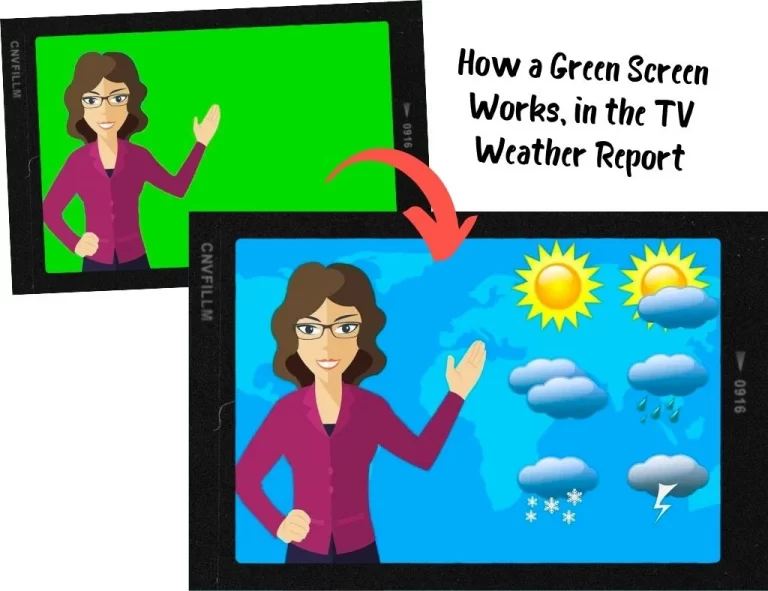
    Green screens are used in a variety of photo and video shooting scenarios; one of the more well-known uses of the green screen is the weather report on television.

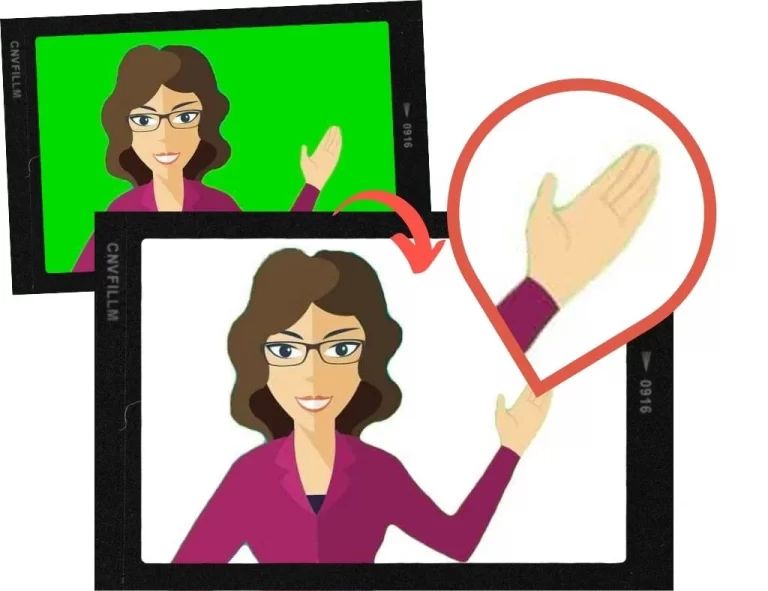
    The example below shows how chroma-keying with a green screen works. The green color behind the person is isolated, then replaced with another image layer:

    How a Green Screen Works, in the TV Weather Report

    Why Should You Use a Green Screen in Your Online Classroom?

    Obviously, using different backgrounds during an online lesson will help you to deliver more effective and fun lessons, and compensate for the disadvantages of not being physically in the same room:

    • You can use backgrounds related to the lesson topic to create an immersive learning environment.
    • Instead of using props, you can show specific objects or situations in the background to explain concepts, elicit discussion and check comprehension; for topics such as geography, landmarks, landscapes, nature, food, and more.
    • You can make your lessons easier to follow and show videos, presentations, or exercises, while your students can still see you on the screen.

    Besides, using a green screen has some practical, not-so-obvious advantages:

    • Your students can’t see your furniture, clothes, or personal items (or mess) in your home.
    • Your family members or roommates can walk around the home without having to duck and crawl behind you while you teach online
    • You can work from almost any location without your students knowing where you are.
    • You can change up your virtual background without redecorating your actual work space.

    Overall, a green screen will let you look more professional, create better results, help you get better ratings and thus, earn more classes.

    In this article, you will find 18 best practices to increase bookings for your online lessons.

    What Equipment Do You Need to Use a Green Screen?

    Although a green screen setting is neither complicated nor expensive, you’ll need to invest in some equipment:

    A Computer with Fast CPU and Sufficient RAM

    It’s important to realize that software to use for chroma-keying your green screen background during a live online ESL lesson can be incredibly demanding on your computer’s processor and memory. You need to make sure you have a capable computer to handle the chroma-keying processes.

    Our recommendation is to have a computer with at least the previous-to-current generation Intel i5 CPU running at 3GHz with no less than 4 cores, and at least 8 GB of RAM.

    Important: With tablet computers and smartphones, you won’t be able to use a green screen.

    Check out our recommended computers for online ESL teachers, all of which have the specs to perform well when using a green screen while teaching online.

    The Green Screen

    Green screens range from very cheap, to costly. You don’t need an expensive pro-grade kit. Indeed, many online ESL teachers make do with fabric they buy from the local fabric store. You can mount them on a stand or frame, or hang them on the wall or the ceiling.

    Buy a green screen large enough to cover the area behind you adequately: It should be both wide and high enough to cover the entire area picked up by your webcam. Dimension requirements will vary for each person based on their height, work area, and whether you stand or sit while you teach online.

    Here are a couple of affordable, recommended options available on Amazon:

    Green Screen Studio Kits

    The majority of online ESL teachers will be working from home. For those who have a spare room or home office where they set up their online classrooms, green screen kits are a quick, all-in-one solution.

    JEBUTU Green Screen Backdrop Stand Kit, 5 x 6.5 feet (ca. 1.5 x 2 m)

    Portable Green Screen Stand (durable steel), washable polyester fiber screen, with carrying bag and five spring clamps

    [amazon-button link=”https://www.amazon.com/dp/B0923LJ3YL?th=1&linkCode=ll1&tag=jimmyeslus1-20&linkId=7b871065d018d7ff260a67c29990bf94&language=en_US&ref_=as_li_ss_tl”]

    Neewer Photography Backdrop Studio Lighting Kit 6 x 9 feet (ca. 1.8 x 2.7 m)

    KIT INCLUDES: Background Support System, 2x 45 W Daylight Lamps with umbrellas and stand, green muslin backdrop with clamps, 2x carry bags

    [amazon-button link=”https://www.amazon.com/dp/B07TWRNMCJ?th=1&psc=1&linkCode=ll1&tag=jimmyeslus1-20&linkId=f5342e186e7ff86272f66b7403c006ca&language=en_US&ref_=as_li_ss_tl”]

    Although the studio kits portable, they’re not really convenient when you change your teaching location frequently.

    Collapsible Backdrops for Ultra-Fast Setup

    If you teach online in your home with limited space, then your best option is to get a collapsible green screen backdrop. They can be quickly opened and closed, don’t require assembling or fudging around with separate stands, and can be stored away in a closet or in the basement when you’re not using it.

    Elgato Green Screen – Collapsible Chroma Key Backdrop, 58.3 x 70.9 inches (ca. 1.50 x 1.80 m)

    Wrinkle-Resistant Fabric and Ultra-Quick Setup

    [amazon-button link=”https://www.amazon.com/dp/B0743Z892W?th=1&linkCode=ll1&tag=jimmyeslus1-20&linkId=837293c290bc88168a3046074a9b2442&language=en_US&ref_=as_li_ss_tl”]

    Paste the Amazon image code here

    ShowMaven Green Screen Collapsible Chromakey Panel, 58.3 x 80.7 inches (ca. 1.5 x 2 m)

    Auto-Locking Frame, Chroma Key Screen with Wrinkle-Resistant Fabric, Aluminum Hard Case

    [amazon-button link=”paste the Amazon link here”]

    Portable Backdrops

    Portable green screen backdrops are different from collapsible green screen backdrops in that they can fit in a suitcase, making them the ideal option for online ESL teachers on the road. You can hang them on a stand or wall behind you, or mount them on the back of your chair.

    One major downside of portable green screens is that due to their compact size, you have to position them more precisely to fully cover your background. If you like to teach while standing, or even move around a bit, then this type of green screen backdrop is probably not the right item for you.

    Neewer Chromakey Backdrops, Double-Sided Green and Blue Screen, 5 x 6.6 inches (ca. 1.5 x 2 m)

    Write a one-line descripDurable steel frame sewn into the fabric. The steel spring frame pops open the backdrop in seconds and helps maintain its shapetion here

    [amazon-button link=”https://www.amazon.com/dp/B00E89Q5OY?th=1&psc=1&linkCode=ll1&tag=jimmyeslus1-20&linkId=ca13e0c45b8f8cc6af539a651038aaa0&language=en_US&ref_=as_li_ss_tl”]

    TARION Collapsible Webcam Background for Chair Back, diameter 55.9 inches (ca. 1.42 m)

    Fits most chairs well and just takes seconds to open up the background and attach to your chair with the belts.

    [amazon-button link=”https://www.amazon.com/dp/B095WQ6PTS?th=1&linkCode=ll1&tag=jimmyeslus1-20&linkId=4dc7a285352eb71880cc2133d44630f8&language=en_US&ref_=as_li_ss_tl”]

    Green Screen Wall Paint

    Though not for everyone, some online ESL teachers prefer not to mess about with positioning the green screen backdrop. If you have enough space and a wall you can paint, green screen paint is an excellent option. Even if you would rather not paint your wall green, you can get a wooden board, drywall or a thick sheet of cardboard to paint over.

    The great thing about green screen paint is that you don’t have to worry about creases and folds, kicking or tripping over the green screen stand, or messing about positioning it. You just paint the wall, or lean the board against the wall, and you’re good to go.

    Of course, painting a color across a wall or board means you will need to know how to paint, and to make sure the paint is consistently applied. You may also need to apply a few coats to the wall or board.

    ChromaKey Green Paint 1 gallon (3.79 l) Green Screen Equivalent

    Water-Based Latex Paint with Low reflectivity, Made in the USA, Dries in 60 mins

    [amazon-button link=”https://www.amazon.com/dp/B07TV1ZFT4?th=1&psc=1&linkCode=ll1&tag=jimmyeslus1-20&linkId=71f6cda4099db685b32564341753e344&language=en_US&ref_=as_li_ss_tl”]

    Lighting

    Many people who use green screens will tell you that your lighting setup is more important than the green screen. When using a green screen for online teaching, lights serve two purposes: Illuminating the teacher and the green screen.

    As you will discover when you set up your green screen in your work space, these two aspects will often conflict with each other.

    You might find that your face and body in the webcam view are well-lit, but there is some fuzziness around your head. On the other hand, you might find that your face and body in the webcam view are well-lit with no fuzziness around your head, but there is some fuzziness around the ends of the green screen.

    This fuzziness (often referred to as bleeding) is usually due to too much light on the green screen, causing the color to spill.

    Both the amount of lighting as well as the color tones you use will play a role in striking the right balance. Different chroma-keying apps also handle the chroma-keying process differently. Ultimately, you will need to play around with your lighting setup until you get it just right.

    Check out our recommended LED lights for online teaching to see which lighting options are best for your work space and green screen setup.

    Chroma-Key Software

    You will need an app that will chroma-key your green screen background. There are several free and paid apps available to accomplish this. What app you use will depend on your computer OS, as well as your specific needs. Some go beyond chroma-keying capabilities, like ManyCam Studio, which has an extensive set of features that enable you to show clip art, YouTube videos, add lower third text on your screen, wear a virtual mask, and much more.

    The popular videoconferencing app Zoom, includes a virtual background feature that lets you skin your background with an image or video using a green screen, and if your computer’s CPU is powerful enough, you can skin it without a green screen. Zoom is an excellent app, but it’s only useful you’re using Zoom specifically for online teaching. If you use another platform, or if the online ESL company you work with has its own proprietary platform, you will need to use an app like ManyCam Studio, which creates a virtual webcam device on your computer that you can use with a green screen and more. Some teachers even use ManyCam and Zoom to access the additional features ManyCam offers while using Zoom.

    Here is a list of apps that let you take advantage of your green screen:

    ManyCam 

    Price: starting from $39 per year or $79 lifetime for one device

    Available for Windows and macOS

    ManyCam Studio is designed to give you a suite of screen effects while live-streaming. Although ManyCam has a free version, to unlock the chroma-key feature, you will need to purchase the paid version. ManyCam has an impressive feature set that can transform how you teach online and interact with your students.

    Open Broadcaster Software

    Price: free

    Available for Windows, macOS and Linux

    OBS is a free, open-source software you can use to record and live stream your screen with a green screen background. Besides being free, OBS packs some really cool features, such as being able to set up multiple scenes, which means you can display images, videos, text, browser windows, and more, alongside yourself via your webcam.

    Free is hard to beat, but you’ll need to rely on the community and a public knowledge base to get support if you need help. It’s recommended for more advanced users.

    Video Meeting Software

    Nowadays, most software for video conferencing has already built-in background-removal functions. They work even without a green screen – of course, with one, they produce much better results.

    These software programs include the most popular ones:

    You can use all the video meeting solutions for free; however, for regular teaching, we recommend using the paid versions which offer more functionality and stable connection. Prices range from $10 to $20 per month.

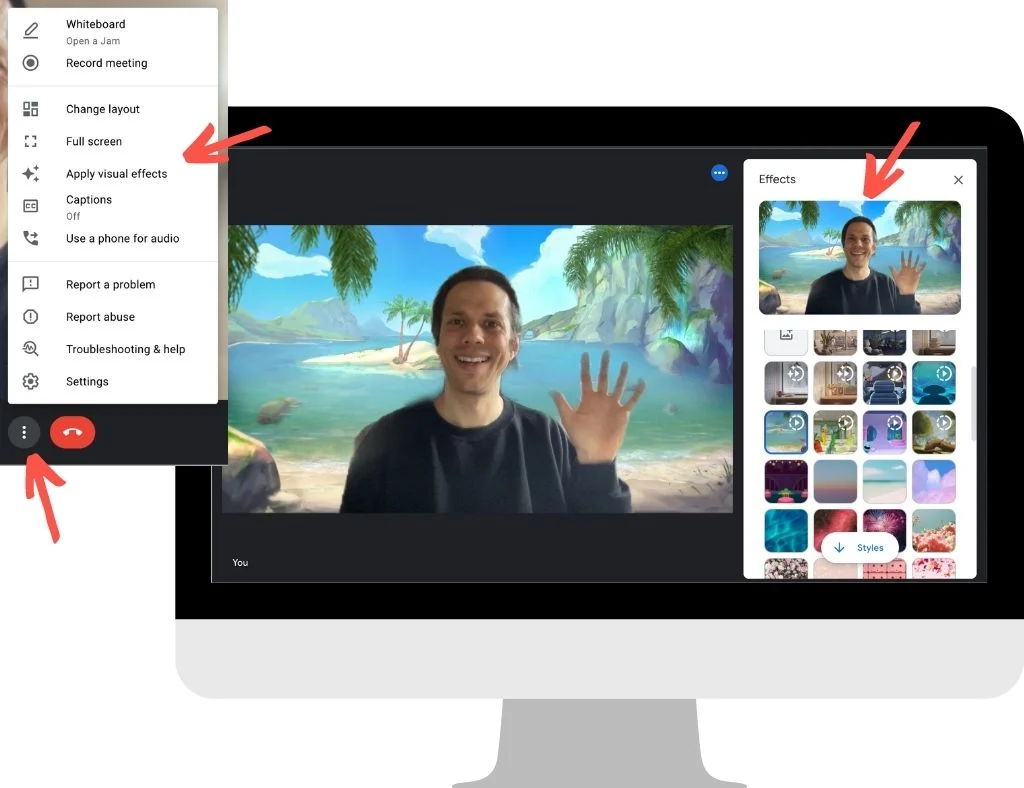
    Here’s how easily it works in Google Meet:

    1. In a meeting, click on the menu item with the three dots in the bottom bar, then choose “Apply visual effects“ from the pop-up menu.
    2. In the sidebar opening on the right, simply choose one of the default backgrounds images, or upload an image.
    Background effects you can use in Google Meet
    Use background images and effects in Google Meet

    Google even offers animated backgrounds with birds flying around or with different weather outside – which looks simply wow!

    You see the effect isn’t perfect in my example; I made the screenshot without using a green screen and proper lighting. (Still impressive how good it works nevertheless!)

    In MS Teams or Zoom, you’ll find the background-removal functions analogously in the settings; it’s not complicated.

    However, these video meeting tools don’t offer advanced configuration settings, so the results may not be as perfect as you expect. And you can’t use them when you need to teach with another software or with a teaching platform of your teaching company.

    That’s why buying a software like ManyCam seems like a good investment; you won’t get broke from a $79 one-time fee. You can use it with any video conferencing tool or teaching platform, and tailor it exactly to your needs.

    Setting Up Your Green Screen for Online Classes

    Video Tutorial

    In this short video, online ESL teacher Michael Wasserstein guides you through the important aspects of setting up a green screen for your online classroom.

    Install and Run Your Chroma-Key App

    The first step we recommend you take is to install and run your chroma-key app. Get familiar with the features of the app, so you can set up your green screen and lighting according to the functionality and recommended settings of the app.

    Set Up Your Green Screen

    Measure the area behind you that your webcam captures. An easy way to determine the green screen size you need is to use a spare bedsheet in place of the green screen. Use some measuring tape to measure the dimensions of the bedsheet that come into the webcam view so that you can figure out the length and width of green screen fabric you will need to buy.

    You might need some help from a family member or friend to hold the bedsheet while you measure the area. A 6 x 9 feet (ca. 1.8 x 2.7 m) muslin cloth green screen should be sufficient for most online ESL teachers.

    You also need to decide if you will be attaching or hanging the green screen to the wall, or using a frame to hold your green screen in place. We recommend using a frame, as this will make it easier to move around the green screen as needed, and won’t damage your wall.

    After you have purchased your green screen, make sure it is free of creases or wrinkles by ironing them out with an iron on low temperature. Once you’ve done that, you can attach it to the frame.

    Some green screens are set in a retractable frame, and if you are using one of these, then you can simply pull it open and lock into place.

    Make sure your green screen is correctly positioned to fill up the area behind where you will be sitting or standing while teaching online. You will need to do this with your chroma-key app open on your computer so that you can view the area your webcam displays.

    Set Up Lighting and Adjust Brightness and Positioning

    Now that you have your green screen in place, you need to determine how bright your online teaching workspace is, and how many lights you need. If possible, choose LED lights with different color temperature settings, so you can increase or decrease brightness in different spots of your work space.

    You will need to position and adjust your lighting with you standing or sitting in front of your computer with the chroma-key app open to preview yourself and your webcam.

    You’re not done with lighting just yet. Next, we need to find and insert an image layer to replace the green screen behind you to test your green screen and lighting set up with your app.

    Choosing an Image to Chroma-key

    Although you can use any image to replace the green color in your green screen, we want to start with the most basic image that will enable us to test and tweak our green screen and lighting set up. For this, we can use a plain white image because a white image is void of any color, and will reveal any issues with light spill/bleeding.

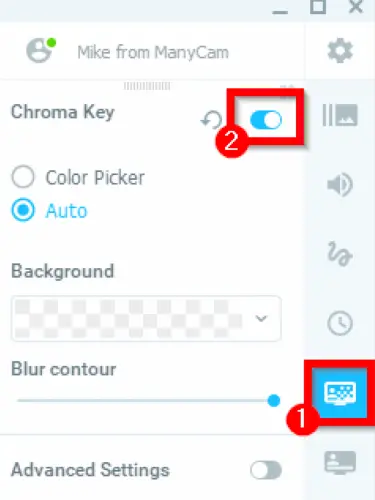
    Let’s see how to do this using ManyCam:

    Screenshot: MannyCam software

    Looking for a plain white image to insert into your chroma-key app? We’ve got you covered. Click this link to download a plain white image.

    If you see any fuzziness or bleeding around your head or on the green screen itself, you will need to check for and iron out any creases or wrinkles in your green screen, and reposition your lighting. Using the white background will also help you figure out if you need to get add lights to your setup.

    This image illustrates how the white background will replace the green screen. Notice the slight green spill around the hair, body, and hands:

    Note: If you have long hair, we recommend tying it back to reduce the green spill around your head.

    Now, you are ready to use your teaching studio. Everything you need to do now is finding great images or other media to use to “decorate” your classroom background.

    Classroom Backgrounds: Find Media to Use with Your Green Screen

    As an online ESL teacher, you will constantly be on the hunt for media to use in your online classroom. A few excellent sites where royalty-free images can be found for free are:

    These sites have a broad range of photos, illustrations, vectors, and videos to choose from, so you should have little difficulty spicing up your green screen images.

    If you need some inspiration, look at these 10 great classroom images from Pexels we’ve selected for you as a starter:

    Primary school classroom: Download

    Classroom: Download
    World map on blackboard: Download
    Blackboard with writing: Download
    Scrabble words: Download

    Numbers: Download
    Colored pencils: Download
    Meeting room: Download
    Nice apartment: Download
    Sitting in the garden: Download

    Wrapping Up: Start Green Teaching

    Now that you have a good idea how to use a green screen in an online classroom, get started! It’s really not as difficult as you think, it’s very affordable, and the difference using a green screen will make to your online lessons will be dramatic.

    It might take you a bit of time to adjust your green screen and lighting to get the ideal setup. It will take you a couple of days to get comfortable using the chroma-key software. But within a month (or less), you will find green screening a cinch, and you’ll begin to wonder how you ever taught online lessons without one.

  • The Best ESL Teaching Props: For Online Teaching & Classroom

    The Best ESL Teaching Props: For Online Teaching & Classroom

    Repeat after me: “You can’t use props too much in the classroom.“

    Do you agree?

    Props – or visual teaching aids – make the learning process fun and effective for the students as well as the teacher. That’s why successful ESL teachers build their stock of props over time and use them in every lesson.

    If you are looking for inspiration, what to try out next, here is our list of the best ESL teaching props, together with tips on how and when to use them.

    The Best Teaching Props: Classroom & Online

    Why Using Props in the ESL Classroom is Important

    When young learners begin acquiring their first language, they are essentially like sponges, absorbing everything they see, hear, smell, touch, and taste.

    Toys, books, games, and activities can help to make the experience more fun, particularly if they are used in a manner that enables young learners to be physically involved in the learning process. Of course, there’s also the show and tell aspect of using these child-centered resources as part of the learning experience.

    For ESL students, especially young learners, acquiring a non-native language poses different challenges. As an ESL teacher, you will likely be using props and other teaching aids, not only to make the learning experience more fun and engaging, but also to elicit responses from students to develop their English fluency.

    For online teaching, props can even more help to focus the student’s attention. In an online lesson, you have less control of the learning environment and potential distractions.

    But you can make use of the fact that the students are used to watching videos or playing online games at home with lots of action happening on the screen. With many props (and high teacher activity), you can deliver an experience close to watching a cartoon movie and draw full attention.

    Read 8 more tips on teaching English to little children.

    What Makes a Prop Good for ESL Instruction?

    In truth, anything can be used as a prop for teaching any subject, if it is used purposefully. As ESL teachers – whether in the classroom or online – we want to get down to business quickly using ready-to-go teaching props and aids.

    We teach many students and classes throughout the day, so having a core set of props and aids can be a major time and lifesaver.

    Good props for teaching ESL are those which can be used across a broad spectrum of classes, students, and contexts. There simply isn’t enough room to fill your home or office with props for every single context.

    That’s why you want to build up an inventory of props that can cover a wide range of ESL age groups, topics, themes, and proficiency levels.

    A prop is evidently a meaningful prop, when you can you it to:

    • develop vocabulary
    • practice spelling
    • learn phonics and improve pronunciation
    • practice describing items
    • compare and contrast
    • explain cause and effect
    • role-play
    • learn and sing songs

    That said, not all props need to be multi-textual to serve a purpose. Very young learners may be more challenging to keep on point, as they have short attention spans. For these situations, noisemakers and clappers will come in handy.

    So, let’s get you set up with the right props for ESL teachers and how you can use them in the classroom.

    Recommended Props for ESL Teachers

    Let’s look into various categories of teaching props, most of them suitable for in-classroom teaching and online teaching as well.

    Hand and Finger Puppets

    Hand or finger puppets make excellent props for ESL classroom instruction. Use them to captivate your students through conversation, role-play, and other forms of engagement.

    Because they slip onto your hand or fingers, puppets can magically transform into make-believe characters your students will connect with and grow to love.

    In this video, Karen Frazier, co-author of the Let’s Go series, gives us an excellent model of how to use puppets in the ESL classroom to introduce conversation:

    As you can see, puppets are great props for ESL instruction. For young ESL learners, you can breathe some life into your puppets – and your lesson – and completely transform the learning experience for your students.

    Buy hand and finger puppets on Amazon:

    Melissa & Doug Hand Puppets: Safari Buddies

    Set of 6: Elephant, Tiger, Parrot, Giraffe, Monkey, ZebraStuffed Animals

    [amazon-button link=”https://www.amazon.com/dp/B07J6TJR2G?th=1&psc=1&linkCode=ll1&tag=jimmyeslus1-20&linkId=f8a39058e1a43c659efc75cecc205e89&language=en_US&ref_=as_li_ss_tl”]

    Melissa & Doug Animal Hand Puppets: Zoo & Farm Friends

    Set of 2, 4 animals in each: Zoo and farm animals

    [amazon-button link=”https://www.amazon.com/dp/B01CQTWNN4?th=1&psc=1&linkCode=ll1&tag=jimmyeslus1-20&linkId=90a7cb8d3909990133b21e612be2b86c&language=en_US&ref_=as_li_ss_tl”]

    Hand Puppet Set – 6 Family Members

    9” Inch Soft Plush Hand Puppets: Mother, Father, Son, Daughter and Grandparents

    [amazon-button link=”https://www.amazon.com/Hand-Puppet-Set-Storytelling-Preschool/dp/B073YKD6T8?keywords=finger+puppets&qid=1638198181&s=toys-and-games&sr=1-31-spons&psc=1&spLa=ZW5jcnlwdGVkUXVhbGlmaWVyPUEyT1hJRllJS1pENVg0JmVuY3J5cHRlZElkPUEwNTc3NjM2MVJGQzQxQjlSNUxMUyZlbmNyeXB0ZWRBZElkPUEwNjM1NzA2MTE3MEU5V0g4UFJPUyZ3aWRnZXROYW1lPXNwX2J0ZiZhY3Rpb249Y2xpY2tSZWRpcmVjdCZkb05vdExvZ0NsaWNrPXRydWU%3D&linkCode=ll1&tag=jimmyeslus1-20&linkId=066a03fd35685d1eb5024f2d5b2eccf1&language=en_US&ref_=as_li_ss_tl”]

    32 Pieces Finger Puppets: Zoo Theme

    32 pieces of zoo animal finger puppets in different styles, 2.76 inches (ca. 7 cm) in height

    [amazon-button link=”https://www.amazon.com/Puppets-Toddlers-Cartoon-Children-Stuffed/dp/B09JSJFNT4?keywords=finger+puppets&qid=1638198181&qsid=146-9466911-0352763&s=toys-and-games&sr=1-17&sres=B08KWP2BX2%2CB00VU5R8JA%2CB06XRK92KC%2CB075FRT75T%2CB08KWMLD3L%2CB08KWNN4NH%2CB07Q69S2DQ%2CB018SWAAOW%2CB08KWLG3ZZ%2CB09DVFYR7S%2CB09JSJFNT4%2CB08PV59Z22%2CB08KWLRC3V%2CB08PB33SK8%2CB01KNDFD78%2CB07PPC48FV%2CB08Z3RHWMS%2CB086XGYNP5%2CB08H843Z18%2CB09CKNXQ59&srpt=PUPPET&linkCode=ll1&tag=jimmyeslus1-20&linkId=cb06e5a72039fe4408295653586bf565&language=en_US&ref_=as_li_ss_tl”]

    Stuffed Animals

    Stuffed animals are a favorite with young ESL learners, and like puppets, they can be used in various learning contexts. Indeed, you can use puppets and stuffed toys interchangeably.

    The main difference between them is that stuffed toys are a little more challenging to bring to life, as you can’t move their parts with your hand like you would with a puppet. Still, there are many types of stuffed toys, that you’re more than likely to find a specific toy you’re looking for.

    You can set them on a table or shelf, or hold them in your hands while teaching. Most of all, stuffed animals are soft, cute, and cuddly, and kids love them.

    Use stuffed toys during warm-up activities, storytelling, or even creating an imaginary zoo, farm, or aquarium.

    Buy stuffed animals on Amazon:

    Stuffed Animals Bundle of Forest Animal Toys

    7 inches (ca. 18 cm); Lion/Elephant/Zebra/Giraffe/Tiger/Leopard

    [amazon-button link=”https://www.amazon.com/My-OLi-Stuffed-Animals-Elephant/dp/B088WGHXLV?keywords=stuffed+animal&qid=1638198933&s=toys-and-games&sr=1-13-spons&psc=1&spLa=ZW5jcnlwdGVkUXVhbGlmaWVyPUEzQzJGNUxDVzA3Ulg2JmVuY3J5cHRlZElkPUEwMjA3Njg4Tk0yMERDM0Q1S1dBJmVuY3J5cHRlZEFkSWQ9QTAyMjU2ODIxOUdXQkJaSDFLMzdQJndpZGdldE5hbWU9c3BfbXRmJmFjdGlvbj1jbGlja1JlZGlyZWN0JmRvTm90TG9nQ2xpY2s9dHJ1ZQ%3D%3D&linkCode=ll1&tag=jimmyeslus1-20&linkId=5f12314b113a9e8caabd977a53244ae6&language=en_US&ref_=as_li_ss_tl”]

    Pink Rainbow Unicorn Stuffed Animal

    8 inches (ca. 20 cm)

    [amazon-button link=”https://www.amazon.com/Stuffed-Unicorn-Plush-Unicornio-Birthday/dp/B08NTBPHZ6?keywords=unicorn+stuffed+animal&qid=1638198756&qsid=146-9466911-0352763&s=toys-and-games&sr=1-18&sres=B088DFWWTZ%2CB08YP73M1B%2CB089F7YR1T%2CB07J6B7BZ4%2CB01BVTKFOO%2CB01MUANJGE%2CB07595QXGP%2CB08C21LJBF%2CB078SW1HFS%2CB08Y1L5H7F%2CB07SG779SB%2CB08NTBPHZ6%2CB095KCMF79%2CB076FB1679%2CB08RHH1LGX%2CB012507Q8Q%2CB08PNXLSBJ%2CB0921WC73M%2CB07M5CB2FQ%2CB07465WWNX&srpt=TOY_FIGURE&linkCode=ll1&tag=jimmyeslus1-20&linkId=bff50b222a50d467e0437c56654a5a9a&language=en_US&ref_=as_li_ss_tl”]

    DOLDOA 5 Packs Soft Stuffed Animals Plush

    Cute Teddy Bear/Monkey/Panda/Rabbit; 12.5 inches (ca. 32 cm)

    [amazon-button link=”https://www.amazon.com/dp/B082NYBBLP?_encoding=UTF8&aaxitk=b1acd80216f4c2b4f36540d6bc8a5945&hsa_cr_id=8394661820601&pd_rd_plhdr=t&pd_rd_r=1cf76db0-dbad-4ce2-a109-bfe1bc44387b&pd_rd_w=TSAux&pd_rd_wg=o4ZMx&linkCode=ll1&tag=jimmyeslus1-20&linkId=06532f6a1a0dda1b8c7e5b47342ee3c5&language=en_US&ref_=as_li_ss_tl”]

    T-Rex Dinosaur Stuffed Animal, Filled with 5 Cute Little Baby Dinosaur Hatchlings Inside

    15 inches (ca. 38 cm); with 5 Cute Little Baby Dinosaur Hatchlings Inside its Zippered Tummy

    [amazon-button link=”https://www.amazon.com/Prextex-Dinosaur-Carrier-Hatchlings-Zippered/dp/B081263TJM?keywords=stuffed+animal+dinosaur&qid=1638198950&qsid=146-9466911-0352763&s=toys-and-games&sr=1-5&sres=B08WTCT7SM%2CB081263TJM%2CB08WTJSNVH%2CB073ZLVWW5%2CB08SWNJ35M%2CB01M0GX0M3%2CB07GBKD38R%2CB097R757YJ%2CB077PR8DX6%2CB07BMJ2BSP%2CB08S9GTRRY%2CB08C7BNF5V%2CB095NR94Y5%2CB08J87LJG3%2CB08Y8CNW9V%2CB07N369ZCR%2CB093GFT24P%2CB00021HB9K%2CB08N679FGC%2CB08GSS945H&srpt=TOY_FIGURE&linkCode=ll1&tag=jimmyeslus1-20&linkId=cc779930574f9fabfa86288c37dccb2a&language=en_US&ref_=as_li_ss_tl”]

    Or just search for “stuffed animals“ on Amazon and look for other options.

    Play Food

    Food is a popular topic with ESL students, and play food is a great way to get students talking about food.

    Use play food to describe food groups, colors, shapes, and tastes. You can also use play food to talk about more complex topics like healthy vs unhealthy food, popular food around the world, or meals of the day.

    So, go ahead and use play food to engage your students in fun, interactive activities. Make a picnic. Have lunch. Cook dinner. Order a meal. Dig in!

    You can find lots of play food on Amazon:

    axoJoy 122-Piece Deluxe Pretend Play Food Set

    BPA-free plastic; bold colors, realistic design

    [amazon-button link=”https://www.amazon.com/dp/B073SDKTL5?th=1&psc=1&linkCode=ll1&tag=jimmyeslus1-20&linkId=fab0bda18d497314e1cb3cf3b0fd77f0&language=en_US&ref_=as_li_ss_tl”]

    70 PCS Cutting Play Food Toy

    Including a toy grocery basket, 2 cutting boards, 2 kitchen knives, and 4 dinner plates. Foods are put together with Velcro and can be repeatedly “cut and sliced“

    [amazon-button link=”“]

    Melissa & Doug Wooden Snacks and Sweets Food Cart

    40+ Play Food pcs; durable, wooden construction

    [amazon-button link=”https://www.amazon.com/dp/B00P4CF59U?th=1&linkCode=ll1&tag=jimmyeslus1-20&linkId=8e5c3dd90885996f4e7166e4a36e2855&language=en_US&ref_=as_li_ss_tl”]

    Balls

    Which child doesn’t love to hit, kick, throw, or catch a ball? We can’t think of one.

    If you’ve never used balls for props in the ESL classroom, you’ll soon realize how much fun they can inject. Use a ball to assign student turns during any activity. There are no limits to the kind of activities you can do in the ESL classroom with a ball.

    Here’s an example of Jenny White using a ball to effectively engage her students in a vocabulary game:

    What’s remarkable about using a ball while teaching is that you can get your students on their feet and physically active during the activity. And if you’re already rethinking how students move in your classroom, it’s worth considering how the layout itself affects participation — here’s how seating arrangement shapes ESL learning.That not only improves their concentration and participation, but also adds elements of competitiveness, teamwork, and coordination between thoughts and actions.

    If you teach ESL online, you can use a ball for talking about sports, colors, and shapes.

    Your ESL students will have a ball learning English – seriously!

    Needless to say, you can find many balls on Amazon:

    beetoy Inflatable Sport Toddler Balls Set

    6 balls: Football, Basketball, Volleyball, Baseball, Rugby, Spike ball; includes bag and pump

    [amazon-button link=”https://www.amazon.com/dp/B08NSQWP27?th=1&psc=1&linkCode=ll1&tag=jimmyeslus1-20&linkId=cd0269aa3c7c0b844f8ade056abc5010&language=en_US&ref_=as_li_ss_tl”]

    Toysmith Get Outside GO! Pro-Ball Set

    Pack of 3 (5-inch soccer ball,6.5-inch football and 5-inch basketball)

    [amazon-button link=”https://www.amazon.com/dp/B000PXP3DQ?th=1&linkCode=ll1&tag=jimmyeslus1-20&linkId=ded9716cd2bd93bcffa84b1b2d1af6fe&language=en_US&ref_=as_li_ss_tl”]

    KLT Sensory Stress Ball Set

    12 Pack Stress Relief Fidget Balls/Squishy Balls, 2.5 inches (6.35 cm)

    [amazon-button link=”https://www.amazon.com/KLT-Sensory-Autistic-Children-Stretchy/dp/B08HN1QPW1?keywords=balls&qid=1638200246&s=toys-and-games&sr=1-42&linkCode=ll1&tag=jimmyeslus1-20&linkId=cdd91eb590202257be12bfabfdaf71db&language=en_US&ref_=as_li_ss_tl”]

    Flash Cards

    Every ESL teacher should be equipped with flash cards for all occasions. Whether teaching in the classroom or online, flash cards are nifty because you can use them in so many contexts to enhance the learning experience.

    Use them for activities and games, drilling vocabulary, pronunciation, conversation, and role-plays. Though most stock flash cards are geared towards young learners, you’ll find a wide variety of flash cards that cover more complex concepts such as nouns and prepositions, and themes such as emotions.

    Flash cards are also easy to pack and carry, they make an excellent teaching aid for traveling ESL teachers. So, if you’re planning a family vacation but plan to teach ESL online during your travels, flash cards will fit neatly into your suitcase.

    Here are some ideas for using flash cards for teaching primary children, by Carol Read of Macmillan Spain:

    These flashcards are available on Amazon:

    Star Right Numbers & Sight Words Flash Cards Set of 4

    144 Sight Words Flash Cards: Numbers, First Words, Colors, Shapes, and Alphabet; with binder rings

    [amazon-button link=”https://www.amazon.com/dp/B073GBDFWN?th=1&psc=1&linkCode=ll1&tag=jimmyeslus1-20&linkId=db6b872eafda21eb0e8817a986fa6478&language=en_US&ref_=as_li_ss_tl”]

    GAMENOTE Dry Erase Alphabet and Number Flash Cards

    Write and Wipe Laminated ABC Letter Tracing Practice Card for Kindergarten (47 Flashcards with 2 Rings and Marker)

    [amazon-button link=”https://www.amazon.com/dp/B08LCZ4THX?psc=1&pd_rd_i=B08LCZ4THX&pd_rd_w=f42XC&pf_rd_p=54ed5474-54a8-4c7f-a88a-45f748d18166&pd_rd_wg=0meHE&pf_rd_r=RT4GE5JSX25DFVEE2H5Q&pd_rd_r=d0dab414-e1ac-4cbe-a54d-4220d5552fe6&spLa=ZW5jcnlwdGVkUXVhbGlmaWVyPUFRMDkySzRGSlMxUk8mZW5jcnlwdGVkSWQ9QTA5MzA4NzgzRFY2WDRSSVNVS1BMJmVuY3J5cHRlZEFkSWQ9QTA0NzAxNTNLQjRFSTZKTTdTSVkmd2lkZ2V0TmFtZT1zcF9kZXRhaWxfdGhlbWF0aWMmYWN0aW9uPWNsaWNrUmVkaXJlY3QmZG9Ob3RMb2dDbGljaz10cnVl&linkCode=ll1&tag=jimmyeslus1-20&linkId=fb5b543be27ec1c21e6d7f963c295355&language=en_US&ref_=as_li_ss_tl”]

    Teacher Rachel’s Educational Flash Cards for Toddlers – Set Of 5

    182 Cards Pre K-K Mega Flashcards Set with First Words, Alphabet, Colors, Shapes, Numbers, Manners, Greetings, Feelings, and Weather

    [amazon-button link=”https://www.amazon.com/dp/B08WJ1XP2L?psc=1&pd_rd_i=B08WJ1XP2L&pd_rd_w=f42XC&pf_rd_p=54ed5474-54a8-4c7f-a88a-45f748d18166&pd_rd_wg=0meHE&pf_rd_r=RT4GE5JSX25DFVEE2H5Q&pd_rd_r=d0dab414-e1ac-4cbe-a54d-4220d5552fe6&spLa=ZW5jcnlwdGVkUXVhbGlmaWVyPUFRMDkySzRGSlMxUk8mZW5jcnlwdGVkSWQ9QTA5MzA4NzgzRFY2WDRSSVNVS1BMJmVuY3J5cHRlZEFkSWQ9QTA2NzYxMTcyUElMOFZJMENTSUxTJndpZGdldE5hbWU9c3BfZGV0YWlsX3RoZW1hdGljJmFjdGlvbj1jbGlja1JlZGlyZWN0JmRvTm90TG9nQ2xpY2s9dHJ1ZQ%3D%3D&linkCode=ll1&tag=jimmyeslus1-20&linkId=522fe985181720989cd8c4e941d3e120&language=en_US&ref_=as_li_ss_tl”]

    Dry-Erase Boards

    There isn’t much we could say about dry-erase boards that ESL teachers don’t already know. Dry-erase boards are an English teacher’s biggest asset in the classroom.

    But what many ESL teachers may not realize is that smaller dry-erase boards (primarily designed for children) are compact enough to hold in your hands. This makes them useful teaching aids for demonstrating grammar, vocabulary, assessments, or keeping scores during a class activity.

    Get a magnetic dry-erase board and use it with magnetic letters and numbers!

    These are great options on Amazon:

    U Brands Contempo Magnetic 11″ x 14″ Dry Erase Board

    Magnet, marker, and double-sided Velcro mounting strips included

    [amazon-button link=”https://www.amazon.com/dp/B00PRYQQES?th=1&psc=1&linkCode=ll1&tag=jimmyeslus1-20&linkId=77fcf815b8996619686a87ddcbc0af17&language=en_US&ref_=as_li_ss_tl”]

    GMAOPHY Dry Erase White Board, 16″ x12″ Large Magnetic Desktop Whiteboard with Stand

    Including 10 Markers, 4 Magnets, 1 Eraser, Portable Double-Sided White Board Easel (12″ x 12″ also available)

    [amazon-button link=”https://www.amazon.com/dp/B08R3V1YTB?th=1&linkCode=ll1&tag=jimmyeslus1-20&linkId=c2e1ccd8a2a3b7dc845b60e94019139c&language=en_US&ref_=as_li_ss_tl”]

    Dry Erase Lapboards (30 Pack) DOUBLE SIDED, 9″ x 12″

    Mini White Dry Erase Boards for Students, including markers and erasers

    [amazon-button link=”https://www.amazon.com/Classroom-ClearWipe-Coating-Lapboards-Whiteboard/dp/B075NQR45W?keywords=small+whiteboard&qid=1638202458&s=office-products&sr=1-13-spons&psc=1&spLa=ZW5jcnlwdGVkUXVhbGlmaWVyPUFIVEMwRTU5NjJOVUImZW5jcnlwdGVkSWQ9QTA2OTkxNTgxVFdFVUVUUEpVRFRaJmVuY3J5cHRlZEFkSWQ9QTAwNDczNDMyQTA2TzFJOENKSDFGJndpZGdldE5hbWU9c3BfbXRmJmFjdGlvbj1jbGlja1JlZGlyZWN0JmRvTm90TG9nQ2xpY2s9dHJ1ZQ%3D%3D&linkCode=ll1&tag=jimmyeslus1-20&linkId=3cee9bcf6fcb61826ea8c907ecd369eb&language=en_US&ref_=as_li_ss_tl”]

    Also read: How to use interactive whiteboards in the classroom

    Magnetic Letters and Numbers

    Magnetic letters and numbers are extremely useful for teaching ESL to young learners, and go well with a magnetic dry-erase board. They can be used in numerous ways, especially for learning the alphabet, counting numbers, spelling, practice phonics, and do math.

    You can also use scrabble letters in place of magnetic ones, though scrabble letters would be better suited for the classroom than online instruction.

    This set has all you need:

    253 pieces Magnetic Foam Letters and Numbers Kit, with Double-Sided Magnetic Board and Storage Box

    52 uppercase letters,156 lowercase letters, 20 numbers, 14 math symbols, 5 cartoon refrigerator magnets, 1 double-sided magnetic writing board, 3 marker, 1 eraser and 1 sturdy storage box

    [amazon-button link=”https://www.amazon.com/Magnetic-Alphabet-Refrigerator-Educational-Children/dp/B07SKFNCYV?__mk_de_DE=%C3%85M%C3%85%C5%BD%C3%95%C3%91&keywords=253+PCS+Magnetic+Letters&qid=1638541715&refresh=1&sr=8-5&linkCode=ll1&tag=jimmyeslus1-20&linkId=2c1316a2bed3f706902642e1ff31ec14&language=en_US&ref_=as_li_ss_tl”]

    Hand Clappers/Noisemakers

    Though hand clappers are not so useful for instruction, they can be useful teaching aids during activities, or simply to keep young learners attentive and focused. You can even use them to celebrate student birthdays during class.

    If you teach online, you probably just need one hand clapper; since they usually come in inexpensive packs, you may as well have an assortment of hand clappers on hand, and use them to practice language skills such as identifying colors.

    Other options to hand clappers are maracas and squeaky rubber chickens.

    Let’s make some noooooise with these hand clappers:

    Kicko Hand Clapper Noisemakers, 12 pieces

    7.5 inches (ca. 19 cm); different colors

    [amazon-button link=”https://www.amazon.com/Kidsco-7-5-Hand-Clappers-Accessories/dp/B06VV91FNJ?crid=3LQIB2FZBWMSK&keywords=kicko+hand+clapper+noisemakers&qid=1638541975&sprefix=Kicko+Hand+Clapper+Noisemakers+%2Caps%2C269&sr=8-2&linkCode=ll1&tag=jimmyeslus1-20&linkId=ae9015a22ff0753a3b8e9bafd4ba9988&language=en_US&ref_=as_li_ss_tl”]

    Giant Hand Shaped Clapper

    1 piece; available in 4 colors; 18.5 inches (ca. 47 cm)

    [amazon-button link=”https://www.amazon.com/dp/B001EIBTJS?th=1&linkCode=ll1&tag=jimmyeslus1-20&linkId=de34ab21aab4f5e1782b04ae82883098&language=en_US&ref_=as_li_ss_tl”]

    24 Mini Wooden Fiesta Maracas

    6 colorful designs; 10.2 inches (ca. 26 cm)

    [amazon-button link=”https://www.amazon.com/Maracas-Designs-Noisemaker-Birthday-Carnivals/dp/B08TMJPYYV?keywords=maracas&qid=1638542163&s=home-garden&sr=1-5&linkCode=ll1&tag=jimmyeslus1-20&linkId=cb81afcf3df57f9ca49569874984707a&language=en_US&ref_=as_li_ss_tl”]

    Wrapping Up

    Our focus in this post was to reach both teachers who teach in the classroom as well those who teach online. We’ve given you some pretty awesome examples of props you can use in the ESL classroom.

    There are undoubtedly more teaching aids than we could possibly cover here. You can use everyday items and almost anything as a prop or teaching aid, as long as you use it in ways that are meaningful to learning and the learning experience.

    Just be creative!

    Many online ESL teachers use green screening as a teaching aid, which is great because you can easily share images, animations, and do other neat stuff on-screen.

  • Can You Be a Teacher With A Criminal Record? (Felonies & Misdemeanors)

    Can You Be a Teacher With A Criminal Record? (Felonies & Misdemeanors)

    You have a criminal record. We aren’t here to judge.

    But, if you are interested in teaching domestically or abroad, you’ve probably figured out that your record may be a major obstacle. So, what you are probably wondering is if it is even possible for you to become a teacher.

    The short answer is that it depends.

    There are a few factors which must be taken into consideration before you completely discount the possibility. So, let’s take a look at what those factors are so that you can be better informed when it comes time to apply for teaching jobs having a criminal record.

    Becoming a Teacher With a Criminal Record: Is it posssible?

    Felonies: Crimes Which Disqualify You to Be a Teacher

    If your criminal record includes serious, violent crimes or crimes against children of any form, you will not find a job teaching, neither in your home country nor abroad.

    Any country where a criminal background check is a requirement for securing employment will not issue you a work visa. If a school requires a background check before being hired, this will be a major red flag and your application will certainly be denied.

    These crimes, in the US laws, are classified as felonies: “crimes punishable by a term of imprisonment of one year or more“. (Definition: britannica.com)

    These include (not limited to):

    • murder
    • rape, serious sexual assault
    • kidnapping, extortion
    • robbery with violence
    • dealing with class A drugs
    • domestic violence, violence against children or vulnerable person
    • and more

    Although the laws of each state and country or the hiring guidelines of schools vary, these crimes will definitely disqualify you from getting a teaching job anywhere.

    As a teacher, you have to take care of young ones – and with a serious criminal background, you won’t be considered qualified to take this kind of responsibility.

    Misdemeanors: Crimes Which Do Not Necessarily Disqualify You

    On the other hand, there are minor crimes, which aren’t an imperative elimination criterion when applying for a teacher job at a school.

    By the US law, these type of convictions are classified as misdemeanors: “offenses punishable only by fines or by short terms of imprisonment in local jails“. (Definition: britannica.com)

    These include (not limited to):

    • drug possession
    • minor burglary, car or store theft
    • affray
    • drunken driving

    The means not that these convictions or misdemeanors doesn’t matter at all. Whether you will be hired as a teacher with that kind of criminal record, is at the discretion of the hiring committee of a school or training center.

    They’ll have to decide whether you pose a threat to the students, colleagues, and school property, or not.

    For the decision, the history and circumstances of the conviction can matter a lot, as well as how long it is ago. If you hurt someone in an act of self-defense or did something idiotic in your youth, people might more easily “forgive“ you and ignore the incident.

    However, this will heavily depend on the specific location and institution where you want to teach, who decides on your application, and how you present yourself.

    When you want to teach abroad, whether you have a chance to land a teaching job with a criminal record, depends mainly on one question: Do you need to provide a background check for the visa application, or only with your job application?

    More on that later. Now, let’s analyze the steps you can take if you have a criminal record and want to become a teacher.

    This article only contains general information, not legal advice. Only a lawyer can advise you, depending on the local laws and your specific situation.

    Request a Background Check

    The first thing to get out of the way is to figure out what is on your criminal record. You might assume that anything you’ve done in your life for which you were arrested will show up. But, that isn’t always the case. 

    For example, if you were arrested for something but never charged or convicted, then there may not be a record. Or, there may be a record for an arrest but not a charge. (Usually, only based on arrests that did not lead to a conviction, employers cannot deny you a job.)

    If you have ever been arrested for anything, whether large or small, it is best to conduct a background check on yourself first so that you know what could potentially show up.

    Be aware, just because you do an online background check, doesn’t mean you are seeing the full story. To secure a visa in many countries or a job at a school, you will be required to submit a background check from the appropriate government authority, which is typically the national police bureau. 

    In the United States, for example, this will be the FBI. These checks will be much more thorough than an online background check. However, they may not include everything such as local misdemeanors. 

    It is a good idea to go right to the source instead of using an online check. Figure out which agency in your country you will be required to apply to for your background check, and go ahead and get a copy for yourself first.

    If nothing comes up, then obviously you are in the clear, as nothing will show on the copy you send to the immigration office or employer. However, if something does show up, you will have to look at your unique circumstances to see what can be done.

    Try to Get Your Record Expunged

    Don’t give up hope on teaching abroad just yet. Depending on what it is on your record, you may still have a number of options for clearing it and getting your criminal record cleaned up. 

    The first thing that you need to do is to talk to an attorney. Depending on what shows up on your criminal record, you may be eligible to have these records expunged. Only an attorney will be able to advise you on this matter so don’t just rely on online information. (That’s why I won’t go into details here.)

    Expungement is not an option in all countries, so you will need to first determine how local laws apply to your circumstances. If you are in the United States, or a country where it is possible to expunge your criminal record, make sure and consult an attorney who specializes in this process to improve your odds of success.

    You should know that this process will not be cheap. The total cost for expunging criminal charges can run multiple thousands of dollars per charge. So, if you have multiple charges, it can get costly. It is important you weigh these costs against your long-term plans and potential earnings.

    If, for example, you only want to go abroad for a year and your expected salary is only $800 per month, then this may not be worth it. However, if you are a skilled teacher, and you intend to make a long-term teaching career with expectations that you can earn a good salary, the time and expenses of expunging your record may be worth it. 

    Teaching in Your Home Country With a Criminal Record

    As being said, with minor convictions (misdemeanors) in your criminal record, you can still land a teaching job in a school.

    First, inform yourself about the laws applicable in your country or state, and the hiring guidelines and procedures of schools. Check the websites of the department/board of education or the responsible authorities of the local school district.

    For example, for the state of New York, USA, the BAR association writes the following in a brochure about employment rights:

    New York law makes it illegal for both public and private employers to deny you a job (or fire you from an existing job), […] based solely on your criminal record unless 1) there is a direct relationship between your past conviction(s) and the job you want; or 2) hiring you would involve an unreasonable risk to property or to the safety of others.

    BAR association, New York, USA

    In this case, a school will have to decide, whether a past conviction of yours is related to a job as a teacher and involves risk to your surrounding. So, if you have been charged for drunken driving once, years ago, there might be a good chance that this won’t lock you out from getting a teacher’s job.

    To keep this chance, be open about your past and never lie during the whole application and interview process. When the truth comes out later, you can and will be instantly fired for that reason.

    Teaching Abroad With a Criminal Record

    Same here: All hope isn’t lost yet, you can’t get your criminal record “cleaned”. Depending on what your charges are, you may still be able to find a job teaching English abroad in certain countries.

    Most likely, you will be required to submit a criminal background check at some point in the process of securing employment abroad. 

    The differences will be in who is looking at that criminal background check and what it’s for.

    If it is a background check to secure a visa, then there is likely to be very little leeway given by the government of that country if something shows up. To be clear: A criminal record will lock out from teaching abroad in all the higher-paying countries, no matter how minor the recorded convictions are.

    On the other hand, if it is a background check being requested only by the school, they may give more leniency depending on what the charge is.

    So, if you have a charge for drunken driving, and you are applying for a job in a country that does not require you to submit a criminal background check to secure a visa, you may be okay. The school may choose to overlook the charge and provide you with a job depending on how desperate they are to hire teachers. 

    It should be noted that countries that do not require a criminal background check to secure a work visa will usually be at the lower end of the pay scale for ESL teaching. These include, for example: Mexico, Costa Rica, Colombia, or Cambodia.

  • Is Teaching English Online Worth It? The Pros & Cons

    Is Teaching English Online Worth It? The Pros & Cons

    Teaching English online from home sounds great: Making money without leaving your home, deciding on your schedule, meeting new people and engaging them in conversations… too good to be true?

    On the other hand, I’ve almost never heard of a teacher who became rich, and many complain about being stressed or even burnt-out.

    So, if you consider stepping into an online ESL career, the question is legitimate: Is teaching English online worth It?

    In this post, I am going to weigh the pros and cons of four aspects of this career – the final verdict is up to you then.

    Is Teaching ESL Online Worth It? Pros & Cons

    Is Teaching English Online Even Legit?

    Perhaps before we even delve into the pros and cons of teaching English online, we should clear up any doubts about it:

    Teaching English online is a legitimate, viable way to earn an income. People are teaching English online, both part-time and full-time.

    We don’t suggest anyone to quit their current job to pursue a career as an online ESL teacher, but we can recommend it as a way to supplement or diversify your income streams. That’s not to say it can’t develop into something more. Indeed, some online ESL teachers found their way into full-time careers in online ESL.

    Teaching English online is a good option for people who have seasonal jobs, are freelancers, or bootstrapping a startup. Even for those who don’t need the additional income, teaching English online can be a great way to bring more fulfillment and joy into your life.

    The online ESL industry is populated with school teachers who have made the transition to online teaching: stay at home parents, musicians, artists, career ESL teachers, and world nomads who have discovered they can enjoy a decent lifestyle in countries where the cost of living is relatively low.

    So now that we have cast any doubts about whether teaching English online is legit, let’s examine the opportunity from different angles and determine if teaching English online is worthwhile for you.

    Video Interview: “Teaching ESL Online is the Best Job I’ve Ever Had“

    Michael Wasserstein is an online ESL teacher who lives in Florida. Prior to starting his career as an online ESL teacher, Michael worked as a computer training consultant. But as the market forces in his career changed, Michael found himself at a crossroads that would eventually lead him to the world of online ESL education.

    Michael only works with one company, and he is one of the most popular online teachers in the company. He is also a member of the company’s academic team, enabling him to enjoy a near full-time schedule in online ESL.

    Making Money as an Online ESL Teacher

    People who enter the online ESL industry don’t do it to get rich. You probably won’t get rich teaching English online, either. However, not everyone has the opportunity or fortune to earn fantastic salaries or launch a successful, multimillion-dollar startup.

    The fact of the matter is, for many people, searching for an online teaching job is a means to making ends meet, or paying down debts. So, let’s be crystal clear that if you’re looking at teaching English online from a monetary perspective, it’s likely because you need to make money.

    Let’s look at the pros and cons and see if teaching English online is worth the money:

    Pros

    The money is real, and you can get hired and start earning in as little as one month. The income can be fairly steady, depending on your popularity and availability.

    Some companies reward top performers with additional work such as recruiting, training, and content development.

    There’s a very low startup cost; you probably have the most expensive cost (i.e., a computer) already covered.

    Because you can do this from home, there are no commuting costs.

    Because most online ESL jobs are offered on an independent contractor basis, some of your expenses may be tax-deductible.

    If you have to travel, you can still teach English online. You don’t have to take days off (unless you really want or need to). So, in essence, you can still make money while traveling.

    Cons

    Though some companies offer rates as high as $50 per hour, most fall in the lowly range of $10 – $20 per hour. Remember, this is pre-tax income, too.

    There’s no fixed income; you get paid per completed lesson, which means you have to be good at maximizing your teaching opportunities by optimizing your work schedule

    While some companies offer 24/7 online classes, most work tends to fall within the early morning and evening hours, mainly due to time zone differences. This somewhat limits your potential to earn more.

    The work can get extremely sparse during holiday and festival periods.

    Your online teaching income is somewhat at the mercy of the Internet gods and freaks of nature. If you lose your Internet, electricity, or your computer crashes, so does your income. Tough luck.

    How Much Can You Expect to Make?

    How much money you earn as an online ESL teacher is going to depend on some factors, but primarily your earning potential will be tightly correlated to your availability to work.

    Some people have a high availability to teach English, and thus have more earning potential. Others look at online ESL teaching as a side hustle, and fit it in or around other work.

    So even though you could potentially make $75,000 per year teaching English online with a company like VIPKid, in reality, the earnings for most online ESL teachers will be lower. Below is a table we have designed to help you estimate your potential monthly earnings based on a $20 per hour rate and 4 weeks per month. Note that these amounts are before taxes:

    Teaching 3 days a week:

    Hours per dayHourly RateMonthly earnings (4 weeks per month)
    2USD 20USD 480
    4USD 20USD 960
    6USD 20USD 1,440

    Teaching 4 days a week:

    Hours per dayHourly RateMonthly earnings (4 weeks per month)
    2USD 20USD 640
    4USD 20USD 1,280
    6USD 20USD 1,920

    Teaching 5 days a week:

    Hours per dayHourly RateMonthly earnings (4 weeks per month)
    2USD 20USD 800
    4USD 20USD 1,600
    6USD 20USD 2,400

    Read our guide on how to make a monthly salary of $4,000 with VIPKid.

    Job Satisfaction

    When it comes to teaching ESL online, the adage “money isn’t everything“ holds true. What you will discover from the broad range of online ESL teachers is that many find the work enjoyable and personally rewarding – and, thus, absolutely worth doing.

    Many could not imagine doing anything else.

    Much of it comes down to being passionate about the work and the difference you make in the lives of your students, but beyond passion, most of it boils down to whether you have the right personality for this job. 

    It isn’t everyone’s cup of tea, and for some, the job may actually feel unrewarding at times. Particularly, if you are introverted and find it uncomfortable engaging with others, this may not be the ideal opportunity for you.

    Let’s have a look at the pros and cons in terms of job satisfaction:

    Pros

    This job is fun if you enjoy interacting with others, and especially if you feel comfortable engaging with young children.

    Though many people feel nervous when getting started with teaching online, teaching online for the most part is not stressful.

    As most lessons are scheduled in the early mornings and evenings, and on weekends, there is a lot of spare time during non-teaching hours to focus on other personal or work priorities.

    Many companies offer incentives and rewards for outstanding performance. For example, some Chinese online ESL companies will invite their top teachers to visit China, all expenses paid.

    Though online teachers work independently of their homes, there isn’t a sense of feeling isolated. You are always interacting with students, and there are numerous channels for online teachers to interact with each other. Some companies have been quite effective at building vibrant communities for their online teachers.

    Because online teachers are essentially independent contractors, that enables them to choose how much they work, work with one or more companies, or split their work between online teaching and other types of freelance work.

    Cons

    If you don’t enjoy interacting with children, this job will not be enjoyable for you. Though there are online classes for adult ESL learners, the largest segment consists of learners between the ages of 6 – 12.

    A lot of the work happens in the early mornings and evenings, so depending on your location, you could be working during hours when most people are still sleeping. Most online ESL classes with Chinese students are scheduled between 6pm – 9pm (China Standard Time), which is 5am – 8am (EDT). If you like sleeping late or sleeping in, this job is not for you.

    Online teaching often involves having a high level of energy and enthusiasm. If you are introverted and have difficulty stepping outside your comfort zone, it may not be a good fit.

    Online teaching is essentially sedentary work. If you have a hard time sitting in one place for several hours, you might feel uncomfortable at times. A standing desk may be a good option in this case.

    Some online ESL companies levy penalties for last-minute cancellations, missed classes, or complaints. For some people, this can be a bitter pill to swallow and detract from the satisfaction that comes with teaching English.

    Some online ESL companies have been known to operate unpredictably or unethically. For example, some companies have changed their terms with short notice, while others have expected teachers to attend training sessions or other work-related sessions without pay.

    Read our guide on how to start your independent English online teaching business.

    Teacher Molly givong an online English lesson about feelings.
    Teacher Molly giving an online English lesson about feelings. (Photo: Molly Oberstein-Allen)

    Challenges

    Most experienced online ESL teachers will agree that the job itself is not difficult.

    If you are fluent English, enthusiastic and engaging, and genuinely passionate about teaching and helping your students improve their English fluency, there isn’t anything complex about teaching ESL online.

    However, as with anything, some aspects of being an online ESL teacher can be difficult to cope with. There will be times when you feel frustrated, feeling like it isn’t worth it, and throwing in the towel.

    Based on my experience, though, the pros far outweigh the cons. As long as you have carefully selected who you want to work with, and selected well, the negatives will be a once in a blue moon thing.

    However, decide for yourself; here are the pros and cons again:

    Pros

    If you know English, you can teach English online. Most online ESL jobs are not actually about teaching grammar, verb tenses, or other mechanics of the English language.

    Except for advanced classes such as IELTS preparation, most online ESL classes are about engaging your students in conversational English. This is one job anyone who speaks English can do.

    Most online ESL companies have their own teaching platforms and courseware, so, beyond reviewing the lesson content beforehand, there is practically little to no preparation required to do the job. You basically show up, teach your lessons, teach them well, and finish up.

    Some companies may also require you to complete post-lesson evaluations of your students. Most of these can be completed within minutes, and many companies pay you an additional fee to complete the reports for each lesson

    If you have a computer and a stable internet connection (which you probably do if you are reading this), you can teach English online. Some companies will require you to install some software to perform the lessons, while other companies have developed their courseware to run in a web browser, with nothing to install on your computer.

    Cons

    You will get complaints. There isn’t a person on this planet who can perform at a level of perfection. And even if you deliver what you thought was the perfect lesson, there will be times when a student (or parent) disagrees. You’re going to get complaints just because the student (or parent) does not like you.

    It is a fact of life you need to accept. It is not something isolated to teaching English online, of course. But, as you will be teaching hundreds, if not thousands of online classes over time, you will have to come to grips with it.

    It is never comfortable to get complaints from students or parents, and that’s one of the things that make this job more difficult. If you struggle with receiving complaints, this job may not be for you

    There are going to be times when the staff of the online ESL company will baffle, anger, confuse or disappoint you in some way. Part of this is routine in any type of employment, but another part of it will be rooted in cultural differences in workplace ethics. People in different parts of the world view work obligations differently, interpret and resolve conflicts differently, and have different priorities.

    Beyond the cultural differences, you will likely also experience misunderstandings due to language barriers. There is a good chance that some staff members you have to deal with inside the company don’t have a high level of English fluency. It is ironic, indeed. But it is true. For these situations, you need to be patient and keep your cool.

    Getting Hired to Teach English Online

    As with many things, getting hired into online ESL teaching used to be super easy. If you spoke English, looked like someone who ought to speak English, and had a pulse, you were hired.

    It is still relatively easy, but, as the industry evolves, requirements for hiring online ESL teachers are becoming more stringent. You will need a university degree as well as a TEFL certification for most dependable online ESL teaching positions today.

    Due to new legislation of the Chinese government, since summer 2021, Chinese companies aren’t allowed to offer online lessons given by foreign teachers to Chinese students (residing in China). Before, China was by far the biggest ESL market; as a result, the demand for online teachers tanked.

    However, people are learning English as a second language in almost every country of the world, so there are still enough opportunities.

    If you are a native speaker who is a visible minority, don’t feel dismayed. Things continue to improve on that front. It is difficult to say discrimination in ESL will vanish completely, but take comfort knowing that many visible minorities are teaching English online with a great deal of success. And, some online ESL companies are equal opportunity employers.

    Here are the pros and cons of getting hired into online ESL teaching:

    Pros

    If you speak English fluently and have a university degree, chances are good you will be hired quickly, especially if you are a native English speaker from the US, Canada, UK, Australia, or New Zealand. In most cases, you will need to have a TEFL certification as well.

    If you demonstrate enthusiasm and a high degree of passion when interviewing and performing your demo lesson, there is really no reason why you would not be hired.

    If one online ESL company isn’t hiring, another one is. There are plenty of choices when it comes to whom to work for at the moment. We anticipate some consolidation as the market matures, but for now, you have the pick of the litter, and can even stack up your calendar with lessons from multiple companies.

    Cons

    Native English speakers without a university degree will be challenged to find ongoing work. For those with degrees, this might not be seen as a con, but for those without, it is an unfortunate reality.

    It is harder to get hired if you are a non-native English speaker. Many companies prefer a native speaker to a non-native, and some companies will only hire natives speakers.

    Though it is gradually improving, native English speakers who are visible minorities still face discrimination, not only when applying for jobs, but also from students and parents after they have been hired.

    Wrapping Up: Is Teaching English Online Worth It?

    If you are adaptable, open-minded, and enthusiastic when interacting with people, then teaching English online is entirely worth it.

    It offers you a lot of flexibility that other types of work don’t, and for many people, it is one of the most enjoyable parts of their day.

    You probably won’t get rich teaching English online, but it might open the door to new opportunities you never imagined.

  • Integrating Technology in the Classroom: The Extensive Guide

    Integrating Technology in the Classroom: The Extensive Guide

    Not so long ago, the internet and the use of technology in education were discussed as things of the future. Education professionals would often question the possibility and accessibility of incorporating technology in the classroom.

    Today, it is evident that technology classrooms are rather the rule than the exclusion, so the question is not whether to integrate technology in our learning environments but how to do this in ways that would be productive and enjoyable for both you and your students.

    There’s a popular belief that technology in the classroom means distraction and too much information. In contrast, research made in the last two decades has come to the conclusion that the effective integration of technology can significantly change and improve the classroom and increase student engagement in learning.

    Read on and discover how to take the first steps toward successful technology integration in your classroom.

    Technology in the Classroom: The Teacher Guide

    How Students Benefit from Using Technology in the Classroom

    Introducing technology in the lessons of your curriculum can be beneficial for students in many ways. Most of them spend a lot of time with digital technology at home but that doesn’t mean that they know how to use the same technology for learning.

    This is where you step in and offer a helping hand by providing guidance and collaboration through the digital tools for learning. Understandably, the access to technology and the age group of students might require different approaches.

    So how do students benefit from the tech classroom?

    Learning in an Engaging Environment

    When you integrate technology in your classroom, regardless of whether by using a mobile device, a laptop, or an interactive whiteboard, you abandon the dull, traditional pattern of presenting new content and replace it with fun, interactive activities that encourage participation and communication among students and the teacher in the classroom.

    Learning Through Different Learning Styles

    One of the important advantages of the tech classroom is that teachers are allowed to adapt and modify their lessons to fit students’ individual needs and preferences as each of them is learning differently. Most digital learning tools allow each student to learn new content on their terms but also to communicate and exchange knowledge with peers and the teacher.

    Improved Collaboration

    Many of the tasks and activities in the technology classroom require students to interact with their classmates or ask questions – excellent ways for students to collaborate while learning new content. If students work in small groups, this process might be even more effective. The teacher could encourage more advanced students to help less experienced students in the group.

    Prepared Digital Citizens

    In the tech classroom, you will surely teach a lot of practical digital skills to students, like Word or PowerPoint, however, it is equally important for them to learn about the most challenging aspects of the digital era, such as proper conduct online, cyber safety, cyberbullying, plagiarism, digital footprint, etc. One practical way to teach these amid lessons is by setting rules for safe usage of online information and expected online conduct.

    Improved Teacher-Student Relationships

    Regardless of what your subject matter might be, the wide array of digital activities and tools will make it more fun and attractive to students and this will automatically create a positive atmosphere in the learning environment.

    Make sure you always check the current context of what you’re teaching and try to keep up with the tech advancements, so you can easily approach students and encourage critical thinking and idea exchange.

    Types of Technology Integration in the Classroom

    When it comes to implementing technology in the classroom, one of the most relevant things to consider is that teachers don’t teach technology as a separate subject work on integrating it when presenting content and that students can later also use it to demonstrate what they’ve learned.

    This approach can really help teachers who are less tech-savvy or skeptical about the benefits of digital education tools. The term “technology integration”, however, is quite broad, but here are some of the most applicable types of technology integration today:

    Online Learning & Hybrid Classrooms

    Hybrid learning had been a hot topic among educators in the last two decades before it became almost a necessity right with the outbreak of the COVID-19 pandemic. Teachers and education professionals are exploring and practicing various ways of blending online and face-to-face education, which makes learning quite challenging and yet more accessible than ever before.

    Learn how to use a green screen for online teaching in this article.

    Project-Based Blended Learning

    Though the so-called project-based learning (PBL) is familiar to most educators, blended learning is yet to be discovered. Blended learning refers to teaching practices that combine traditional methods with online learning, so we can say that it’s a hybrid learning experience.

    This type provides learning content in a highly adaptive and personalized way, allowing students to follow their own pace while engaging in the online content and then apply what they’ve learned in the common project, i.e. the hands-on part of the learning process.

    Gamified Learning, Web-Based Projects & Research

    Even the simplest of games can turn learning from a passive activity into a fun and motivating process. When you use technology for gamified learning, for example through quizzes or virtual information hunts, you really change the atmosphere in your classroom – playing digital games is one of the students’ most favored activities in their free time.

    Another simple and practical way to encourage students to use technology for learning is through digital field trips, using web resources, and helping students to do online research on a specific topic.

    These types of technology integration will practically merge your objective with their focus and interests and this creates a seamless learning experience.

    Learning through Mobile Devices & Social Media

    Integrating handheld devices and social media as learning tools are among the innovative ways to use technology in the classroom. Instead of observing these as attention takers, try to find a convenient way to make them work for your benefit.

    Mobile phones and tablets can be quite practical for connecting students to classroom resources and sharing materials. As for social media, it allows teachers to create groups or pages for discussions, poles, and debates for their students.

    Learning through Interactive Whiteboards & Classroom Response Systems

    More and more schools abandon the green chalkboards and replace them with interactive whiteboards to make lessons more fun and appealing. The “smart boards” allow you to design your lesson using their tools, use the internet at any time to browse information together with your students, etc. In addition, most of the teacher resources nowadays contain a “smart board” extension of the textbooks with extra activities.

    The classroom response systems (CRS), on the other hand, aims to transform abstract learning into a hands-on experience by using remote devices which allow students to individually engage in the content projected on the screen through a receiving device and software.

    Levels of Technology Integration

    According to Mary Beth Hertz, a director of Education Technology and an expert in the field, there are four levels of classroom technology integration. Here is how she defines these on her blog:

    1. Sparse: Technology is rarely used or available, so students rarely use it for their projects or assignments.
    2. Basic: Technology is more often used in the lab, but not in the classroom which makes students’ access to it limited. Students use only one or two digital tools when creating projects.
    3. Comfortable: Technology is used on a fairly regular basis in the classroom and students know and can use many tools for creating projects and presenting knowledge.
    4. Seamless: Students use technology daily in the classroom and can use different tools to create projects and assignments and demonstrate understanding of content.

    The levels of integration can vary and depend on a number of factors, especially the availability of digital resources, equipment, and support as well as the access to technology in a specific school or classroom.

    Tips on How to Use Technology in the Classroom

    Now that we’ve presented some of the integral ways of incorporating technology in the classroom, let’s look at a few tips on how to do it practically:

    Types of integrationTips
    Online learning and hybrid classrooms  I recommend creating class recordings that prove to be invaluable to students’ individual needs (online and offline). Don’t forget to hit that record button!
    Project-based blended learningFocus on providing real-world context to the learning units. If your primary objective is teaching climate change, for example, present it through contrast, i.e. climate change in Greenland vs. Europe. Include digital maps, field trips, and videos.
    Gamified learning, web-based projects, research  Make sure you create interesting yet not overly ambitious game mechanics so you can manage your time and monitor the progress of students. The same goes for web-based projects – link every action to an outcome that is clear to the learner.
    Learning through mobile devices and social media  Create authentic hashtags that you and your students will use. Make photo albums or note sections where you can upload relevant materials. Turn cell phones into learning instruments by using tools like Celly or Study Boost for creating polls and quizzes that engage students in a group or individually.
    Learning through interactive whiteboards and classroom response systems  The interactive whiteboard will help you to encourage all students to participate and perform interactively. For example, you can use a name generator, enter students’ names before class, and then engage each student as names pop out. If you use response systems in the classroom, focus on creating a variety of questions that will address content, student perspective, misconceptions, and student questions (prepared in advance).

    Great Tools to Use in the Classroom

    Regardless of whether you’re a beginner or a veteran in integrating technology in the classroom, it’s always practical to have a list of apps and tools that are practical and easy to use in your tech classroom.

    Google Classroom

    A simple app that many find to be super convenient as it is connected to Gmail, Google Docs, Sheets and Slides, Google Meet, and Google Calendar. It encourages collaboration between students and teachers. Teachers can add students and form a class while students get a clear overview of their assignments and can enroll in discussion forums.

    Khan Academy

    A free education app that offers exercises, instructional videos, and a personalized learning dashboard. The app can also help you find resources for subjects like science, math, reading, writing, etc. One of the most convenient things is that you can download the videos and watch them at any time.

    Edmodo (not available anymore)

    This is a social learning app that provides communication, polling, and sharing assignments between students, teachers, and schools. It contains millions of resources that are created and shared by teachers worldwide. Also, parents get access and can keep track of their children’s school calendar, grades and assignments.

    Kahoot!

    Teachers can use this tool to conduct quizzes, surveys, and discussions. It is a classroom response system, so the whole class can participate simultaneously. The activities involve multiple-choice questions that are projected on the screen and students can answer through a tablet, smartphone, or computer.

    iCan-Special Educational Fun

    This app is specially designed for young students with learning difficulties. It contains a rich add-free library of educational videos and games that promote the cognitive and socio-emotional skills of the students. There are 8 games available for practicing different skills like Matching, Memory Building, Coloring, Tracing etc.

    Edublogs

    This app caught my attention as it provides simple creation and management of student and teacher blogs but it can also be used for creating videos, photos and podcasts with the support of a growing lesson library included.

    To Conclude

    Integrating technology in the classroom is a challenging, yet exciting process that takes patience and willingness for continuous learning. Results won’t come overnight but strong diligence and an open mind can surely help you go a long way in this pursuit that would improve the learning experience for both you and your students.

  • Establishing A Hybrid Classroom: 7 Easy-To-Implement Tips

    Establishing A Hybrid Classroom: 7 Easy-To-Implement Tips

    The challenging development of the COVID-19 events from 2020 onwards has drastically changed most of the important aspects of our lives, including jobs and professional lifestyles.

    Teaching and studying have instantly and directly felt the price of social distancing as lockdowns around the world have caused a massive migration of both students and educators from the regular physical classroom to online teaching and studying.

    Currently, institutions and individuals are implementing innovative ways of learning and teaching intending to adapt to the new circumstances. One of these learning models is the hybrid classroom, which combines the virtual and the physical classroom.

    Read on and find out more about how the hybrid classroom works, what are its pros and cons, and how to run it successfully.

    Teacher Tips for the Hybrid Classroom: the guide

    What Is A Hybrid Classroom?

    The term ‘hybrid classroom’ can be simply explained as a classroom that combines two different elements, i.e. hybrid. The distinctive elements in this learning model are the traditional, in-person classroom and the online, virtual classroom.

    In other words, teachers and students who engage in this type of classroom will participate in a combined learning environment where there will be students present in the physical class and remote students.

    The hybrid classroom is also known as a “hyflex classroom” as it is a flexible and creative way of studying that seeks to provide flexibility and safety while maintaining good quality education.

    For remote students, the lectures and seminars in the hyflex environment can be attended from any location through the popular video-conferencing software platforms like Zoom, Google Meet, Microsoft Teams, etc.

    As a learning model, the hybrid classroom can vary depending on the institution and the educators that would implement it. Some schools choose this model to offer their study programs to foreign students who find it practical to attend lectures they’re interested in without their physical presence.

    Another popular way is the so-called 50-50 hyflex classroom where the curriculum is taught in a certain number of days appointed for in-person participation in the classroom while other students are learning online – this approach was especially effective in schools that insisted on remaining open during a lockdown but still wanted to keep a safe environment for students and staff.

    Many teachers choose this model to let their students be flexible and keep their enthusiasm and engagement in the in-person classroom. According to most teachers’ experiences, students show better results when they can choose their time and place for studying.

    Benefits and Downsides of the Hybrid Classroom

    In the perfect scenario, a hybrid classroom sounds almost like an edutopia. Students choose their time for studying, they commit to their choice, engage their efforts while teachers have the best technical support at hand, and never fail to complete classes successfully.

    The reality, however, is quite different, since the hyflex classroom has both its benefits and downsides.

    Benefits

    The top benefit of this learning model is flexibility – a trait much required in today’s dynamic digital world. Students appreciate when they have the chance to study from the comfort of their location.

    Other benefits are accessibility and inclusion, aspects that are crucial when it comes to equality in education. Online students from all around the world can enroll in courses without physical presence, which can be conditioned by health or financial circumstances that could prevent studying in the traditional way.

    Latest studies have shown that the performance of students in hybrid classrooms surpasses the traditional learning and teaching experience.

    Downsides

    Nevertheless, learning environments thrive on interaction and communication between teachers and peers, and this is one of the top challenging aspects of the hyflex model.

    Teachers complain that students can easily lose interest in a specific topic and reduce their engagement when they follow lectures in a combined class. Reading our guide on interactive learning might help you to avoid this.

    Another, yet equally important downside of hybrid classrooms is the hybrid classroom technology, i.e. the technical requirements and issues that can appear.

    If the technical support is not good enough, remote students will have difficulties in following the classes and teachers will become frustrated while trying to maintain the dialogue between the physical and the online classrooms.

    Finally, this type of classroom requires teachers to follow the latest technology advancements and invest in their knowledge and practice and support their schools regarding the tech infrastructure. Unfortunately, this is more often regarded as a privilege than a necessity.

    Tips On How To Introduce A Hybrid Classroom

    Introducing a functional hybrid classroom is not an easy task, as you need to use top tech and think of new creative ways to bridge online and offline students.

    However, there are ways to make great lessons with a bit of effort and use this challenging way of teaching to your advantage.

    Turn Lesson Exercises Into Games

    If you feel exhausted by jumping from the remote student group to the students around you and vice versa, try combining different approaches of communication while performing exercises.

    For example, you can mute online students while giving a task to in-person students and then gather them together to guess, add or swap information or send the online students’ lesson materials that the physical students cannot see.

    Use Interactive Online Tools

    Online lessons depend on the multitude of online quiz tools and games, and these can be as effectively used in the hybrid classroom. Useful tools for both teaching and revising of the study material are Mentimeter Quiz, GimKit, Kahoot!, Quizizz, Quizlet Live etc. Moreover, you can use real-time cloud-based apps like Google Docs or Google Jamboard for collaborative writing activities.

    Use An Online Whiteboard

    Using an online whiteboard will ensure that all students can follow the lesson. One of the benefits of using a cloud-based notebook as a whiteboard, like Microsoft OneNote, for example, is that you can keep all your files in one place and not be bothered with sharing them later.

    Also read: Tips for using interactive whiteboards in lessons

    Pair the Screen Share With Your E-Book

    Most of the course books nowadays come with an online version, i.e. an e-book that contains the content of lessons plus extra materials like worksheets, additional exercises, and audio files that support the lessons. Share the e-book on your screen and engage all students in the virtual materials.

    Leave Room and Time for Repeating and Revising

    The hybrid classroom requires a clear and straight-to-the-point approach when it comes to presenting and explaining lesson materials so that all students can simultaneously follow and understand the information addressed to them.

    However, the uncertainty of the technical support can easily impede the dynamic in a classroom, so it is important to always be ready to repeat and revise what you have said to be sure that all students’ have received the message successfully.

    Create a Backup for the Low-Tech Environment

    Many teachers have only a laptop and a speaker in their virtual learning environment, so most of them come up with alternative ways to keep the flow and the quality of their teaching despite the poor technical conditions.

    One such way is to organize research activities for students in advance and then just revise and give feedback during the lesson – this will keep students more engaged and introduced to the lesson materials before you give them a deeper insight into a topic.

    Create Quality Time Sessions With Students

    Hybrid classrooms can seriously affect the level and quality of social interaction between students, as well as their attention span in class. Therefore, you must contribute to creating a comfortable and welcoming classroom environment.

    One way to do this in the challenging hyflex conditions is by appointing a monthly session of 20-30 minutes in which in-person and online students would meet and share their latest experiences, discuss popular topics or engage in group activities related to their interests outside the school curriculum.

    To Conclude

    Undoubtedly, the hybrid classroom model was a life savior in the ever-changing situation caused by COVID-19, although it has been present and under extensive development in the last two decades. We live in a digitalized world that’s continuously growing and changing, therefore, the traditional models of education are no longer applicable.

    Embracing hybrid learning is a smart way to move forward. It not only removes the expired ways of teaching and thus changes the way we think of education, but it also makes education more accessible and gives students the freedom to choose their way of learning.

  • The Best Zoom Tips & Tools for Teachers

    The Best Zoom Tips & Tools for Teachers

    In the so-called “new normal” we’re all living now, where physical distance has become a sheer necessity, the popular application Zoom is rapidly gaining popularity. It is very practical for meetings and conference calls, and nonetheless effective for online teaching and distance learning.

    The change from physical to online has been challenging for even the most tech-savvy teachers, so it’s very important to share information on digital teaching tools to improve both teachers’ and students’ experiences in the virtual classroom.

    Read on and learn more about our Zoom guide for teachers that includes essential tips and tools that will make your life easier and faster.

    Zoom for teachers: tips and tools, the guide

    Zoom Guide & Instruction for Teachers

    You can use Zoom in many different ways, so you can choose to stick to the app’s basics and adapt it to your and your students’ needs and skills, or you can always explore its new extensions and learn new ways to use it.

    Here are some of the essential functions of how teachers can use Zoom most effectively.

    Schedule a Meeting

    After you’ve signed up for Zoom, you can schedule a meeting. There are two ways to do it.

    First, use your personal meeting link that never changes in a personal meeting room for staff or office hours. Also, you can use this link to host sessions with your colleague teachers. This is a great option for one class section and in case anyone enters your Zoom room when you’re unavailable, their access will be denied. 

    Second, if you have multiple classes, I recommend you to schedule a unique meeting to prevent students from dropping in during classes. You can do that by using the dashboard.

    Friendly reminder: Make sure you send your invitations on time, and that the subject line is easy to understand. Always double-check the date.

    Teach Live Lessons

    If your class doesn’t encounter any technology or internet connectivity issues, you can easily have live lessons and perform remote activities together with your students at a scheduled time.

    Record and Share Lessons

    Use the recording feature and create video lessons that you can share with your students who weren’t present in class or have unreliable internet at home.

    Mute Microphone and Video

    Sometimes it can be even harder to control the atmosphere in the virtual classroom. In order to make sure that while one person is speaking, the rest of the students are listening, as a host, you can mute the microphone of all students, or turn off the video when needed.

    • Go to the ‘Manage Participants’ option.
    • Select ‘Mute All.’
    • The shortcut to mute the microphone is Alt + A or Cmd+Shift+A.
    • The shortcut to turn off the video is Alt + V or Cmd+Shift+V.

    Chat (Personal and Public)

    In the Zoom chat, students can send a message to the entire class and the teacher. There is also a private chat which you can’t view (something like when they’re passing notes to other students in class when you’re not looking :) You can also disable this feature for students.

    Share Screen 

    When a person shares their screen, the entire class can view it and even leave annotations. As a teacher, you can restrict these functions by disabling the annotation and allow screen sharing only for you. 

    Waiting Rooms

    Students can be held in a virtual lobby and you can admit them one by one to make sure no intruders enter class. You can manage this option in the settings.

    Zoom Tools and Tips for Teachers

    As the current standard for video streaming for remote teaching and learning, Zoom offers many tools and features that focus on improving the teacher’s experience of Zoom.

    Here are some additional great Zoom tools for teachers:

    Breakout Rooms

    The Breakout rooms allow you to split your Zoom meeting or online class into many separate sessions (up to 50). So for certain activities, you can split students into smaller groups or meet them individually and then meet the class together again, after the group work is finished.

    This is how to do it:

    • Enable breakout rooms in Zoom.
    • Before class, pre-assign the students of the small groups.
    • Assign them during class or use the option to have Zoom randomly break the class into groups.

    Whiteboarding

    This is an excellent feature for group projects or just to launch your warm-up with brainstorming at the beginning of class. Students can draw or write on the whiteboard. This is a great way to make classes more interactive.

    The “Flipped Classroom” Model

    Teachers that opt for this online teaching model, assign the new material to students to learn it individually and then clarify information and practice it during class. Prepare activities that will engage students to apply new knowledge and encourage brief Q & A sessions on the new material.

    Show-and-tell Time for the Younger Students

    Young elementary students can’t pay long attention to video online classes, however, it is important to make them feel the communal spirit of the classroom. Schedule days when they can see their classmates, enjoy reading time, share stories, show toys or drawings etc.

    Virtual background

    Yeah, messiness has become a new normal within the new normal of many of us teachers. Luckily, Zoom got us covered! Use the feature for changing your background and avoid the stress about the way your bedroom or office looks.

    Just make sure you use something that will not distract students and always test before class to prevent any unexpected fails. Also, you can change the background to a theme that matches the day’s topic of your class. For example, melting icebergs for a lesson on climate change.

    Turn off File Transfer

    Young students especially use the chat to get distracted in online classes. If you disable the file transfer, students won’t be able to share GIFs, memes or any other files during class. This will help them to stay focused and is a great way to set rules in online classes.

    Reactions & Nonverbal Feedback

    Just like in regular classes, students can express reactions and engage directly in class. They can use the icons of this feature and raise a hand when they have a question, clap, disagree or ask the teacher to speak slower or faster. Use these functions to engage your students to participate in class.

    Wikipedia Search

    This is a chat app that is very practical for classes that include research on the spot. You and your students can search for Wikipedia articles directly from the Zoom chat channels and share them with each other.

    Link Your Google Calendar to Your Zoom Account

    One of the best ways to stay organized and to keep track of all your appointments and your schedule is to connect your Google Calendar with your Zoom account.
                                    

    • Log into your Google Calendar, go to “Settings” and choose “Gett adds”.
    • In the pop-up tab look for Zoom for GSuite and confirm the installation of the app. 
    • Create an event in your calendar and select Zoom as the option for the call.
    • An ID and a password will be automatically generated for your call that you can easily copy.

    Connect Zoom to Slack

    This is another great way to improve your organization while multitasking as usual. Considering that Zoom and Slack are apps used by most professionals worldwide, it is very practical to connect them and have your task schedule and appointments always at hand.

    • Log in to both Zoom and Slack via the same email.
    • Enter Zoom, then find the Slack app in the Zoom Marketplace and install it.
    • Search for more useful options in Settings.

    To be continued…

    The popularity of Zoom inspires regular updates and extensions of the app. Some of its tools are features of the platform itself but there are also external apps that can be connected to Zoom.

    Online teaching requires exploring alternate approaches in teaching and learning, therefore, it is very important that teachers stay up to date with the new technologies to make their lessons fun and appealing.

    Don’t forget to check this post again in months and see what’s new!

  • ESL Cooking Vocabulary: All Resources You Need for Your Lesson

    ESL Cooking Vocabulary: All Resources You Need for Your Lesson

    Planning to do an ESL lesson about cooking? You want to give your students a practical and appealing introduction to cooking vocabulary?

    Perfect! We got it all for you: lists, definitions, activities and worksheets.

    Use the resources on this page to engage your students and make them learn cooking vocabulary.

    Cooking vocabulary: free lists and worksheets for ESL lessons

    Why Should You Spend Time Teaching Cooking Vocabulary?

    Cuisine is one of the most cultural aspects of persons every day’s life. People associate emotions and identify themselves with their home kitchen. 

    If your students are ever in another country, they can easily connect with the person they are talking to, using cooking vocabulary.

    How Can You Incorporate Cooking Vocabulary Into Your Lessons?

    There are various ways to include these lists and exercises into your lesson. 

    You can ask your students to explain the vocabulary to each other. The other person has to guess the words and rate the explanation of the classmate.

    Another option is to divide your students into groups. Then they can ask each other questions about how to prepare their favorite dish. After such a lesson, you can give your students a homework to write a recipe about their favorite dish.

    ESL Cooking Vocabulary List & Definitions

    to bakecook something in the oven (We can bake the potatoes in the oven)
    to boilheat something up in water so that it gets hot or cooked (Let us boil the spaghetti in the next step)
    a bowlRound container that is open at the top and is deep enough to hold soup or fruits. (We need a bowl to serve the soup) 
    to carvecut something big into small pieces (We have to carve the turkey now)
    to cookto prepare food for your meal
    a cookThe person in a restaurant preparing the food (The cook starts to prepare your food now)
    a chefThe head cook in the kitchen of a restaurant (The chef tells the cooks, what to do.)
    a cookbookA book with recipes and guides to help you cook (In the cookbook we can find the full instructions.)
    a dishA type of food (My favorite dish is Thai Curry.)
    a forkThe silverware you need to eat most food.
    to grillto cook food directly under a hot flame (I like steak best, when it is grilled.)
    herbIngredients used to spice up dishes. (You could add some herbs.)
    ingredientA component of a dish. (The ingredients for spaghetti bolognese are meat, spaghetti, tomatoes, salt, pepper etc.)
    a knifeThe silverware you need to cut your food. (The knife is blunt. I can’t cut the meat)
    meltto turn solid food into a more liquid one (The cheese on my burger melts.)
    mixto combine two or more elements and put them together (You have to mix the butter and flour.)
    a panThe kitchen utensil you need for cooking. (I need a pan to cook the eggs.)
    peelto cut off the skin of a fruit or vegetable (You have to peel the apple.)
    preheatto heat something up before cooking it (We have to preheat the chicken in the oven.)
    prepareto make the vegetables, fruits, and other food ready for cooking (Can you prepare the apples for the cake?)
    recipeAn instruction that helps you to cook a dish. (Can you hand me the recipe, so I can see what else we need?)
    roastto cook vegetables or meat in the pan (ideally with a brown, crispy skin). 
    saltA seasoning used for most food (I need some salt for my eggs.)
    serveto bring the dishes to the table (The waiter serves the food.)
    stir-fryto fry something quickly in the pan (with oil for example). 
    spoonThe silverware you need to eat a soup. (Do we have spoons for the soup?)
    waiterThe person in the restaurant bringing the drinks and food. (We have to call a waiter.)

    The 5 Best Activities to Teach Cooking Vocabulary

    Food Quiz

    Two students should get together and talk about their favorite dish. They should not mention the name of the food, but describe the ingredients that are used, the preparation and the taste of it.

    Cooking Vocabulary Pantomime

    The students should go together in small groups of persons and each explain two vocabularies. The team with more points wins.

    Make a list of the above listed vocabulary. Give each student one piece of paper with a word on it. Tell them to explain the verbs and nouns with pantomime. 

    Cooking Show Time

    Let your students watch a video of a cook preparing a dish. They should observe the preparation, instructions and ingredients. After watching the TV, they should explain, how to do the dish.

    Restaurant Conversation

    Two students should get together and make a role play. One student acts as the guest, one as the waiter. 

    To make it easier, let them act as if they were in a local restaurant. If necessary, give them some phrases in advance, that will help them to complete the dialogue.

    Recipe Writing

    Students should take pen and paper or their tablet and write an instruction on how to cook or bake a certain dish. They should list the ingredients, give tips and provide a step-by-step instruction.

    Free Printable ESL Cooking Worksheets

    Download, edit and print all of the following worksheets for ESL teachers – completely free!

    NameLink
    Verbs WorksheetWord
    Verbs WorksheetWord
    Verbs ActivityWord
    Reading ComprehensionWord
    Reading ComprehensionWord
    Crossword ExerciseWord
    Crossword ExerciseWord

    Browse our full archives of resources for ESL teachers.

  • The Extensive Guide to Stress Management for Teachers

    The Extensive Guide to Stress Management for Teachers

    Let’s face it- teaching is an amazing amazingly stressful job. Working as a teacher for many years, I always feel torn between days when I feel like “Yes, this is my dream job!” and days when I hear a voice inside me saying, “That’s it! I quit!”. Sounds familiar?

    When discussing stress that teachers experience in their careers, it is important to recognize the factors and to highlight various approaches and strategies that can be used as effective tools in stress management for teachers.

    Managing stress means controlling yourself when situations, people, and events you encounter are too demanding.

    Read on and learn about tips and strategies that can help teachers cope with stress.

    Stress management for teachers tips and strategies

    Factors Leading to Stress

    Stressors in teaching is a broad category that requires layered examination. To clarify for your understanding: According to psychology, a stressor is anything that causes the release of stress hormones, so stressors can be either physical or psychological. All these below listed reasons undoubtedly carry the potential to result into a burnout. Therefore, pay attention to whether the following points apply to you.

    Here are the main psychological stressors that can endanger the mental health and the working environment for teachers:

    Overworking 

    Unfortunately, working past working hours or during the weekends became normalized in most jobs, including teaching. Apart from the classes on the weekly schedule, teachers also spend a great deal of time in preparations, grading, checking homework, etc. These additional tasks often double the official working hours and significantly reduce the leisure time of teachers.

    Multitasking

    Teacher’s daily work requires countless things to consider and perform, and the lessons for the day sometimes may seem like the simplest thing of them all. Teachers need to follow up on students’ attendance and progress, communicate with parents, prepare a variety of activities for the present and the following day and keep up the amiable atmosphere in the classroom, including handling misbehavior and unpredictable events that are imperative in this job.

    Lack of Administrative Support

    Frustration and stress can also arise when individuals feel they have no one to rely on when times get hard. My colleague teachers often complain about the lack of support by their administration that fails to provide them with resources that meet the learning needs of their students. 

    Additionally, education administrators should consider free mental health support as one of their top priorities when it comes to supporting education professionals.

    Inattention and Lack of Effort in Class

    This is a serious, yet extremely common issue that teachers face when it comes to students’ misbehavior in the classroom. Keeping the attention of students can be quite a challenge that requires a lot of patience, dedication, and behavior management, so it can often feel demanding and tiring. 

    Using some interactive learning methods and digital tools might help you to improve attention span of your students.

    Hostility Towards the Teacher and Other Students

    Hostile-aggressive students are encountered by every teacher. These are the students who are labeled as “problem students” as they usually show intimidation and irrational or even explosive behavior towards the teacher and other students in the class. 

    Some of these students have emotional or behavioral disorders or suffer from ADHD and often show poor performance in class. The behavior of these students is anxiety-inducing and requires the development of additional coping strategies for better communication.

    Disregard of School Rules

    Every teacher has rules and expects these rules to be respected by their students. But how simple is this in practice, really? Teaching requires simultaneous strictness and flexibility, and this can often feel like mission impossible to teachers. In other words, the rules are the same for every student. But not every student is the same, so it takes a bit of creativity to remain on friendly terms with your students and still keep the bar of discipline high enough.

    Challenging Interactions with Parents

    The parents of some students can be really difficult to handle and add to teaching stress. Teachers need to be ready to face all kinds of situations with parents, including manipulative and abusive behavior. Also, too many teachers complain that they feel a tone of disregard and distrust from parents, which further burdens their mutual communication.

    Lack of Regular Training Opportunities

    Another major stumbling block for teachers on their career path is the discrepancy between their continuous need to upgrade their teaching skills by learning and implementing new innovative education methods and technologies and the lack of resources and opportunities for them to do so. Stress levels increase when teachers face a lack of knowledge or resources for their work.

    Insufficient Work-Life Balance

    Most of the time, teachers have to bring their work home to finish it, and this leaves them with hardly any time for friends and family or enjoying free time in any way. The lack of proper balance between work and private life negatively affects teachers’ mental health and well-being.

    The Impact of COVID-19 

    When discussing stressors, we have to distinguish the latest global stress factor that amplified and exacerbated stress for everyone, including teachers whose mental health issues have been reported to be on the rise while facing the challenges of the pandemic.

    One of the latest surveys from the Yale Center for Emotional Intelligence and the Collaborative for Social, Emotional, and Academic Learning showed that what teachers mostly feel every day at work since COVID-19 started is worrying, sadness, fear but most of all, anxiety.

    Understandably, anxiety is on the rise as teachers, a great deal of them now working from home, are forced to restructure their professional and private lives and find new ways to cope with working full time, taking care of their families and personal needs, and learning to use new technology.

    Symptoms of Stress

    Recognizing and detecting symptoms of stress is a crucial step toward finding solutions to it. 

    Let’s look at the most common stress symptoms experienced by teachers:

    • feeling irritated or exhausted when thinking about work
    • experiencing constant episodes of headache, insomnia, or physical fatigue
    • withdrawing from colleagues at work and avoiding socializing at work
    • facing difficulty to concentrate while working
    • finding excuses to be absent from work and miss classes

    Tips and Strategies for Stress Management

    Like for any stress-triggering job, there are effective and proven ways to tackle stress when it comes to teaching. The first, crucial step is your willingness to “turn over the page” and approach the issues from a different angle. 

    Personally, this was the hardest part for me, and I’m sure that many other teachers out there know what I mean when I say that, at first glance, this may seem like an extra stressor.

    The basic pattern in the stress management scenario is:

    Recognize- understand causes and consequences- label and express- regulate.

    So, once you recognize what causes you to feel stressed, the next step is to understand how it affects you and then decide to act upon it until you finally feel relieved or try practicing a different approach.

    Have a look at the following tips and stress management strategies that I use during stressful times at work.

    Make a Schedule & Stick To It

    Organize, organize, organize, no matter how banal and tedious it sounds. Creating a proper schedule and sticking to it reduces an enormous deal of stress (and this tip comes from a naturally messy person, so you can trust my word!). 

    Yes, at the beginning it will be hard, and you might even think you’re “just too creative and find balance in chaos, so calendars and charts just don’t work for you…”. Trust me, you’re not.

    Get a notepad, get a calendar, write down those dates and start slow. Choose 3 days in the week when you get up earlier or stay later at work, finish the tasks and then stop working. Make the last task of the day a free-time activity.

    Create Routines

    You maybe can’t control the mood swings of students in class nor parents’ behavior at meetings, but you can certainly create moments in the day when you do something nice for yourself and relax. Even waking up and having your coffee in 30 minutes of silence (or your favorite playlist) can make a difference when it comes to providing a minimum of self-care. 

    Routines will help you tune into yourself, feel calm and grounded, and ready to face daily challenges. Try short intervals of stretching, a cup or glass of your favorite drink at the beginning or at the end of the day, or simply sit down, close your eyes and try to relax your body for 15-30 minutes.

    Check Your Rules Chart

    I’m sure that, just as any teacher, you also have a list of rules in class that students need to follow. But how well does it really work lately? 

    If you have noticed changes in students behavior that affect the overall discipline and atmosphere in the classroom environment, you might want to reconsider the consistency of your rule patterns or simply track down the reasons for the latest “disruptions” that are causing you stress or anxiety when working and try to redirect the course of your coping mechanisms.

    Regardless of whether you’re teaching in the classroom or online, make sure your rules are supported by simple directions and routines that are easy for students to follow.

    With these activities, you can help your students to stay mentally healthy, too.

    Do Something Completely Different 

    Finding a hobby or activity you enjoy doing regularly can help you reduce stress. What made an actual difference for me was choosing an activity that was completely the opposite of everything that teaching involved. 

    For a long time, I was convinced that reading or studying foreign languages is what I should do when I have some time off, as these are my greatest passion. However, what I found to really “rewire” my mood in times of stress was actually baking. 

    I was surprised how good it made me feel, and soon I realized why- I used my hands while working instead of my head, I was alone in the kitchen, I focused on a single task at a time and I would finish feeling physically, instead of mentally tired.

    Plus, I got a treat with my afternoon coffee. Baking is my thing and who knows, maybe yours is knitting, repairing, gardening or even welding.

    Try Belly Breathing

    Yoga practice can help you a lot. I’m sure you’ve heard this many times before, so I will not suggest anything complicated but two simple relaxing poses that you can do almost anywhere, at any time.

    1: Sit comfortably in a chair or on the ground, as you like. Close your eyes, relax the body as much as you can, then take a deep inhale through your nose followed by an exhalation through your mouth. Repeat as many times as you feel you need to.

    2: Lie on your back, put a pillow under your head, then elevate your legs on a wall opposite you. Breathe all the way down to your belly and feel how it rises and falls with each breath. Repeat it several times and feel how anxiety slowly goes away.

    Move Your Body & Do Sports

    Running, hiking, swimming, brisk walking, jogging, cycling… There are numerous physical activities you can choose from and any of them is stress relief. I find 30 minutes of cardio training as most effective in elevating my mood or “squeezing out” daily portions of anxiety and stress. 

    Sometimes I do it every day, other times 4 days per week. However, what keeps me motivated in the long term is the post-stress relief effect. If you’re up for low-impact activity, that’s fine too. Just find a slot in the day when you’re moving instead of overthinking.

    Meet Your Friends and Family & Talk

    Regardless of how cheerful someone may look from the outside, the truth is that every person feels stress when working. Also, everyone feels better when they know they’re not alone in their battle. 

    Maintaining regular communication and socializing with friends and family can reduce stress, as you can share your feelings and exchange experiences with people you trust and feel close to. Remember to share good and happy times too.

    Be Patient!

    Managing stress takes effort and diligence, so keep on trying, but don’t be too hard on yourself. Teaching is a job related to many stressors that often cannot be avoided but, fortunately, can be tackled through a creative combination of strategies and self-care as the main stress relief for teachers.

    Find our full list of teaching tips here.

  • Your Guide to ESL Classroom Rules for A Better Learning Environment

    Your Guide to ESL Classroom Rules for A Better Learning Environment

    Is chaos in the classroom your worst nightmare? As a teacher, you, of course, know that rules are the key to a productive classroom environment and that both students and teachers must follow them to feel happy and fulfilled while in class.

    But how do you make rules work practically and yet remain on friendly terms with your students? 

    Read this entry to find out about ESL classroom rules that may vary according to teacher’s goals and students’ age.

    Effective Classroom Rules: Teacher Tips

    Importance of Classroom Rules

    Learning Atmosphere

    Both research and teachers’ experiences have proven that it is far more effective to build positive behaviors than to control students’ negative, defiant behavior. This illustrates that setting rules and sticking to them is the key to a pleasant learning atmosphere. Motivating students by giving rewards is one of the most effective ways to do so.

    Academic Performance and Social Behavior

    As a result, students’ academic performance and social behavior improve while the professional progress of teachers grows. But to set and react to a rule, it is necessary to build it on a routine that will support it.

    Routines and rules go hand in hand, and consistent routine patterns are the pillars of rules respected. For example, if one of your rules in class is “No mobile phones in class!” you have to make sure that you have introduced an understandable and easy-to-follow procedure that supports this rule. 

    In other words, you explain to students that the use of mobile phones distracts their attention in class, so they are asked to leave it upon arrival in their pocket on the hanging chart. This way, students will feel respected and more willing to cooperate in the classroom environment.

    The same goes for online classes. Rules like “Always turn your camera on” should be supported by a solid explanation and routine that students could easily rely on, like reporting attendance at the beginning of each class.

    Routines and rules rely on two imperatives: consistency and predictability.

    The classroom is a complex, challenging environment. So as a teacher, you should try to make it simple by informing your students about what they should expect, what is expected from them, and what behavior is acceptable. 

    By introducing routines in class, students and teachers learn how to manage their daily tasks and smoothly transit between activities, which will strengthen their coping skills when unexpected changes or disruptions occur. It will also reduce stress for you, since you don’t have to manage too many things at once.

    Faster Learning Process

    Once properly taught and regularly practiced for a certain time, following routines and respecting rules in the classroom comes naturally and needs only occasional assistance.

    This brings benefits to both students and teachers. On the one hand, students get more opportunities to learn, and, on the other hand, teachers have more time to give effective instructions and follow up on students’ progress in the learning process.

    Classroom Example

    Meet Ron, an ESL teacher of different grade levels.

    Today, Ron and his students were greeting and preparing for class. Ron was sitting on his desk, browsing through his materials for the day’s lesson, and just shortly said “Hello!”, when a student would enter the classroom. Just before the class began, some students were chatting, others were texting and almost everyone’s desks were empty. 

    When Ron started the class, he had to waste extra time making students quiet and taking their mobile phones away. On the wall of the classroom, a Rules Chart was hung, which included rules like, “Prepare books before class starts!” and “No mobile phones in class!”.

    Now meet Robin, an ESL teacher of multiple grade levels, whose classroom is located opposite Robin’s. 

    That same day, Robin went to his classroom before his classes had started, prepared his teaching materials, then waited outside by the door to greet his students upon arrival. As each student approached, they first did a “high-five” with Robin and said “Hello. How are you today?”, Robin replied, “Hello. I’m fine, thank you.”, then enter the classroom and place their mobile phones in the pocket on the hanging chart marked with their name. 

    Next, they’d take their seat and lay their books and stationery on the desk. “We’re ready to start.” said Robin, and so a new ESL class began.

    What’s the difference between these two scenarios? 

    Robin’s story speaks of positive rules management in the classroom while Ron’s scenario shows what happens in the classroom when there are no rules, i.e. when rules are just nominal but not implied.

    Rules are the imperative of a productive classroom environment, and it is equally important for students and teachers to follow them to feel happy and fulfilled while in class. Understandably, ESL classroom rules may vary according to teacher’s goals and students’ age.

    What To Do When Rules Are Broken? 

    Even the best students and teachers break rules from time to time, and that’s fine. Teaching is an organic process full of unpredictable events and behavior, so instead of striving toward flawlessness, consider upgrading your communication strategies and mechanisms. Rules are conditioned by appropriate consequences and rewards that you ought to design in parallel to the rules.

    As a teacher, you’ll often encounter situations with obviously defiant behavior and in that case, a warning or consequence must follow. Nevertheless, you may also see students who fail to demonstrate the expected behavior due to exceptional events or misunderstandings. 

    In these situations, it’s essential to stick to the rules for the sake of the classroom community, but also show a rational understanding of the situation.

    Exceptions to the Rules

    The truth is, if you never bend the rules, your class atmosphere will become boring. Make sure you don’t let things go out of control, but show trust and respect to your students in certain situations and let them have fun from time to time. 

    For example, inform students that the rule “Never shout in class!” can be broken when playing games or that the only time when they’re allowed to change seats without asking are during group activities. Make sure you give out this information before you begin with activities to prevent misunderstandings.

    Examples of Classroom Rules and Tips on Implementation

    In the ESL classroom, the age and the level of language proficiency will determine the way routines and rules will be constructed and assessed. 

    Your main objective as a teacher is, however, to make sure everyone acquires the same high-quality English language learning. 

    Here are some examples of rules that you can add to improve the language 

    skills of your students and boost their confidence while learning a foreign language.

    Communicate in English While in Class

    Encourage your students to communicate in English before using their native language. Tell them that they have to use English for daily questions and statements like:

    • What date is it today?
    • Sorry, I’m late. May I come in?
    • May I go to the restroom?
    • May I ask you a question?
    • Can you spell that, please?
    • Can I borrow your pencil?

    Always give classroom instructions in English and monitor students’ responses. For example:

    • Open your textbooks on p. 15.
    • Please read the text.
    • Leave the homework notebooks on my desk, please.

    This YouTube video will help you to do so.

    Don’t Laugh When Other Students Make Mistakes

    The learning environment in the ESL classroom must be positive, so students can progress and don’t feel uncomfortable when making mistakes while misspelling words in writing or mispronouncing while reading. Explain to students that mistakes are a normal part of the learning process and that ridiculing others will not be tolerated as it shows unkindness.

    Raise Your Hand to Speak! Don’t Interrupt!

    Tell students that when they are kind and respect their teacher and their classmates, that means that they respect themselves too. Explain that it is vital that every person in the class has a chance to speak without being interrupted and have the others listening carefully.

    Take at Least One Turn in Activities in Class

    This rule will activate and encourage students who are timider or feel insecure to speak in front of the class during solo or group activities. Inform students that their activity is very important for their learning and their grades.

    You Mustn’t Use Phones in Class

    We’ve already discussed this rule and explained it above. However, it still deserves to be pointed out as one of the top rules, as you do want to retain students’ attention. Also, you can use this rule to explain and practice the grammar form of the verbs “must” and “mustn’t”.

    Examples of Rules for Distance Learning

     When it comes to rules in the digital classroom, we can conclude that effectively built routines have an equally positive effect as those in physical learning environments. Although online learning may seem harder to control as there is no physical contact, however, you can try to make a simple order of rules for students to follow to make sure the class runs smoothly.

    Create a list of rules and email it to your students at the beginning of the school year, or send them a link to this video.

    Be On Time

    Tell students that they should sign in to the teaching platform at least 10 minutes before class starts, so they can all start the lesson together. 

    Turn Your Camera On

    Another rule that we mentioned above but equally important to be stressed again. Explain to students that they must have their camera on so that you can confirm their presence in class, and you can all see each other.

    Do Not Eat or Drink

    Need to say more? Just explain that, just like when in school, eating and drinking is something that they should do before class or during recess but never during online sessions.

    Dress Appropriately

    Explain to students that online classes are just like any other tête-à-tête classes, and that their PJs or a sports bra is not something they’d wear in school. Tell them to choose comfortable but representable clothes.

    Mute Your Mic

    Tell students to keep their microphones on mute unless they need to speak. Explain that this will prevent crowded sounds and unwanted (often embarrassing) moments while in class.

    Bonus: ESL Classroom Rules for Younger Students

    The aforementioned rules apply to students of all ages. However, when it comes to younger students, you must be extra careful when designing rules and expectations in the ESL classroom.

    Younger students still haven’t developed consistent social behavior and are not mature enough to fully understand the implications that follow when a rule is respected or broken.

    Therefore, you should avoid applying consequences when students of this age group break rules, but rather develop an approach with positive reinforcement that will illustrate what is “right” or “wrong” to do.

    For example, you have to be flexible when it comes to “Communicate in English while in class” and encourage only simple use of language in the classroom. 

    Also, try saying things like, “We did an outstanding job for raising our hands to speak today. We are a class of kind and good friends.”

    Wrap up

    It is very easy to talk about rules, but it’s a different story to apply them effectively and make them work. Every class is different, and every teacher knows their class best, so it takes time, trust, and understanding finding the approach that is best for you. 

    Lastly, regardless of the strategy, remember to keep consistency between your expectations, the responses from your students, and your feedback.

    Find all teaching and education advices of JimmyESL here.

  • 15 Engaging Community Building Activities for the Classroom

    15 Engaging Community Building Activities for the Classroom

    “We’re in this together!” is a phrase we all like and need to hear. Not only that it says that we’re supported and can rely on other people, but it also makes us feel understood, safe, accepted, and thus, empowered to contribute to the relationships with our “supporters”.

    A community classroom is precisely that – a place where students feel accepted, loved and connected to their peers and teacher, so they feel motivated to change, grow and learn.

    According to experts, community building is the foundation of a happy classroom. For students to be productive learners, they need a sense of belonging, as their emotional and social development is deeply connected to their learning. When young students enter the classroom for the first time, they actually enter a new community away from their family, so it is essential for them to feel both empowered and invested. Or in other words, a great deal of students’ energy for learning comes from their social connectedness. 

    As a teacher, you can try different community building activities and strategies that will help you create a belonging classroom for your students. Understandably, these may be conditioned by students’ age group, i.e. grade, however, they all focus on facilitating both students’ and teachers’ skills that are crucial for problem-solving, interaction, and teamwork. 

    Community building activities for the classroom

    Community Building Activities for Elementary Students

    When it comes to young students in elementary school, it is utterly important for teachers to get to know each child and set the foundations of trust and familiarity. You can play games or do projects that focus on the development of these aspects, but you can also make discussions where children can express their opinions and demonstrate who they are to their peers. 

    These community building activities will encourage students to work together, communicate, listen and think creatively.

    Storytelling Round Robin

    For this, community building activity, you’ll need a story of your preference. Have students seated at their desks and then start the game by reading the first line of the story. Then stop and tell each student to add a new line to the story, one by one, as they’d imagine the story continues.

    For example:

    Teacher: Once upon a time…

    Student A: …there was a squirrel…

    Student B: …its name was Pirri…

    Student C: …and she loved peanut butter cookies…

    Keep doing this until every student gets a turn.

    Additional idea: Write the story down and save it. Repeat the activity a few times throughout the year and create a printed storybook that you can give to your students at the end of the school year.

    Co-Created Rules Chart 

    Bring materials for creating a fun and colorful chart poster for the classroom and gather your students for this team activity. Discuss what makes them feel nice and happy in the classroom, and then explain why following rules is important for everyone.

    Guide your students in creating a chart of classroom rules together with you. Give each child a turn to suggest a rule. Write down the rules and leave a replaceable blank line under each rule (you can use an adhesive write-on strap).

    Explain to students that each time a rule is broken you’ll draw a frowned face under it. Change the tape every week and save it to count the frowned faces at the end of the month. Reward students if there are no more than 5 frowned symbols per month. 

    Birthday Line Up

    This is a fun and energetic activity. To prepare students for this activity, make sure they know the order of months and their birthday. The goal is to line up the students in order of their birthdays, starting from January to December. Tell them to go around and ask each other about their birthdays to figure out the order they need to make. Add an extra challenge by telling them to do it with pantomime instead of talking.

    Kind Mondays 

    This activity will teach students about the importance of encouraging and lifting their peers up. Start every school week by sitting with your students in a circle with their legs straight. Tell your students to compliment the classmate opposite them, say why they are good friends or what they like most about them. 

    Each time a student receives a compliment, they cross their legs. Make sure you change students’ positions and pair students that are not very close as friends to make them more interested in one another positively. 

    Creative Solutions

    Choose four random items and think of fun, challenging scenarios that you will later read to your students. Split your students into teams and present the scenario that each team will have to solve only with those four items.

    For example:

    You’re trapped in the jungle with Captain Hook…

    If you need more resources to engage your young-aged students, look at these warm-up activities for kids.

    Community Building Activities for Middle School Students

    The quality of the social and academic achievements of middle school children becomes better when they feel that they belong. Considering that middle school is a transitional period and the very beginning of puberty, it is important that teachers incorporate activities that will help students of this age feel accepted and active in their learning environment and thus cultivate their sense of belonging.

    Step into My Shoes

    Learning about diversity can be fun and very helpful for students to learn how to interact and relate with people who are different from themselves. 

    Prepare a reading sheet with scrambled letters (free download below) and hand out a copy to each student. Ask for students to read the sheet aloud. After students have struggled reading, read the full text from the answer sheet. Ask students how it felt to read this and explain that this is how people with learning disabilities usually feel despite their intelligence (dyslexia, dyscalculia).

    Ask students if people with learning disabilities can make important contributions to society (give examples- Walt Disney, Albert Einstein, Tom Cruise). Conclude that people with learning disabilities have similar feelings to the ones they’ve experienced.

    Walk Apart-Walk Together

    With this activity, you will help students recognize differences among peers and the similarities they share. Ask two volunteers to come forward and stand back to back. Ask other students to call out things that are different about the two volunteers. 

    For each difference, the volunteers take one step away from each other. When they finally reach the end of the walking space, tell them to turn and face each other. Next, tell students to call out similarities of the two volunteers. The volunteers take a step toward each other as each similarity is listed. Talk about the differences that are easy to see and mention but also the similarities that are sometimes not visible (interests, goals, preferences).

    Anti-Bullying Campaign

    Ask students to give examples of bullying behavior and then inform them about the possible consequences, like low grades, health issues, depression, etc. Tell students that you’re going to create an anti-bullying campaign together and present it to other classes in the school. 

    Divide students into 3 groups and tell them to think of things that demonstrate kindness as opposite to bullying behavior. Write them on the board. 

    Then give them the following tasks: creating an anti-bullying poster with messages that encourage nonviolent behavior, a song or YouTube video with a message against bullying, writing anti-bullying and pro-kindness tear-off messages, and creating anti-bullying memes and hashtags. Present these in front of other classes and spread the campaign in your school.

    Paper Tweets

    Create a bulletin board modeled according to a social media profile (e.g. Facebook or Twitter). Each student creates a profile and includes at least three followers- a close friend and two other classmates they don’t interact with much. The student writes their current mood, a problem or news and their followers respond.

    After-School Hangouts

    Make sure you schedule a monthly informal after-school gathering where you’d invite both parents and students. If the weather is nice, you can do this in the schoolyard or even have a picnic in the park, for example. 

    Tell students that they can bring food or drinks if they want and share them. Bring a portable speaker and play some relaxing music while chit-chatting together. This type of activity allows teachers, students, and parents to interact on a different level and build deeper connections.

    Community Building Activities for College School Students

    Building a community in the college environment can be challenging and require creative thinking. Most college students are commuters or have jobs, so college instructors ought to focus on activities that will build community among students and within the classroom.

    Two Truths and A Lie (Icebreaker Activity)

    Students write down two truths about themselves and one lie. Then they present the three “facts” to the rest of the group, who tries to guess which one is the lie.

    Weekly Class Meetings

    Meeting and talking for 15 to 30 minutes with your students at the beginning of each week is one of the simplest but effective ways to build classroom community. And it doesn’t need to be complex or specific, just ask how everyone is doing, what are their goals for the week, and what they’re doing to meet those goals. This also works via Zoom in times of COVID-19.

    Gratitude Journal

    Thinking about and expressing gratitude is a fun and mindful community building activity for older students. Ask your students to create a gratitude journal and write 5 things they feel grateful for at the beginning or end of the class. Ask students to share what’s on their list.

    I Wish My Teacher Knew…

    Though college students are adults, they might not always feel encouraged enough to speak out in the classroom and share their opinion about things. This activity will give them a voice and value their perspective. 

    Create printable comment cards that read, I wish my teacher knew… with a blank line for students to fill out. Hand out the cards to students who can return them anonymously, and then you can read them aloud.

    Compliments Ritual

    Students like to hear that they’re doing well or that someone believes in their potential. Create a ritual at the beginning or at the end of the class where students would stand in a circle and give compliments to each other to recognize their work and positive traits.

    Here are even more activities that are perfect for engaging teenagers.

    Wrap up

    Community classrooms can effectively impact students’ personal development and provide stronger motivation to learn. Studies have shown that community classroom students more often state that at school they feel at home or that they care about their classmates. And that, to conclude, results in greater social competence, higher educational expectations, and stronger problem-solving skills.

    If you want more tips on how to improve your classes, you can look at many other activities for your students of every age here.

  • Culturally Responsive Teaching: Strategies for an Inclusive Classroom

    Culturally Responsive Teaching: Strategies for an Inclusive Classroom

    If you’re a classroom teacher or tutor, then you know how important it is to create lessons that interest and excite your students.

    And you also know that the best students are the ones who feel welcome in the classroom and are empowered to share their thoughts and feelings with the class.

    The hard thing can be figuring out how to create a learning environment that accomplishes these things.

    Culturally responsive teaching helps you create classes that excite and motivate students, and that make them feel like their classes are for them instead of just somewhere they need to be.

    Culturally Responsive Teaching: 5 Strategies

    What is Culturally Responsive Teaching?

    In the traditional classroom setup, the teacher is positioned as an expert who passes down knowledge to the students.

    We’re all familiar with this setup, and there are times when it is useful.

    The truth is, though, that positioning the classroom as a strict hierarchy where the teacher is the sole keeper of knowledge can be hurtful to students and keep them from getting the most out of class.

    Each student brings a fount of knowledge and lived experience to the classroom. 

    It helps everyone when the teacher can build on that knowledge and draw on it to create classes that are meaningful and relevant to students, and that honor what everyone has to bring to class – not just the teacher.

    Culturally responsive classrooms address the problems with traditional classroom setups by using strategies and techniques that draw on students’ cultural contexts and experiences.

    A culturally responsive teacher creates classes that feel relevant and immediate to students and that are connected to their backgrounds and knowledge bases.

    Why Is Culturally Responsive Teaching Important?

    If you think back to your time in school, you might remember a specific type of classroom experience: books written by white men that take place in Europe or America, pictures featuring smiling white children, and examples in your math textbook involving children named Alice and John dividing up pieces of pizza or apple pie.

    While there are of course some great books written by white men (and we all love pizza), classroom institutions like these can create an environment that caters to a specific kind of student and speaks to a specific kind of lived experience.

    Culturally responsive teaching seeks to broaden that scope, acknowledging the various identities of the students in a given classroom and creating lessons that speak to the full range of backgrounds and ethnicities in a classroom.

    This makes each student feel more included in class and makes the lesson content feel more relevant to them, which in turn leads to greater participation and more learning. 

    More than that, it helps students feel seen and accepted for who they are.

    Culturally responsive education turns the classroom into a place that affirms and celebrates students’ backgrounds and identities instead of furthering a narrative that certain cultures, backgrounds, or references are more valid or normative than others.

    Culturally responsive curriculum is important in any learning environment, but it can be especially important in ESL classrooms.

    That’s because in ESL classrooms, students often have extremely diverse sets of backgrounds and cultural references from their teachers and thus may struggle to connect with the types of lessons the teacher provides.

    5 Strategies and Techniques for Culturally Responsive Teaching

    There are a number of easy ways to incorporate culturally responsive teaching into your classroom. 

    Most of these strategies are fairly easy to implement, but they’ll make a huge difference in terms of what your lessons look like and how your class feels.

    Learn About Your Students

    The first step toward creating a more inclusive classroom is to figure out who your students are and what they care about.

    There are a number of ways to do this – and you don’t need to limit yourself to just one method.

    One of the easiest ways to learn about students is to distribute a survey or questionnaire at the beginning of the semester asking students about their hobbies, interests, backgrounds, and more. 

    You can also facilitate open-ended discussions throughout the year that center on your students’ favorite activities, areas of interest, and more.

    Once you have an idea of what your students like and what’s important to them, it becomes easier to incorporate those things into the classroom – whether that means playing the newest Billie Eilish song at the beginning of class or facilitating a unit on oceanography.

    Make Your Classroom Setup More Inclusive

    Simply evaluating the way your classroom looks can go a long way in terms of creating a learning environment that feels more relevant and inclusive to students. 

    For example, if you have posters on the wall, do they feature modern families or only traditional nuclear families? Do your bookshelves feature works by diverse authors or only canonical white authors?

    If you teach younger students, do you have dolls, toys, and costumes that speak to a number of identities or are they limited in their scope?

    Expand the array of decorations, tools, and objects in your classroom to be more inclusive. This can be as simple as putting up a poster of a celebrity or public figure your students look up to or including playthings that represent a number of different backgrounds, living situations, and professions.

    Simple changes like these will help students feel more welcome in the classroom and will signal to them that this is a space for them.

    Let Your Students Be the Experts

    As was discussed above, changing the norm wherein the teacher is the sole expert in the classroom is a huge part of culturally responsive teaching.

    Creating classroom experiences where your students get to be the experts validates the importance of the knowledge they bring to the table, and it also helps them practice compiling knowledge and teaching. 

    There are ways to let students be the experts in all sorts of classroom settings. For example, in an ESL class you can have a unit where students teach the class about foods, holidays, or other topics that they grew up with. 

    Or in a history class, you could teach about historical events that are relevant to your students and have them interview parents or relatives about said events and then report back to the class on their findings. If they did a great job, you can motivate them by giving rewards.

    Bring in Guest Speakers

    An easy way to make students feel represented in and excited by the classroom experience is to bring in guest speakers.

    You can bring in speakers who share a cultural background, gender, or nationality with your students – and in fact, a 2015 study shows that students are often motivated to perform better in the classroom when they have educators who share a background or racial identity with them. 

    You can also bring in speakers who share interests with your students. So, if your class is ga-ga over soccer or guitar or TikTok, you can try to find a speaker who’s an expert in one of those fields. 

    Or you can feature guest speakers who can speak to your lesson material. So for example, if you’re teaching a certain book, you could try to contact the author to come speak (or Zoom into your class for 10-15 minutes). 

    Or if you’re teaching about a geographical region, you could invite someone who’s spent time there to come speak.

    Your students will love getting to hear from someone with a background that speaks to them or the content, and they’ll also be excited about a special lesson that’s a change from the norm.

    Make Room for Each Student

    It’s important to make each student feel that their voice is important and that there is room in the classroom for their unique perspective.

    You can foster this kind of environment by calling on each student and giving them a chance to speak. 

    You can also make room for each student by having everyone submit anonymous feedback or answer questions on index cards that you then redistribute randomly to be read back to the class.

    Another way to include every student is to invite students to teach back material after you’ve introduced it, making sure to cycle among every student eventually.

    These methods create a more inclusive environment and make each student feel that they have a stake in the classroom experience.

    Culturally Responsive Education is What You Make It

    At the end of the day, there’s no specific rubric for culturally responsive teaching – and that’s a good thing because it gives you room to connect with your students and really see what they need.

    The most important thing you can do in terms of creating a culturally responsive classroom is to listen to your students, create genuine connections with them, and make them feel valued and welcomed in the classroom.

    Hopefully, these strategies will help you accomplish that, but no matter what techniques you use you’ll be successful as long as you show up as your most authentic self and create an environment that makes students feel celebrated and secure.

    If you have other methods you use for creating a culturally responsive learning environment, please let us know in the comments below! 

    We love hearing your ideas for how to make any classroom a more inclusive, learning-friendly place.

    If you want more tips on how to make your students more motivated, our guide on interactive learning might help you.

  • 61 ESL Technology Questions for Exciting Conversations (PDF)

    61 ESL Technology Questions for Exciting Conversations (PDF)

    Struggling to find good ESL questions to do a class about technology?

    Now no longer! We’ve compiled a list of questions for you and your students to practice speaking, writing and exchanging ideas — no matter what age or level they are!

    With technology reaching every part of our lives, it is getting increasingly important to prepare your students to get used to the topic.

    51+ Technology ESL Questions  for your lessons

    Tips on Using Technology Questions in the Classroom

    You can put students into pairs or small teams, or discuss the questions in class. Another option is to ask your students individually to write down some phrases. Later they can present their results in class.

    By using these questions, your students will learn new vocabulary in the context of technology. This will help them in daily lives and especially in business. 

    General Technology Questions

    This set of questions will help your students to get a brief overview over the topic “technology”.

    • What is technology?
    • What do you think of when you hear the word ‘technology’?
    • How has technology changed in the past?
    • How has technology changed your life?
    • Could you live without technology?
    • What technological achievement was the best?
    • What do you think technology will be like in the future?
    • What are the advantages of technology?
    • What are the disadvantages of technology?
    • Which new technological tool are you looking forward to?
    • What do you think will be the next biggest technological advance?

    Opinion and Discussion Technology Questions

    Your students can exchange opinions and ideas using these questions. It’s also perfect to start a conversation.

    • At what age should children get a cell phone?
    • How many hours a day should children be allowed to use electric devices?
    • What are the disadvantages of using technology?
    • Do you think people rely too much on technology?
    • What do you think about online shopping?
    • Does technology make society lazy?
    • Do you prefer Windows or Apple computers?
    • Do you prefer to text your friends or call them?
    • What do you think of today’s technology? Do we use it the right way?
    • Do you think that technology controls and spies on us?
    • How can countries help to create more inventors?
    • Is there a piece of technology that you are afraid of that might exist in the future? (artificial intelligence, flying cars)
    • Which technology has made the world worse?
    • What are the possibilities of technology in clothing?
    • What is the future of transportation?
    • What do you think old people think of modern technology?
    • How has technology changed society?
    • Do you think modern technology reduces or increases stress? Why?
    • Do you think robots will cause unemployment in the future? Why? Why not?
    • What do you think about GMO (genetically modified organisms) food?
    • What changes would you like to see science make to the world?

    Personal Technology Questions

    These questions will give students the possibility to talk or write about their personal background of using technology.

    • At what age did you have your first cell phone? Which one was it? What did you like about it?
    • What is the most important technology device in your daily life?
    • How often do you use a cell phone?
    • Do you think you are addicted to technology, like social media or your cell phone?
    • Which social networks do you use? Why?
    • Are you shopping online? Why and how often?
    • What device do you use to watch TV, Netflix or other TV shows?
    • How much time do you spend online every day?
    • How often do you play video games?
    • Do you usually buy apps in GoogleStore or AppStore?
    • What is your favorite website?
    • Do you stream music? Why? Why not?
    • Do you use a smartwatch? Why? Why not? 
    • What moment do you remember, when you were let down by technology?
    • Are you afraid of technology in the future?
    • Are you giving out lots of personal data?
    • What do you know about Artificial Intelligence (AI)?
    • Have you used the Internet to learn English?
    • How have technological advances affected our life?
    • What science fiction movies have you seen? Which ones did you like? Why?

    Controversial Questions about Technology in the Future

    • Will advancements in artificial intelligence lead to a loss of jobs for humans?
    • Should governments regulate the development and use of autonomous weapons?
    • Will virtual reality become a primary form of entertainment and communication in the future?
    • Should there be limits placed on the use of facial recognition technology by law enforcement?
    • Will the increasing use of technology lead to a loss of privacy for individuals?
    • Should there be limits on the use of genetic engineering to modify human embryos?
    • Will the widespread use of drones have a negative impact on personal privacy and security?
    • Should companies that collect large amounts of personal data be required to provide greater transparency about how that data is used?
    • Will the increasing dependence on technology lead to a loss of critical thinking skills in individuals?
    • Will the increasing use of automation in various industries lead to a widening income gap and increased social inequality?

    These questions are perfect to include into your conversation lessons. You can go in detail by using our Artificial Intelligence Questions. Another great option to start conversations are “Would You Rather” Questions or these fun speaking activities.

  • Interactive Learning: Methods & Tools to Improve Collaboration

    Interactive Learning: Methods & Tools to Improve Collaboration

    It’s a Tuesday morning.

    You have a PowerPoint that you put a ton of work into, and you’re teaching your favorite class, but when you look out into the sea of students, or at the tutee on your screen…

    People look bored.

    Too often even the most dynamic, interesting classes turn into this kind of scene, but it doesn’t need to be this way.

    Interactive learning can help you create a class structure that’s more engaging and fun, so your students show up actually wanting to learn.

    Interactive Learning Tools & Apps: Easy-to-use
    Click to save this post on pinterest

    What is Interactive Learning?

    Interactive learning is a hands-on, immersive method of teaching and learning where students take an active role in their education.

    It’s a departure from the normal classroom structure where teachers lecture and students take notes, which can also be thought of as passive learning.

    Interactive learning can encompass traditional classroom tools like role-playing activities and group projects as well as online modalities that encourage self-directed learning.

    The most important aspect of interactive learning is that it encourages critical thinking and a spirit of discovery in students.

    Strategies and Methods for Interactive Teaching

    If you’ve spent much time teaching in the classroom or online, you’re probably already starting to get a sense for what kind of strategies and activities interactive learning might encompass…

    And you may even use some of these in your classroom already!

    Either way, you can implement this list of activities and tools in your interactive classroom or use it as a jumping off point to come up with your own strategies for creating a more dynamic, responsive classroom environment.

    Concept Mapping

    Concept mapping is a wonderful tool because it’s endlessly adaptable for different class sizes and age groups, and it’s applicable for pretty much any kind of content.

    You can use this technique when introducing a new concept to get students’ wheels turning or once you’ve taught it to help them recap and summarize what they’ve learned.

    Concept mapping entails drawing a circle on your physical or virtual whiteboard and writing the main concept you’re discussing inside it. Then, you can create lines to other bubbles that talk about related ideas or subconcepts. 

    Click here for an easy-to-use concept mapping tool for your digital classroom.

    Eventually, you’ll have a branching diagram encompassing a number of interrelated ideas. This encourages students to think more deeply about the topic at hand, deepen their association and synthesization skills, and participate more fully in class.

    Short Story Writing

    This easy-to-implement exercise will challenge your students’ powers of imagination as well as their English language capabilities. 

    Once you’ve introduced some new vocabulary or grammar concepts, have your students take 15-20 minutes to write a short story encompassing the new concepts they’ve learned. 

    You can give them a prompt to help them, like write a scary story or write about a real event that happened to you, or you can leave it more open-ended and have your students decide for themselves what to write about.

    Once your students have finished writing, you can ask them to read their stories aloud to the class. For more advanced students, you can have pairs or groups pass their stories between themselves. Each student will edit another’s story and provide feedback on it.

    Q&A Sessions

    For this exercise, all you need are some index cards or an online tool like Slido, which allows students to post questions anonymously and then upvote the questions they like.

    After you’ve introduced a new concept, have each student come up with 3-5 questions and write them down on their notecard or enter them online.

    Then, read some of the questions out loud and answer them.

    The anonymity of this exercise may help quieter students feel more confident and encourage people to ask questions they would be embarrassed to ask otherwise. It also forces students to think critically about the ideas being presented.

    Peer Teaching

    For this exercise, place students in pairs and have one act as the student and one as the teacher. The teacher will explain a grammar concept or other theme or idea to the student while the student takes notes.

    The student may ask the teacher questions, and once the lesson is over the student can point out information the teacher may have missed and evaluate the teacher’s teaching.

    If you’re tutoring online or in person, you can simply have your student act as the teacher and you will act as the student.

    This method is great because explaining a concept to someone else requires a deep understanding of it, and students will work through their working knowledge of the concept more as they prepare to teach.

    Interactive Whiteboard

    Whether your school provides you with a Smartboard or you use a virtual interactive whiteboard like Ziteboard, you can use this tool to make your classes more collaborative and fun.

    Interactive whiteboards have a number of applications, like letting multiple people write on the board and annotate content. They also let you easily download and share what’s been written on the board. 

    There are tons of ways to use interactive whiteboards in person and virtually, from games to brainstorming to doodling to group problem-solving, that allow your students to participate more in the classroom experience.

    Learn more about interactive whiteboards for teaching.

    Benefits of Interactive Teaching and Learning

    Interactive learning has been proven to increase student performance and help students develop more autonomy. It also improves students’ retention of material and promotes self-directed learning. 

    Beyond that, it provides students with a number of other benefits, such as the following…

    Improved Classroom Collaboration

    Interactive learning promotes classroom collaboration because it makes students active players in the class. They learn the skills to take control of their own learning process and work well with others.

    These skills will serve your students well both in the classroom and beyond.

    Click here for further fun ESL speaking activities that improve collaboration among your students.

    Sharper Critical Thinking Skills

    Interactive learning encourages students to hone their critical thinking skills and information synthesis capabilities because it puts students in the position of developing their own opinions instead of simply receiving and regurgitating the teacher’s words. 

    Activities that include free association, student teaching, and idea generation help students learn to synthesize information, think critically, and develop an understanding of the class material that they can articulate in their own words.

    More Immersion

    In an interactive classroom, your students are constantly doing activities or preparing to do something active with the information you’re learning. 

    Because of this, students in interactive learning environments stay more engaged than their peers in more traditional situations. This keeps them more interested and engaged, helps them learn the information better, and also makes class more fun.

    Challenges of Interactive Teaching and Learning

    Although interactive classrooms overwhelmingly benefit students and teachers alike by creating a more cohesive, collaborative environment that empowers students, there are some challenges that come with this learning model.

    Here are some of the challenges that come with transition:

    Technical Difficulties

    A number of interactive teaching techniques utilize technologies like interactive whiteboards, social media back channels, and other virtual solutions. 

    While these solutions can be vastly helpful in increasing the possibilities for students in the classroom, they may have a steep learning curve if you’re new to this type of technology.

    However, technical difficulties don’t need to be an impediment to your interactive classroom. Many virtual tools have video tutorials, virtual assistants, and other aids that can help you overcome bumps in the road.

    Or you can go a lower tech route and still create a perfectly successful interactive learning model in your classroom!

    Increased Workload

    When you first make the switch to an interactive classroom, you may find yourself with an increased workload as you figure out which methods make most sense to implement in the classroom and how to best use them to the advantage of your students.

    Designing a new syllabus and curriculum, getting acquainted with new technologies, and getting students accustomed to interactive learning while keeping up the pace of their current education all take time.

    However, you can alleviate the stress of transitioning to interactive learning by gradually introducing new learning strategies instead of attempting to overhaul your classroom all in one day.

    Resistance to Change

    Some students may not want to switch over to an interactive learning model and may mock or resist new techniques or technologies rather than embracing them.

    This can be compounded when they are expected to participate more in interactive learning methods and students are used to being more passive classroom participants.

    You can help students adjust to an interactive learning model by giving them agency in choosing the activities they do and making the activities more fun. Introducing new technologies may also excite students and make them more enthusiastic about proposed classroom changes.

    Interactive Teaching Aids, Apps, and Tools

    There are a number of online resources and apps that can help you incorporate interactive learning into your classroom and expand the possibilities for your classroom. A tablet helps you to use many apps and still be mobile.

    You can find a few great resources below, but these are just a small sampling of the range of interactive learning tools available online.

    Dotstorming

    This innovative application combines the functionality of interactive whiteboards with a number of other useful capabilities.

    It has a collage function that allows students to draw individually or collaboratively as well as voting polls that can expedite class decisions and give students a greater voice.

    Pixton

    This neat tool allows students to create collaborative comics!

    This is a great way for students to integrate the new vocabulary and grammar they’ve learned in class and practice their English skills while having fun.

    They’ll love creating funny, kooky comics with their friends – and best of all, they’ll be learning while they’re at it.

    Nearpod

    This innovative teaching tool lets you import existing content like YouTube videos, presentations, and more and make your whole lesson interactive.

    You can add quizzes, polls, virtual reality simulations, and other fun interactive pieces into your lessons seamlessly, giving your students more opportunity to engage with the lesson – and yourself more opportunity to check in on your students’ progress.

    Socrative

    This classroom app has a number of functionalities. It lets you ask students quick questions for instant feedback, create quick quizzes and exit tickets, split students into virtual rooms, and more.

    You can use this app as a resource for virtual learning or as a backchannel in a physical classroom.

    Synth

    This tool is particularly good for ESL learning environments because it allows teachers and students to send voice messages.

    You can send voice messages to students that they need to listen to in order to practice listening comprehension, and they can send messages to you to work on their pronunciation and speaking skills.

    You can incorporate this as homework or in a number of other ways to supplement students’ learning.

    And More…

    Interactive learning may look different to every teacher – and every student. Especially, when you are teaching in front of multicultural students. Then you might have to adapt some strategies to teach culturally responsive.

    Use these tools in your ESL class to create more opportunities for students to learn, practice, and engage.

    And don’t sweat the small stuff too much. As long as students are active participants in class, they’re getting what they need to out of it. 

    You don’t need to use 100 different apps and strategies to create a successful interactive classroom. 

    Just find the techniques you love and run with them – your students will thank you for it.