Author: Magda Origjanska

  • Interactive Whiteboards in the Classroom: The Starter Guide

    Interactive Whiteboards in the Classroom: The Starter Guide

    With the rapid expansion of new technology, today’s schooling may seem easier than ever yet never more challenging. 

    On one hand, teachers and students can teach and study online anywhere and the progress of digital learning devices is skyrocketing. On the other hand, most teachers would agree that keeping students’ attention has never been harder. 

    The truth is, there’s no more room to connect with students if you insist on old-fashioned chalkboards and paper-based study materials. 

    Students nowadays live in a smart, connected world and receive information fast through digital services. Therefore, they expect to receive knowledge at school in the same way. Otherwise, they easily lose interest.

    You can use technology in multiple ways to simplify and improve your teaching methods while engaging students in fun, interactive lessons. Among the top and most practical ways to do this is using an interactive whiteboard in your classroom that will upgrade your standard text-based teaching.

    What Is an Interactive Whiteboard?

    The interactive whiteboard is also known as “smart whiteboard” or “electronic whiteboard”. It is a learning tool in the classroom that displays multimedia content from a computer onto a classroom board, so teachers and students can interact with the content on the screen using tools, digital pens or even fingers.

    You simply connect the computer to the internet, and you can access any information and use it while teaching. Interactive whiteboards also enable teachers to store data used in previous lessons and search through it when needed. All in all, these smartboards are a teacher’s treasure case.

    Both teachers and students can benefit from the interactive whiteboard in the classroom. The content can be shared and used during lessons, which simplify teachers’ work and motivates students to collaborate and interact.
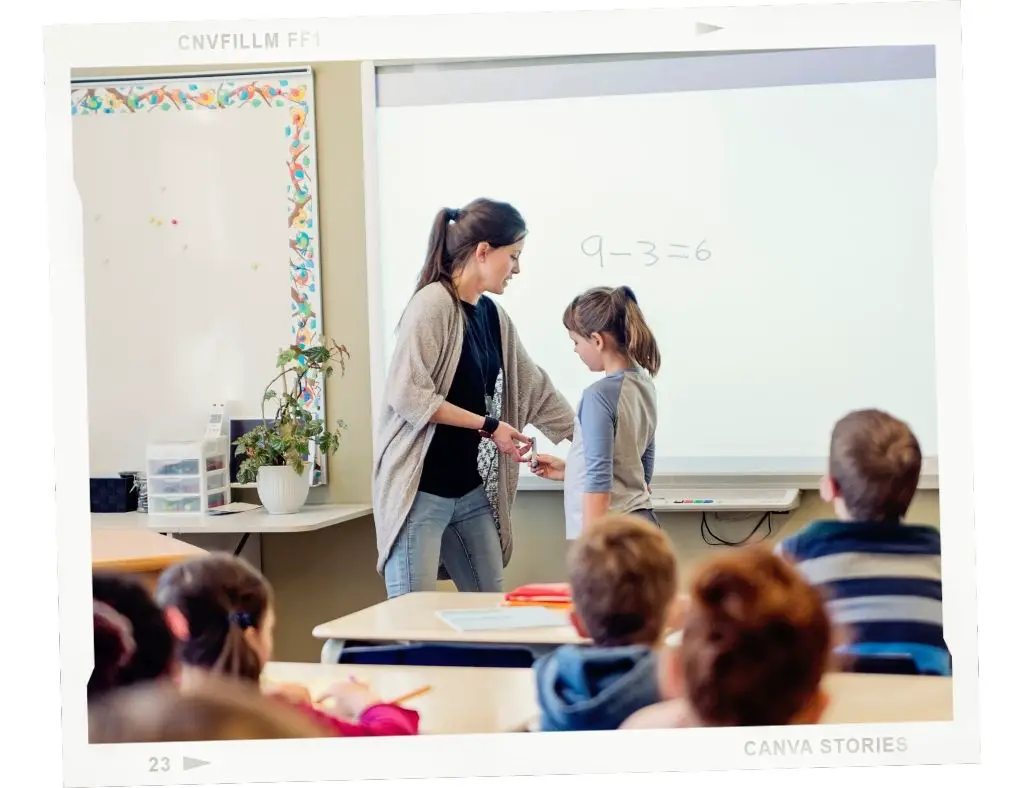
    A teacher and a student using an electronic whiteboard during a lesson.

    Also read: 7 easy tips on how to establish a hybrid classroom

    How Can Teachers Use Interactive Whiteboards In the Classroom

    The majority of teachers have reported seeing improvement in their students engagement and a more positive and livelier atmosphere since using this digital learning too. Nevertheless, many educators of different ages and levels of tech-savviness may find switching or frequently using the interactive smart whiteboard a bit tricky. 

    Although we’ve been using technology for over two decades, its exponential growth in the past several years might seem like a big leap when one needs to implement it daily in the classroom. According to my experience, the sooner, the better. 

    When they first brought me an interactive whiteboard in my classroom, I felt a bit unready to do a full switch. I instantly changed my mind when I saw the smiles on my students’ faces and when I saw just how simple and fun this tool was for me too. 

    There are so many ESL activities you can do using an interactive whiteboard. Games, quizzes, charades, karaoke shows, drawing… 

    Top 5 Activities for the Interactive Whiteboard in the Classroom

    These are my favorite activities:

    Disappearing Text 

    Write a sentence on the board, then instruct the students to say the whole sentence together out loud. 

    Then, erase a couple of words at the beginning and tell them to say the full sentence again.

    Keep on erasing words until the sentence is gone, but encourage students to say the complete sentence correctly.

    Walking/Running dictation

    Divide the class into 2 teams.

    Next, one student from each team approaches the teacher, who tells them a word or sentence from the lesson. Then, the students go back to the team and tell the word or sentence, and they have to write it on the board as quickly as possible.

    The first team who writes the correct word or sentence wins and gets a point.

    Read the full instructions on running dictations.

    Tic Tac Toe

    Divide students into two teams. Choose a grammar tense you want to practice.

    Draw a 4 x 4 grid on the interactive boards. Write a sentence in every square and leave a blank space for the verb. On the side write 13 verbs (one of them is extra).

    Instruct students to complete the sentence with the correct form of the verb. The first team who answers correctly gets a Tic Tac Toe.

    Pictionary

    Divide students into small teams.

    Make a list of vocabulary words you want to practice, and that are familiar to students. List the words separately on cards turned upside down and present the on the board.

    Invite a student to “draw” one word and show it to his team that has only 5 seconds to guess the word.

    Continue with the next teams, then pick a winner according to the number of points that each team has won. (1 correct guess = 1 point)

    Mixed-Up Sentences

    Divide students into two teams or more small teams.

    Make two separate columns on the board. Write jumbled sentences in the first column and leave the second column empty. Instruct students to race to make a correct sentence in a limited timeframe.

    Each team gets a point for each correct and fast answer. You can also do this activity as a test review to practice syntax.

    Find more activities here:

    Advantages and Disadvantages of Interactive Whiteboards for the Students

    Student involvement in the classroom would surely progress when students realize that teachers speak their language, i.e., fast and interactive information input. Therefore, interactive whiteboards contribute to building positive student experience in the classroom, however, just like any learning tool they have certain disadvantages when it comes to student learning.

    Let’s take a look at both the advantages and disadvantages of interactive whiteboards for the students:

    Advantages

    Students learn in different learning styles

    With the interactive whiteboard, teachers can support and encourage different styles of learning, i.e., visual, kinesthetic, and auditory.

    Students who are keen on visual learning would be able to draw, manipulate and present on the board, while the auditory learners will enjoy videos, songs and sound effects. The kinesthetic students can have physical interaction with the board that allows them to touch and move objects on the display.

    Enhances language learning

    The interactive smart board is especially effective for language classes. Language teachers usually combine the digital format of their teaching materials with the textbooks, so students can get multiple interaction with the language they are learning.

    Students can work with new vocabulary or grammar content by clicking, highlighting, watching dialogue videos, listening to pronunciation of words related to images and much more.

    Direct-from-source information remains available

    Another important benefit of interactive whiteboards in the classroom is that presentations during lessons can be recorded, saved, shared and used at any time when needed.

    Students can thus plan when to revise study material and be sure that they rely on correct information. This way, students feel more self-confident, motivated and focused.

    Storytelling

    According to research of educators, ESL students exposed to digital storytelling develop their English skills and progress fast. For young learners, for example, teachers can use comics and cartoons to introduce new vocabulary and grammar structures.

    Another practical and fun way to use storytelling in the classroom is with predictable storybooks or picture books with no text that you can change, adapt or upgrade together with your students’ ideas.

    More experienced students can write words or sentences and add to a story to finish it, or create a new one from scratch together with their classmates.

    Enhanced interaction in the classroom

    Smart interactive boards have a touchscreen that can be used by many students simultaneously. Teachers would be happy to see that their students turn into active participants in the lessons, communicating and enjoying the hands-on experience of learning.

    Disadvantages

    Negative impact on eye health

    No need to go any deeper, as it is clear that staring at any screen for a long time may have a negative impact on the eyesight. One of the best ways to avoid this is to limit the time of use of the interactive board and combine it parallelly with other activities that do not involve screen time.

    Risky when remote access by students is permitted

    To increase students’ engagement, many teachers allow their students to interact on the board through their personal computers. In one way, this can have a positive outcome, as students can share relevant data related to the curriculum.

    However, students often use their access to share inappropriate and irrelevant information on screen that may disrupt learning time.

    Technical problems

    Both teachers and students can use these boards only when the lighting in the classroom is appropriate. Inadequate lighting can make students’ reading experience unpleasant.

    Also, if the power goes out, or the computer collapses, the lesson material might disappear and it is likely that this will interrupt students focus and break the learning atmosphere.

    The Best Whiteboards for the Classroom? 

    Teachers can enhance their lessons by using the interactive whiteboards in various ways, incorporating a wide range of audiovisual material to have more motivated and engaged students. However, choosing an interactive whiteboard can be a bit challenging if you don’t know where to start from.

    Here are my top 2 suggestions:

    Samsung Flip 65 Inch 

    [amazon-button link=”https://www.amazon.com/Samsung-WM65R-Flipchart-Business-LH65WMRWBGCXZA/dp/B07WXZDCC9?crid=60QK5R3QTLFM&keywords=samsung%2Bflip%2B65%2Binch&qid=1653912076&refresh=1&sbo=RZvfv%2F%2FHxDF%2BO5021pAnSA%3D%3D&sprefix=Samsung%2BFlip%2B65%2Binch%2Caps%2C128&sr=8-3&th=1&linkCode=ll1&tag=jimmyeslus1-20&linkId=51c2c08a09706a2648a824431b6f5a02&language=en_US&ref_=as_li_ss_tl”]

    With its digital flip chart and screen size of 65 inches (1.65 m), this interactive whiteboard makes any room turn into a classroom.

    Samsung Flip 65 Inch includes a built-in Wi-Fi module and a built-in speaker that will enhance your presentations of various audiovisual teaching materials within your lessons.

    It has a rather large display, a temperature sensor and time and date memory which are practical for steady control of this learning tool and the data you want to save and classify.

    This interactive smartboard comes with two passive digital pens, a power cable and a touch out USB cable that you can use to connect to your computer or smartphone.

    Plus, you get a 3-year warranty with on-site pickup service during the warranty period.

    VIBE All-in-One Computer Interactive Whiteboard

    [amazon-button link=”https://www.amazon.com/Vibe-Interactive-Touchscreen-Collaboration-Whiteboard/dp/B081LPL772?crid=21GPPMOHWCPW8&keywords=Vibe+All-in-One+Computer+Interactive+Whiteboard&qid=1653912258&sprefix=vibe+all-in-one+computer+interactive+whiteboard%2Caps%2C145&sr=8-1-spons&psc=1&spLa=ZW5jcnlwdGVkUXVhbGlmaWVyPUEyOUZDMzY1R1MxWlI5JmVuY3J5cHRlZElkPUEwMzIyMzMyMzZZVzdEOUtXREhTNSZlbmNyeXB0ZWRBZElkPUEwMjcxNjQ4U0NIQTZLQUo3VU04JndpZGdldE5hbWU9c3BfYXRmJmFjdGlvbj1jbGlja1JlZGlyZWN0JmRvTm90TG9nQ2xpY2s9dHJ1ZQ%3D%3D&linkCode=ll1&tag=jimmyeslus1-20&linkId=346770ead3f3c082c6d6f2e649403f76&language=en_US&ref_=as_li_ss_tl”]

    This exceptional interactive board is designed to make teaching and learning experience a breeze. One of its main pros is the pen that you can use on the touchscreen, which looks natural and feels familiar like a marker on a regular whiteboard.

    Next, you can edit and share information with many people at the same time, either face-to-face in the classroom or while working remotely (ping, offline-online teachers!). 

    The size of the screen of the VIBE smart board is 55 inches (1.4 m). You can use various apps for teaching, as the board works with almost any of the teaching tools.

    Plus, you can store all of your necessary data in the VIBE Cloud in real time. So, you don’t have to worry about the whereabouts of your notes – they will all be stored and ready to use back and forth during lessons. Then, you can export the content to your cloud drive like Dropbox, Google Drive etc.

    The VIBE Smart Digital Whiteboard can be easily installed and has a thin and compact size that makes it convenient for any classroom.

    Also read: The 10 best laptops for teachers

    To Sum Up

    Using an interactive whiteboard in the classroom is beneficial for both teachers and students. This learning digital tool is rapidly taking over, so the sooner you catch up with the multiple ways to use it, the better the attention and motivation of your students.

  • 10 Great Information Gap Activities for ESL Lessons

    10 Great Information Gap Activities for ESL Lessons

    ESL teachers are often in a quest of activities that will target a specific language skill and make the students’ experience more interactive and, thus, fun and meaningful.

    I often find myself struggling to select and implement convenient speaking exercises. On the one hand, I want these to work and enhance my students’ speaking skills, but I also care if students feel motivated and comfortable doing the exercises.

    Considering that fluency in speaking relies on communication, which is the most important part of speaking, it is vital to provide exercises through which students can communicate as naturally as possible.

    One of the most effective speaking exercises in ESL lessons are the information gap activities. These rely on asking questions and investigating which is among the best ways to obtain, interpret and use information while communicating.

    Information Gap Activities for ESL Lessons

    What Is an Information Gap Activity?

    In a nutshell, information gap activities are drills that are commonly used in task-based learning and are most often performed in pairs, although more students can participate. In the basic pair format, one of the students looks at one information compilation while their partner looks at another one. 

    Both information clusters are related, and students miss the information they need to complete a task or solve a problem, so they have to talk and exchange the information given.

    Information gap activities are beneficial as they make students ask questions and provide answers in an authentic, real-life fashion while talking about a cinema program that they want to attend in the evening or scheduling a tennis match or a coffee meeting together.

    Information gaps can help your students become successful as speakers, as they would be able to collect and give information in different contexts, used in everyday situations. 

    I like most about this type of activity because it involves students only, while teachers only give instructions, demonstrate and monitor if the activity is done correctly. 

    This way, there is a higher interaction between students, and they become active participators in the learning process, which is a big step toward becoming confident, successful speakers of English.

    Next to the effective information gap activities in task-based learning and teaching, which focuses on having students communicate and use language as a tool for information exchange and problem-solving, are the opinion gap activities.

    Also read: 15 tips to limit teacher talk time during lessons.

    What Is an Opinion Gap Activity?

    When doing opinion gap activities, students are asked to express their personal ideas, feelings, or preferences in a given context, i.e. real-life situation.

    The opinion gap activities for elementary to intermediate ESL students are usually made in the “complete the story” format, however, higher-level students can practice this type of activity by participating in a debate or discussion on a certain topic.

    It is worth noting that opinion gap activities don’t have an objective assessment method, meaning there is no right or wrong answer to what students express as opinions or ideas.

    As a teacher, however, you can instruct students to use specific grammar constructions and assign them a certain time frame that they should stick to while taking turns speaking.

    10 Great Information Gap Activities for ESL Lessons

    Now, let’s take a look at my list of the 10 Great Information Gap Activities for ESL Lessons that you can use in your classroom.

    1. 20 Questions 

    Level: Intermediate and above

    Divide students into pairs or small groups of 3-4 students. Pick a topic on which you will base your questions, like animals, food, famous people from history, etc.

    Write these on paper slips and close them. One student picks a slip of paper and keeps it a secret. The other students ask a maximum of 20 “yes” or “no” questions until they guess what the secret paper slip holds.

    2. Drawing Dictation 

    Level: Intermediate and above

    Divide students into pairs. Instruct students that their task is to draw a simple image; e.g., their “dream beach house” or “tree house” without their partner looking at the drawing.

    Next, tell them to describe the image to their partner, who should follow the description and ask questions until they reproduce the image of the first student in the pair.

    Instruct students to include shape, sizes, colors, exterior parts of the beach house and the area.

    Another fun writing activity: Running dictation

    3. Role Play

    Level: Intermediate and above

    Divide students into pairs and create a situation.

    For this activity, you have to “create a problem” that students will need to solve. For example: One of the students is a waiter at a luxury restaurant, while the other one is a guest.

    The first role-play card should contain a description like, “You are a guest at a luxury restaurant, but the dish you ordered looks a bit and feels lukewarm, plus the glass is stained… (add more problems). You want to get a new dish and don’t want to pay for the first one. Talk to the waiter to solve the problem.”

    The other student gets a role-play card that says, “You are a waiter at a luxury restaurant. You have a guest who complains about their plate, although the meal is fresh and shouldn’t be served hot. You can bring them another dish from the menu, but they will have to pay 50% for the first one. Talk to the guest and solve the problem.”

    4. Find Your Partner

    Level: Upper-Elementary and above

    This is an activity where the entire class participates. Prepare cards, two each with the same image printed on it (according to the topic of your lesson).

    Each student gets a card, and they must go around the classroom with their cards face down and find the person with the same image by asking “yes” or “no” questions.

    Mind to instruct students not to ask directly, “Are you a…?” but tell them to ask descriptive questions.

    5. Mingle Activity 

    Level: Upper-Elementary and above

    This activity includes the entire class. Pick your thematic content from covered units for the activity, like classroom items, cartoon characters, cities, etc.

    Create a list of items that answer questions like “Where am I?”, “Who am I?”, and “What am I?.” Each student gets a different card (if you have a large class, you can divide them into larger groups). Stick the card on each student’s forehead and tell them that each of them has received a person/object they need to guess.

    Next, tell students that they must ask their classmates questions (that you will write on the board to keep things under control) about their person/object until they discover who they are. They aren’t allowed to ask questions which can be answered with “yes“ or “no“.

    Example: What does … eat? Where does … sleep? Does it … (verb)? What color is …? Does it have …? How much/many…?

    6. Get to Know You

    Level: Upper-Elementary and above

    You can do this activity by dividing students into pairs or working with the whole class. Prepare lists of questions that refer to a daily schedule but put them in a jumbled order.

    Each student should question their partner about their schedule, then order the questions-answers in the right order. Next, students should compare their daily routines and describe the differences and similarities in their routines in front of their class.

    Find more icebreaker activities for the first day of school here.

    7. Picture Difference

    Level: Upper-Elementary and above

    Prepare two different pictures on the same thematic content. Divide students into pairs.

    The first student describes their picture to their partner. The second student listens to the description carefully and tries to find 4-5 differences in on their picture. Then, the second student describes the differences and the first student should confirm if they are correct.

    8. Information Exchange

    Level: Intermediate and above

    Prepare film or theater programs with 4 pieces each. Include information like date, time, duration, genre, age limit and price of ticket. Make one full copy of the program and one with missing information.

    Divide students into pairs. Each student gets a program. The first student looks at the information about the films or plays and uses them to answer the questions by their partner who wants to know more about the films. 

    9. Same-Different

    Level: Upper-Elementary and above

    Divide students into pairs. Prepare two samples of different tourist offers for one destination. Tell students that they are friends or a couple who want to go on a vacation at the same place.

    They have found different offers, and now each tries to persuade the other that the offer they found is the right one. Include price of the offer, accommodation, air tickets, excursions, and extra activities etc.

    10. End-of-School Party

    Level: Upper-Elementary and above

    This activity is for the entire class. Create a shopping list for an end-of-school party and make a stack of cards that will contain things that students will “need to buy,” like drinks, food, decorations etc.

    Give a list and a card to each student. Tell your students to mingle with their classmates and ask them what they bring to the party. Next, divide students into groups and present questions on the board that your students will need to use

    What time does the party start? What food, drinks is best to bring? What music should be played? What activities should be planned, like karaoke, etc.?

    Instruct students to ask these questions within the group and write a plan for the party. Finally, each student presents their plan, and you can choose the best ones.

    Wrapping Up

    I hope that this article inspired you to incorporate some information gap activities on my list and make your ESL classroom an interactive environment where students exchange knowledge and enjoy learning.

  • How to Develop Patience as a Teacher? 7 Practical Strategies

    How to Develop Patience as a Teacher? 7 Practical Strategies

    We are discussing and trying out various teaching tools all the time but fail to remember the most powerful tool that teachers have: patience.

    Pressured by the overwhelming day-to-day tasks and obligations, let alone disobedient students and demanding multitasking, did we lose this magic, yet almost endemic trait?

    Personally, I usually find it hard to stay patient at work while living in a world where “fast” means “effective”. 

    Sometimes I remember that progress takes time, but often I feel impatient and frustrated when I see that some students are lagging behind despite my efforts.

    So lately, I’ve implemented 7 techniques that helped me to develop my patience as a teacher and approach teaching from a different angle. Read on and try them yourself!

    How to Be a  Patient Teacher: 7 Strategies

    Why Is Patience Important In Teaching?

    Patience in teaching means dedicating the necessary time and effort to help students learn something, with the intention to explain, contextualize and build on their prior knowledge.

    Patience also refers to developing and maintaining trust in the student-teacher relationship. 

    Both the teacher and the student need to believe that their actions will eventually bear fruit, though they may face many obstacles on the way.

    Despite the common misconception, being patient as a teacher doesn’t simply mean “waiting for students to become better”. In fact, using patience as a tool reflects in all aspects of your work: like being patient with peers and their requests but also with yourself when you’re approaching the end of a term, and you have a pile of stuff to get done.

    Being patient when working with students requires higher emotional control and awareness on the side of the supportive teacher, allows learners to make mistakes but also encourages students to analyze them and create new solutions.

    This, on the other hand, turns students into critical thinkers instead of marathon runners for the “best” results — a very pragmatic quality for their future.

    In other words, neither teaching nor learning can be effective if there’s no patience which makes it fundamental in all educational processes.

    The college science professor and educational expert Leslie Schwab highlights patience as the top trait of any effective educator, along with concern for students, knowledge of the subject being taught and willingness to adapt.

    Schwab writes that patience is important as teachers cannot expect all students to progress at the same pace, so their task is to provide more extensive explanations in several times. According to her, the counter tactic, i.e., “go home and practice more” usually triggers anxiety and insecurity in students that would eventually reflect on the work of the teacher.

    Nevertheless, we can’t just put a blind eye on the fact that teachers are only humans, and they can simply lose patience and snap. Some of us are triggered by the noise, others by the scratching of chairs on the floor, or by the constant “forgetting” of homework…

    After all, research has shown that during their career, teachers have more stress and frustrations than workers in other fields, and show a bad temper.

    On the surface, patience may seem complicated to master, yet there are many small steps that you can make to see it grow within you and resonate in your working place.

    Also read: How to become a good and effective ESL teacher.

    7 Strategies for Teachers to Be More Patient 

    Follow these strategies to develop patience and stay calm in stressful environments or situations.

    1. Take Care of Yourself

    Yes, this is my number one, top tip as there’s no way to stay calm, focused and productive at work without providing basic personal care for your physical and mental health.

    Despite what mainstream culture of work preaches, burnouts are not a sign of professional success but of a low-quality life.

    Going to the spa once a week or weekend getaways in Tuscany sound fantastic, but I’ll stick to simple self-care strategies that any teacher can try on a daily level:

    Get enough sleep

    Make sure you sleep enough hours every night. Believe me when I say that NOTHING can soothe your nervous system better than regular slots of quality sleep. Make it a priority.

    Make routines and stick to them

    I already wrote about establishing routines as great stress-relievers when it comes to task management and feeling calm on a daily level.

    Wake up a bit earlier, start the day with a cup of coffee and NO extra stimulants like news, music, or Instagram stories.

    Relax, breathe and get ready for the new day. Then make a list and note down your tasks for the day and the day after — no need to plan further, just stick to this simple practice on a daily level to feel more organized and ready.

    Pull the breaks when needed

    You start working early in the morning and finish late in the afternoon, or sometimes even continue working at home — no wonder if you feel constant fatigue throughout the working week. I recommend 3-4 breaks in the day to balance this out.

    Just isolate yourself for 10-20 minutes, lean your body on the chair, take a few deep breaths, or do a short meditation to relax (link below). Occasionally, I need a short pick-me-up, so I go for a quick run and listen to my fav music or podcast.

    Mind your nutrition and caffeine intake

    Our mood is closely related to our nutrition patterns, meaning, what we eat when we’re busy can have a big impact on how sluggy or motivated we feel.

    Try to eat moderate, balanced meals and stick to 2-3 coffee cups maximum per day.

    Stay hydrated while in class, and always have some sugar booster at hand when your energy bars start going down. Personally, I run on pralines, dates or bananas, but you can also have dry fruits and nuts, protein bars etc.

    Make leisure time mandatory

    At a certain point of the day, you have to stop working if you want to continue working productively.

    Leave some time in the day for other activities like sport, reading, watching films, hanging out with friends… Whatever makes you feel happy and relaxed.

    Also read: The extensive stress management guide for teachers.

    2. Examine Your Impatience

    Analyze what causes your impatience while in class, and try to recall and identify situations when you lost your tolerance.

    Think about the consequences of losing your cool and project possible alternative reactions on your side.

    Once per week, I imagine a situation, like a student spilling water on my computer for example, and let myself think about 3 possible reactions, then I choose the most and the least appropriate and I write it down. 

    At the end of the month, I analyze all responses in my diary, check my progress, and see if I have implemented positive solutions in my classroom.

    If you know your triggers, you can choose how to react in similar situations in the future.

    3. Learn to listen to others

    Listening to others at work before reacting, may seem like an easy-peasy thing to do, but actually, it requires conscious effort and can clearly show how patient you are.

    Try practicing this at home or with your friends. Don’t interrupt them while speaking, nor when they make short breaks between sentences. Let them finish their thoughts, think about what they said, and THEN reply. 

    Do the same at work with your students and colleagues. You will notice that your responses become more clear and measured, as you get more time to understand the other person and think about what you’re going to say instead of bursting out in the very minute.

    4. Practice being the person you want your students to be

    Students mirror your energy and behavior. Or let me put it this way: when I had a bad day and I enter class feeling anxious, angry or sad, students can feel my uneasiness and respond by reacting in a disturbing manner.

    Try to count to ten before you open the door of your classroom and leave personal burdens behind. Remember that you are there to share time together and collaborate for a good cause.

    If you give instructions with a calm voice and approach them with kindness, they will identify this atmosphere with their behavior in class.

    Remember the good old “Show, not tell”?

    5. Be responsive, not reactive

    When you behave just reactively, it means you react immediately and without conscious thought, i.e., impatiently.

    Example: Students are texting under the desk, you expel them from class.

    You can practice replacing this behavior with responsiveness, a thoughtful action that considers the short and long-term consequences of the immediate situation.

    Example: Students are texting under the desk, you take their cell phones away and ask them to stay after class for a short talk.

    Here are some ways to help you achieve this:

    Take a deep breath — this is the fastest way to interrupt stress. Signal the mind and the body that you noticed the signal, and now you’re preparing to go from reactive to responsive.

    Pause — when you feel the trigger to snap, freeze and slow down. Think before speaking. It’s okay if students are waiting for your response. 

    Mark your triggers — most signs of reactive behavior include shallow breathing, muscle contraction in the chest, neck, belly, feeling to push or shut something down, lack of focus, anxiety, sudden wave of warmth in the head etc. Notice these signs, so you can recognize and learn how to deal with them.

    These 6 activities will help you to promote mental health of your students as well.

    Motivational Quotes about Patience for Teachers

    Need Some Motivational Patience Quotes for Your Board?

    I’ve Got You Covered!

    Patience is bitter, but its fruits are sweet.

    Aristotle

    I have only three things to teach: simplicity, patience, compassion. These are your greatest treasures.

    Lao Tze

    Patience is not the ability to wait, but the ability to keep a good attitude while waiting.

    Unknown

    You can learn many things from children. How much patience you have, for instance.

    Franklin P. Jones

    Time is the Best of critics, and patience the best of teachers.

    Frederic Chopin

    Conclusion

    There’s no magic wand that will help a teacher be more patient over night. However, you can practice these simple strategies and see what works best for you.

    Take it slow, trust yourself and most importantly, accept that you cannot control everything at all times and find joy in riding the storms in our noble work.

  • 12 ESL Pronunciation Activities to Practice With Your Students (PDF)

    12 ESL Pronunciation Activities to Practice With Your Students (PDF)

    Correct me if I’m wrong: when teachers teach English, what they neglect most is pronunciation, and when students learn English, what they neglect most is pronunciation.

    Teaching and learning pronunciation in ESL classes can be really tricky for both teachers and students, but the good, old “practice makes perfect” does wonders as always.

    Are you looking for ESL pronunciation activities that will improve your students’ pronunciation? Then check out my list of pronunciation tips and 12 activities for both preschool and advanced ESL students.

    Why Teaching Pronunciation Matters?

    We can all agree that there’s simply not enough time to practice all core activities in class, so we usually prioritize grammar, reading or writing.

    Then no wonder why our students also think that pronunciation is not SO relevant, and forget that regardless their knowledge in grammar or vocabulary, if pronunciation fails, communication will also fail.

    To speak comfortably, students must learn the basics of phonics, i.e. pronunciation, which would immediately improve their listening comprehension skills. When they learn how to pronounce “free” and “three”, they will easily distinguish these two words when listening.

    What Is Good Pronunciation?

    Unlike the popular belief, good pronunciation doesn’t necessarily mean to sound “like a native”. 

    To start with, it is hard to say what “a native” really sounds like, especially when it comes to English, a language that encompasses many language variations that express diversity in pronunciation.

    When you practice pronunciation, include activities that encourage slow, easy and smooth speaking even when sounds are not perfect. 

    Next, add activities that focus solely on accuracy, i.e. how to produce sounds correctly.

    Ready? Here are my favorite activities for adults and advanced students, as well as as for preschool students or beginners.

    Pronunciation Activities for Adults and Advanced ESL Students

    Let’s start with some advanced activities:

    1. Fast Dictation

    • Student level: Intermediate–Advanced
    • Type of lesson: Group or individual

    In this activity, the teacher dictates the content in a single continuous stream, without breaks.

    The students listen and write words and phrases they notice.

    The dictation should include target words in minimal pairs, e.g., bent — vent, thumb — sum, save — safe, that students need to detect and write in the order they hear them.

    Learn how to conduct a running dictation activity.

    2. Homophone Go Fish

    • Student level: Pre-Intermediate–Advanced
    • Type of lesson: Group

    Make a list of homophones, and write each word on a separate piece of paper/ card.

    Plan ahead the number of cards according to the number of participatory groups.

    Each group member gets 5 cards, the rest is put in a pile.

    The goal of the game is students to find a matching homophone by asking another student: “Do you have a word that sounds like…?” (for example, sun – son).

    To keep the pair, Student 1 has to use the matching words in 1- 2 sentences. 

    In case Student 2 doesn’t have the homophone, they say, “Go fish!” and Student 1 draws a card from the pile.

    3. Rhyming Poetry

    • Student level: Pre-Intermediate–Advanced
    • Type of lesson: Group or Individual

    You can do this activity both face-to-face and online. 

    Instruct your students to write a simple poem with rhymes, e.g., love — dove, face — embrace, and read it out loud.

    This activity is especially convenient and inspirative when related to a festive occasion like St. Valentine’s Day, Christmas or Earth’s Day.

    4. Sound Chain

    • Student level: Intermediate–Advanced
    • Type of lesson: Group

    Another activity that you can do both face-to-face and online. 

    Students should line up or take a designated order in the class if online.

    Give your students a key sound, e.g., “ue” — like in fuel, due, tissue, rescue. Then instruct each student to find a word with the same sound.

    Have your class tell a story with the words that were listed during the sound chain game in the exact order. (take notes of the order, just in case your students forget it).

    5. The Odd One Out

    • Student level: Intermediate–Advanced
    • Type of lesson: Group

    Prepare a list with several sets of 3-4 words with the same vowel sound. Add one word in the middle that differs from the rest, like meet, sit,  meat, seat.

    Divide the class into teams and instruct them to line into 2 lines in front of the board. 

    Write the first set of words on the board. The first student row reads the words, then goes fast to the board and circles the odd word. 

    The student who first circles the odd words wins a point for the team.

    6. Extra Drill: Pronunciation Check

    Check how well your students can pronounce the following mispronounced English words:

    Pronunciation Activities for Preschool ESL Students

    Now, these activities are fun and effective for beginners and kids:

    7. Sound TPR

    • Student level: Beginner–Elementary
    • Type of lesson: Group

    Designate movements to specific sounds, for example, clapping, stumping or raising hands.

    For example, when students hear the sound ‘oi” in oil or boil, they jump or wave their arms.

    You can read to them, play an audio or show flashcards and encourage them to respond to the words on the flashcards with correct pronunciation and movement.

    8. Fruit Salad

    • Student level: Beginner–Elementary
    • Type of lesson: Group

    Instruct students to sit in a circle and have one student standing in the middle.

    Each student represents a type of fruit, i.e. words containing minimal pairs (pin, bin).

    The student in the middle calls a fruit and all students who represent that fruit have to quickly change places while the student in the middle tries to take one of their chairs.

    From time to time, they can say “fruit salad”, i.e. another word (bean!) and then all students have to change places.

    9. Pronunciation Bingo

    • Student level: Beginner–Pre-Intermediate
    • Type of lesson: Group

    Prepare Bingo sheets with words for each individual sound you want to review, as well as sound flashcards.

    Show a sound flashcard and say the sound while showing the card.

    The students must find the word on the Bingo sheet that matches the sound.

    E.g., “e” – “pet”.

    10. Correct the Teacher

    • Student level: Beginner–Elementary
    • Type of lesson: Group or Individual

    Say a sentence in both natural and unnatural rhythm and ask your students to decide if it was right or wrong. If wrong, they need to say it in the correct way.

    E.g., “I fond tree keys in the box.” (I found three keys in the box.)

    11. Rhyming Pair Memo Game

    • Student level: Beginner–Elementary
    • Type of lesson: Group or Individual

    Prepare cards with rhyming words like pet-bat, man-can etc., and put them face down. Students take turns and turn over the cards to find the rhyming pairs.

    12. Extra Drill: Tongue Twister + Role Play 

    Play this video to your students (minute 00:00-07:00). Explain to them what is a tongue twister: A sentence made up of words that are difficult to pronounce quickly, e.g., “She sells sea shells on the sea shore.” 

    Replay the video and encourage students to repeat the 3 tongue twisters. Then assign a role to each student or divide students in groups where each would get a role if they’re too many, and do the role play demonstrated in minute 07:00-13:25.

    Follow-up…

    To improve students pronunciation, try to stay diligent in implementing ESL pronunciation activities and establish routinely follow-ups of their progress, so you can detect any impediments and work on these accordingly.

    Stay committed and results will follow!

    Check out out our extensive guide on teaching English pronunciation with more tips and exercises.

  • Integrating Technology in the Classroom: The Extensive Guide

    Integrating Technology in the Classroom: The Extensive Guide

    Not so long ago, the internet and the use of technology in education were discussed as things of the future. Education professionals would often question the possibility and accessibility of incorporating technology in the classroom.

    Today, it is evident that technology classrooms are rather the rule than the exclusion, so the question is not whether to integrate technology in our learning environments but how to do this in ways that would be productive and enjoyable for both you and your students.

    There’s a popular belief that technology in the classroom means distraction and too much information. In contrast, research made in the last two decades has come to the conclusion that the effective integration of technology can significantly change and improve the classroom and increase student engagement in learning.

    Read on and discover how to take the first steps toward successful technology integration in your classroom.

    Technology in the Classroom: The Teacher Guide

    How Students Benefit from Using Technology in the Classroom

    Introducing technology in the lessons of your curriculum can be beneficial for students in many ways. Most of them spend a lot of time with digital technology at home but that doesn’t mean that they know how to use the same technology for learning.

    This is where you step in and offer a helping hand by providing guidance and collaboration through the digital tools for learning. Understandably, the access to technology and the age group of students might require different approaches.

    So how do students benefit from the tech classroom?

    Learning in an Engaging Environment

    When you integrate technology in your classroom, regardless of whether by using a mobile device, a laptop, or an interactive whiteboard, you abandon the dull, traditional pattern of presenting new content and replace it with fun, interactive activities that encourage participation and communication among students and the teacher in the classroom.

    Learning Through Different Learning Styles

    One of the important advantages of the tech classroom is that teachers are allowed to adapt and modify their lessons to fit students’ individual needs and preferences as each of them is learning differently. Most digital learning tools allow each student to learn new content on their terms but also to communicate and exchange knowledge with peers and the teacher.

    Improved Collaboration

    Many of the tasks and activities in the technology classroom require students to interact with their classmates or ask questions – excellent ways for students to collaborate while learning new content. If students work in small groups, this process might be even more effective. The teacher could encourage more advanced students to help less experienced students in the group.

    Prepared Digital Citizens

    In the tech classroom, you will surely teach a lot of practical digital skills to students, like Word or PowerPoint, however, it is equally important for them to learn about the most challenging aspects of the digital era, such as proper conduct online, cyber safety, cyberbullying, plagiarism, digital footprint, etc. One practical way to teach these amid lessons is by setting rules for safe usage of online information and expected online conduct.

    Improved Teacher-Student Relationships

    Regardless of what your subject matter might be, the wide array of digital activities and tools will make it more fun and attractive to students and this will automatically create a positive atmosphere in the learning environment.

    Make sure you always check the current context of what you’re teaching and try to keep up with the tech advancements, so you can easily approach students and encourage critical thinking and idea exchange.

    Types of Technology Integration in the Classroom

    When it comes to implementing technology in the classroom, one of the most relevant things to consider is that teachers don’t teach technology as a separate subject work on integrating it when presenting content and that students can later also use it to demonstrate what they’ve learned.

    This approach can really help teachers who are less tech-savvy or skeptical about the benefits of digital education tools. The term “technology integration”, however, is quite broad, but here are some of the most applicable types of technology integration today:

    Online Learning & Hybrid Classrooms

    Hybrid learning had been a hot topic among educators in the last two decades before it became almost a necessity right with the outbreak of the COVID-19 pandemic. Teachers and education professionals are exploring and practicing various ways of blending online and face-to-face education, which makes learning quite challenging and yet more accessible than ever before.

    Learn how to use a green screen for online teaching in this article.

    Project-Based Blended Learning

    Though the so-called project-based learning (PBL) is familiar to most educators, blended learning is yet to be discovered. Blended learning refers to teaching practices that combine traditional methods with online learning, so we can say that it’s a hybrid learning experience.

    This type provides learning content in a highly adaptive and personalized way, allowing students to follow their own pace while engaging in the online content and then apply what they’ve learned in the common project, i.e. the hands-on part of the learning process.

    Gamified Learning, Web-Based Projects & Research

    Even the simplest of games can turn learning from a passive activity into a fun and motivating process. When you use technology for gamified learning, for example through quizzes or virtual information hunts, you really change the atmosphere in your classroom – playing digital games is one of the students’ most favored activities in their free time.

    Another simple and practical way to encourage students to use technology for learning is through digital field trips, using web resources, and helping students to do online research on a specific topic.

    These types of technology integration will practically merge your objective with their focus and interests and this creates a seamless learning experience.

    Learning through Mobile Devices & Social Media

    Integrating handheld devices and social media as learning tools are among the innovative ways to use technology in the classroom. Instead of observing these as attention takers, try to find a convenient way to make them work for your benefit.

    Mobile phones and tablets can be quite practical for connecting students to classroom resources and sharing materials. As for social media, it allows teachers to create groups or pages for discussions, poles, and debates for their students.

    Learning through Interactive Whiteboards & Classroom Response Systems

    More and more schools abandon the green chalkboards and replace them with interactive whiteboards to make lessons more fun and appealing. The “smart boards” allow you to design your lesson using their tools, use the internet at any time to browse information together with your students, etc. In addition, most of the teacher resources nowadays contain a “smart board” extension of the textbooks with extra activities.

    The classroom response systems (CRS), on the other hand, aims to transform abstract learning into a hands-on experience by using remote devices which allow students to individually engage in the content projected on the screen through a receiving device and software.

    Levels of Technology Integration

    According to Mary Beth Hertz, a director of Education Technology and an expert in the field, there are four levels of classroom technology integration. Here is how she defines these on her blog:

    1. Sparse: Technology is rarely used or available, so students rarely use it for their projects or assignments.
    2. Basic: Technology is more often used in the lab, but not in the classroom which makes students’ access to it limited. Students use only one or two digital tools when creating projects.
    3. Comfortable: Technology is used on a fairly regular basis in the classroom and students know and can use many tools for creating projects and presenting knowledge.
    4. Seamless: Students use technology daily in the classroom and can use different tools to create projects and assignments and demonstrate understanding of content.

    The levels of integration can vary and depend on a number of factors, especially the availability of digital resources, equipment, and support as well as the access to technology in a specific school or classroom.

    Tips on How to Use Technology in the Classroom

    Now that we’ve presented some of the integral ways of incorporating technology in the classroom, let’s look at a few tips on how to do it practically:

    Types of integrationTips
    Online learning and hybrid classrooms  I recommend creating class recordings that prove to be invaluable to students’ individual needs (online and offline). Don’t forget to hit that record button!
    Project-based blended learningFocus on providing real-world context to the learning units. If your primary objective is teaching climate change, for example, present it through contrast, i.e. climate change in Greenland vs. Europe. Include digital maps, field trips, and videos.
    Gamified learning, web-based projects, research  Make sure you create interesting yet not overly ambitious game mechanics so you can manage your time and monitor the progress of students. The same goes for web-based projects – link every action to an outcome that is clear to the learner.
    Learning through mobile devices and social media  Create authentic hashtags that you and your students will use. Make photo albums or note sections where you can upload relevant materials. Turn cell phones into learning instruments by using tools like Celly or Study Boost for creating polls and quizzes that engage students in a group or individually.
    Learning through interactive whiteboards and classroom response systems  The interactive whiteboard will help you to encourage all students to participate and perform interactively. For example, you can use a name generator, enter students’ names before class, and then engage each student as names pop out. If you use response systems in the classroom, focus on creating a variety of questions that will address content, student perspective, misconceptions, and student questions (prepared in advance).

    Great Tools to Use in the Classroom

    Regardless of whether you’re a beginner or a veteran in integrating technology in the classroom, it’s always practical to have a list of apps and tools that are practical and easy to use in your tech classroom.

    Google Classroom

    A simple app that many find to be super convenient as it is connected to Gmail, Google Docs, Sheets and Slides, Google Meet, and Google Calendar. It encourages collaboration between students and teachers. Teachers can add students and form a class while students get a clear overview of their assignments and can enroll in discussion forums.

    Khan Academy

    A free education app that offers exercises, instructional videos, and a personalized learning dashboard. The app can also help you find resources for subjects like science, math, reading, writing, etc. One of the most convenient things is that you can download the videos and watch them at any time.

    Edmodo (not available anymore)

    This is a social learning app that provides communication, polling, and sharing assignments between students, teachers, and schools. It contains millions of resources that are created and shared by teachers worldwide. Also, parents get access and can keep track of their children’s school calendar, grades and assignments.

    Kahoot!

    Teachers can use this tool to conduct quizzes, surveys, and discussions. It is a classroom response system, so the whole class can participate simultaneously. The activities involve multiple-choice questions that are projected on the screen and students can answer through a tablet, smartphone, or computer.

    iCan-Special Educational Fun

    This app is specially designed for young students with learning difficulties. It contains a rich add-free library of educational videos and games that promote the cognitive and socio-emotional skills of the students. There are 8 games available for practicing different skills like Matching, Memory Building, Coloring, Tracing etc.

    Edublogs

    This app caught my attention as it provides simple creation and management of student and teacher blogs but it can also be used for creating videos, photos and podcasts with the support of a growing lesson library included.

    To Conclude

    Integrating technology in the classroom is a challenging, yet exciting process that takes patience and willingness for continuous learning. Results won’t come overnight but strong diligence and an open mind can surely help you go a long way in this pursuit that would improve the learning experience for both you and your students.

  • Establishing A Hybrid Classroom: 7 Easy-To-Implement Tips

    Establishing A Hybrid Classroom: 7 Easy-To-Implement Tips

    The challenging development of the COVID-19 events from 2020 onwards has drastically changed most of the important aspects of our lives, including jobs and professional lifestyles.

    Teaching and studying have instantly and directly felt the price of social distancing as lockdowns around the world have caused a massive migration of both students and educators from the regular physical classroom to online teaching and studying.

    Currently, institutions and individuals are implementing innovative ways of learning and teaching intending to adapt to the new circumstances. One of these learning models is the hybrid classroom, which combines the virtual and the physical classroom.

    Read on and find out more about how the hybrid classroom works, what are its pros and cons, and how to run it successfully.

    Teacher Tips for the Hybrid Classroom: the guide

    What Is A Hybrid Classroom?

    The term ‘hybrid classroom’ can be simply explained as a classroom that combines two different elements, i.e. hybrid. The distinctive elements in this learning model are the traditional, in-person classroom and the online, virtual classroom.

    In other words, teachers and students who engage in this type of classroom will participate in a combined learning environment where there will be students present in the physical class and remote students.

    The hybrid classroom is also known as a “hyflex classroom” as it is a flexible and creative way of studying that seeks to provide flexibility and safety while maintaining good quality education.

    For remote students, the lectures and seminars in the hyflex environment can be attended from any location through the popular video-conferencing software platforms like Zoom, Google Meet, Microsoft Teams, etc.

    As a learning model, the hybrid classroom can vary depending on the institution and the educators that would implement it. Some schools choose this model to offer their study programs to foreign students who find it practical to attend lectures they’re interested in without their physical presence.

    Another popular way is the so-called 50-50 hyflex classroom where the curriculum is taught in a certain number of days appointed for in-person participation in the classroom while other students are learning online – this approach was especially effective in schools that insisted on remaining open during a lockdown but still wanted to keep a safe environment for students and staff.

    Many teachers choose this model to let their students be flexible and keep their enthusiasm and engagement in the in-person classroom. According to most teachers’ experiences, students show better results when they can choose their time and place for studying.

    Benefits and Downsides of the Hybrid Classroom

    In the perfect scenario, a hybrid classroom sounds almost like an edutopia. Students choose their time for studying, they commit to their choice, engage their efforts while teachers have the best technical support at hand, and never fail to complete classes successfully.

    The reality, however, is quite different, since the hyflex classroom has both its benefits and downsides.

    Benefits

    The top benefit of this learning model is flexibility – a trait much required in today’s dynamic digital world. Students appreciate when they have the chance to study from the comfort of their location.

    Other benefits are accessibility and inclusion, aspects that are crucial when it comes to equality in education. Online students from all around the world can enroll in courses without physical presence, which can be conditioned by health or financial circumstances that could prevent studying in the traditional way.

    Latest studies have shown that the performance of students in hybrid classrooms surpasses the traditional learning and teaching experience.

    Downsides

    Nevertheless, learning environments thrive on interaction and communication between teachers and peers, and this is one of the top challenging aspects of the hyflex model.

    Teachers complain that students can easily lose interest in a specific topic and reduce their engagement when they follow lectures in a combined class. Reading our guide on interactive learning might help you to avoid this.

    Another, yet equally important downside of hybrid classrooms is the hybrid classroom technology, i.e. the technical requirements and issues that can appear.

    If the technical support is not good enough, remote students will have difficulties in following the classes and teachers will become frustrated while trying to maintain the dialogue between the physical and the online classrooms.

    Finally, this type of classroom requires teachers to follow the latest technology advancements and invest in their knowledge and practice and support their schools regarding the tech infrastructure. Unfortunately, this is more often regarded as a privilege than a necessity.

    Tips On How To Introduce A Hybrid Classroom

    Introducing a functional hybrid classroom is not an easy task, as you need to use top tech and think of new creative ways to bridge online and offline students.

    However, there are ways to make great lessons with a bit of effort and use this challenging way of teaching to your advantage.

    Turn Lesson Exercises Into Games

    If you feel exhausted by jumping from the remote student group to the students around you and vice versa, try combining different approaches of communication while performing exercises.

    For example, you can mute online students while giving a task to in-person students and then gather them together to guess, add or swap information or send the online students’ lesson materials that the physical students cannot see.

    Use Interactive Online Tools

    Online lessons depend on the multitude of online quiz tools and games, and these can be as effectively used in the hybrid classroom. Useful tools for both teaching and revising of the study material are Mentimeter Quiz, GimKit, Kahoot!, Quizizz, Quizlet Live etc. Moreover, you can use real-time cloud-based apps like Google Docs or Google Jamboard for collaborative writing activities.

    Use An Online Whiteboard

    Using an online whiteboard will ensure that all students can follow the lesson. One of the benefits of using a cloud-based notebook as a whiteboard, like Microsoft OneNote, for example, is that you can keep all your files in one place and not be bothered with sharing them later.

    Also read: Tips for using interactive whiteboards in lessons

    Pair the Screen Share With Your E-Book

    Most of the course books nowadays come with an online version, i.e. an e-book that contains the content of lessons plus extra materials like worksheets, additional exercises, and audio files that support the lessons. Share the e-book on your screen and engage all students in the virtual materials.

    Leave Room and Time for Repeating and Revising

    The hybrid classroom requires a clear and straight-to-the-point approach when it comes to presenting and explaining lesson materials so that all students can simultaneously follow and understand the information addressed to them.

    However, the uncertainty of the technical support can easily impede the dynamic in a classroom, so it is important to always be ready to repeat and revise what you have said to be sure that all students’ have received the message successfully.

    Create a Backup for the Low-Tech Environment

    Many teachers have only a laptop and a speaker in their virtual learning environment, so most of them come up with alternative ways to keep the flow and the quality of their teaching despite the poor technical conditions.

    One such way is to organize research activities for students in advance and then just revise and give feedback during the lesson – this will keep students more engaged and introduced to the lesson materials before you give them a deeper insight into a topic.

    Create Quality Time Sessions With Students

    Hybrid classrooms can seriously affect the level and quality of social interaction between students, as well as their attention span in class. Therefore, you must contribute to creating a comfortable and welcoming classroom environment.

    One way to do this in the challenging hyflex conditions is by appointing a monthly session of 20-30 minutes in which in-person and online students would meet and share their latest experiences, discuss popular topics or engage in group activities related to their interests outside the school curriculum.

    To Conclude

    Undoubtedly, the hybrid classroom model was a life savior in the ever-changing situation caused by COVID-19, although it has been present and under extensive development in the last two decades. We live in a digitalized world that’s continuously growing and changing, therefore, the traditional models of education are no longer applicable.

    Embracing hybrid learning is a smart way to move forward. It not only removes the expired ways of teaching and thus changes the way we think of education, but it also makes education more accessible and gives students the freedom to choose their way of learning.

  • The Best Zoom Tips & Tools for Teachers

    The Best Zoom Tips & Tools for Teachers

    In the so-called “new normal” we’re all living now, where physical distance has become a sheer necessity, the popular application Zoom is rapidly gaining popularity. It is very practical for meetings and conference calls, and nonetheless effective for online teaching and distance learning.

    The change from physical to online has been challenging for even the most tech-savvy teachers, so it’s very important to share information on digital teaching tools to improve both teachers’ and students’ experiences in the virtual classroom.

    Read on and learn more about our Zoom guide for teachers that includes essential tips and tools that will make your life easier and faster.

    Zoom for teachers: tips and tools, the guide

    Zoom Guide & Instruction for Teachers

    You can use Zoom in many different ways, so you can choose to stick to the app’s basics and adapt it to your and your students’ needs and skills, or you can always explore its new extensions and learn new ways to use it.

    Here are some of the essential functions of how teachers can use Zoom most effectively.

    Schedule a Meeting

    After you’ve signed up for Zoom, you can schedule a meeting. There are two ways to do it.

    First, use your personal meeting link that never changes in a personal meeting room for staff or office hours. Also, you can use this link to host sessions with your colleague teachers. This is a great option for one class section and in case anyone enters your Zoom room when you’re unavailable, their access will be denied. 

    Second, if you have multiple classes, I recommend you to schedule a unique meeting to prevent students from dropping in during classes. You can do that by using the dashboard.

    Friendly reminder: Make sure you send your invitations on time, and that the subject line is easy to understand. Always double-check the date.

    Teach Live Lessons

    If your class doesn’t encounter any technology or internet connectivity issues, you can easily have live lessons and perform remote activities together with your students at a scheduled time.

    Record and Share Lessons

    Use the recording feature and create video lessons that you can share with your students who weren’t present in class or have unreliable internet at home.

    Mute Microphone and Video

    Sometimes it can be even harder to control the atmosphere in the virtual classroom. In order to make sure that while one person is speaking, the rest of the students are listening, as a host, you can mute the microphone of all students, or turn off the video when needed.

    • Go to the ‘Manage Participants’ option.
    • Select ‘Mute All.’
    • The shortcut to mute the microphone is Alt + A or Cmd+Shift+A.
    • The shortcut to turn off the video is Alt + V or Cmd+Shift+V.

    Chat (Personal and Public)

    In the Zoom chat, students can send a message to the entire class and the teacher. There is also a private chat which you can’t view (something like when they’re passing notes to other students in class when you’re not looking :) You can also disable this feature for students.

    Share Screen 

    When a person shares their screen, the entire class can view it and even leave annotations. As a teacher, you can restrict these functions by disabling the annotation and allow screen sharing only for you. 

    Waiting Rooms

    Students can be held in a virtual lobby and you can admit them one by one to make sure no intruders enter class. You can manage this option in the settings.

    Zoom Tools and Tips for Teachers

    As the current standard for video streaming for remote teaching and learning, Zoom offers many tools and features that focus on improving the teacher’s experience of Zoom.

    Here are some additional great Zoom tools for teachers:

    Breakout Rooms

    The Breakout rooms allow you to split your Zoom meeting or online class into many separate sessions (up to 50). So for certain activities, you can split students into smaller groups or meet them individually and then meet the class together again, after the group work is finished.

    This is how to do it:

    • Enable breakout rooms in Zoom.
    • Before class, pre-assign the students of the small groups.
    • Assign them during class or use the option to have Zoom randomly break the class into groups.

    Whiteboarding

    This is an excellent feature for group projects or just to launch your warm-up with brainstorming at the beginning of class. Students can draw or write on the whiteboard. This is a great way to make classes more interactive.

    The “Flipped Classroom” Model

    Teachers that opt for this online teaching model, assign the new material to students to learn it individually and then clarify information and practice it during class. Prepare activities that will engage students to apply new knowledge and encourage brief Q & A sessions on the new material.

    Show-and-tell Time for the Younger Students

    Young elementary students can’t pay long attention to video online classes, however, it is important to make them feel the communal spirit of the classroom. Schedule days when they can see their classmates, enjoy reading time, share stories, show toys or drawings etc.

    Virtual background

    Yeah, messiness has become a new normal within the new normal of many of us teachers. Luckily, Zoom got us covered! Use the feature for changing your background and avoid the stress about the way your bedroom or office looks.

    Just make sure you use something that will not distract students and always test before class to prevent any unexpected fails. Also, you can change the background to a theme that matches the day’s topic of your class. For example, melting icebergs for a lesson on climate change.

    Turn off File Transfer

    Young students especially use the chat to get distracted in online classes. If you disable the file transfer, students won’t be able to share GIFs, memes or any other files during class. This will help them to stay focused and is a great way to set rules in online classes.

    Reactions & Nonverbal Feedback

    Just like in regular classes, students can express reactions and engage directly in class. They can use the icons of this feature and raise a hand when they have a question, clap, disagree or ask the teacher to speak slower or faster. Use these functions to engage your students to participate in class.

    Wikipedia Search

    This is a chat app that is very practical for classes that include research on the spot. You and your students can search for Wikipedia articles directly from the Zoom chat channels and share them with each other.

    Link Your Google Calendar to Your Zoom Account

    One of the best ways to stay organized and to keep track of all your appointments and your schedule is to connect your Google Calendar with your Zoom account.
                                    

    • Log into your Google Calendar, go to “Settings” and choose “Gett adds”.
    • In the pop-up tab look for Zoom for GSuite and confirm the installation of the app. 
    • Create an event in your calendar and select Zoom as the option for the call.
    • An ID and a password will be automatically generated for your call that you can easily copy.

    Connect Zoom to Slack

    This is another great way to improve your organization while multitasking as usual. Considering that Zoom and Slack are apps used by most professionals worldwide, it is very practical to connect them and have your task schedule and appointments always at hand.

    • Log in to both Zoom and Slack via the same email.
    • Enter Zoom, then find the Slack app in the Zoom Marketplace and install it.
    • Search for more useful options in Settings.

    To be continued…

    The popularity of Zoom inspires regular updates and extensions of the app. Some of its tools are features of the platform itself but there are also external apps that can be connected to Zoom.

    Online teaching requires exploring alternate approaches in teaching and learning, therefore, it is very important that teachers stay up to date with the new technologies to make their lessons fun and appealing.

    Don’t forget to check this post again in months and see what’s new!

  • The Extensive Guide to Stress Management for Teachers

    The Extensive Guide to Stress Management for Teachers

    Let’s face it- teaching is an amazing amazingly stressful job. Working as a teacher for many years, I always feel torn between days when I feel like “Yes, this is my dream job!” and days when I hear a voice inside me saying, “That’s it! I quit!”. Sounds familiar?

    When discussing stress that teachers experience in their careers, it is important to recognize the factors and to highlight various approaches and strategies that can be used as effective tools in stress management for teachers.

    Managing stress means controlling yourself when situations, people, and events you encounter are too demanding.

    Read on and learn about tips and strategies that can help teachers cope with stress.

    Stress management for teachers tips and strategies

    Factors Leading to Stress

    Stressors in teaching is a broad category that requires layered examination. To clarify for your understanding: According to psychology, a stressor is anything that causes the release of stress hormones, so stressors can be either physical or psychological. All these below listed reasons undoubtedly carry the potential to result into a burnout. Therefore, pay attention to whether the following points apply to you.

    Here are the main psychological stressors that can endanger the mental health and the working environment for teachers:

    Overworking 

    Unfortunately, working past working hours or during the weekends became normalized in most jobs, including teaching. Apart from the classes on the weekly schedule, teachers also spend a great deal of time in preparations, grading, checking homework, etc. These additional tasks often double the official working hours and significantly reduce the leisure time of teachers.

    Multitasking

    Teacher’s daily work requires countless things to consider and perform, and the lessons for the day sometimes may seem like the simplest thing of them all. Teachers need to follow up on students’ attendance and progress, communicate with parents, prepare a variety of activities for the present and the following day and keep up the amiable atmosphere in the classroom, including handling misbehavior and unpredictable events that are imperative in this job.

    Lack of Administrative Support

    Frustration and stress can also arise when individuals feel they have no one to rely on when times get hard. My colleague teachers often complain about the lack of support by their administration that fails to provide them with resources that meet the learning needs of their students. 

    Additionally, education administrators should consider free mental health support as one of their top priorities when it comes to supporting education professionals.

    Inattention and Lack of Effort in Class

    This is a serious, yet extremely common issue that teachers face when it comes to students’ misbehavior in the classroom. Keeping the attention of students can be quite a challenge that requires a lot of patience, dedication, and behavior management, so it can often feel demanding and tiring. 

    Using some interactive learning methods and digital tools might help you to improve attention span of your students.

    Hostility Towards the Teacher and Other Students

    Hostile-aggressive students are encountered by every teacher. These are the students who are labeled as “problem students” as they usually show intimidation and irrational or even explosive behavior towards the teacher and other students in the class. 

    Some of these students have emotional or behavioral disorders or suffer from ADHD and often show poor performance in class. The behavior of these students is anxiety-inducing and requires the development of additional coping strategies for better communication.

    Disregard of School Rules

    Every teacher has rules and expects these rules to be respected by their students. But how simple is this in practice, really? Teaching requires simultaneous strictness and flexibility, and this can often feel like mission impossible to teachers. In other words, the rules are the same for every student. But not every student is the same, so it takes a bit of creativity to remain on friendly terms with your students and still keep the bar of discipline high enough.

    Challenging Interactions with Parents

    The parents of some students can be really difficult to handle and add to teaching stress. Teachers need to be ready to face all kinds of situations with parents, including manipulative and abusive behavior. Also, too many teachers complain that they feel a tone of disregard and distrust from parents, which further burdens their mutual communication.

    Lack of Regular Training Opportunities

    Another major stumbling block for teachers on their career path is the discrepancy between their continuous need to upgrade their teaching skills by learning and implementing new innovative education methods and technologies and the lack of resources and opportunities for them to do so. Stress levels increase when teachers face a lack of knowledge or resources for their work.

    Insufficient Work-Life Balance

    Most of the time, teachers have to bring their work home to finish it, and this leaves them with hardly any time for friends and family or enjoying free time in any way. The lack of proper balance between work and private life negatively affects teachers’ mental health and well-being.

    The Impact of COVID-19 

    When discussing stressors, we have to distinguish the latest global stress factor that amplified and exacerbated stress for everyone, including teachers whose mental health issues have been reported to be on the rise while facing the challenges of the pandemic.

    One of the latest surveys from the Yale Center for Emotional Intelligence and the Collaborative for Social, Emotional, and Academic Learning showed that what teachers mostly feel every day at work since COVID-19 started is worrying, sadness, fear but most of all, anxiety.

    Understandably, anxiety is on the rise as teachers, a great deal of them now working from home, are forced to restructure their professional and private lives and find new ways to cope with working full time, taking care of their families and personal needs, and learning to use new technology.

    Symptoms of Stress

    Recognizing and detecting symptoms of stress is a crucial step toward finding solutions to it. 

    Let’s look at the most common stress symptoms experienced by teachers:

    • feeling irritated or exhausted when thinking about work
    • experiencing constant episodes of headache, insomnia, or physical fatigue
    • withdrawing from colleagues at work and avoiding socializing at work
    • facing difficulty to concentrate while working
    • finding excuses to be absent from work and miss classes

    Tips and Strategies for Stress Management

    Like for any stress-triggering job, there are effective and proven ways to tackle stress when it comes to teaching. The first, crucial step is your willingness to “turn over the page” and approach the issues from a different angle. 

    Personally, this was the hardest part for me, and I’m sure that many other teachers out there know what I mean when I say that, at first glance, this may seem like an extra stressor.

    The basic pattern in the stress management scenario is:

    Recognize- understand causes and consequences- label and express- regulate.

    So, once you recognize what causes you to feel stressed, the next step is to understand how it affects you and then decide to act upon it until you finally feel relieved or try practicing a different approach.

    Have a look at the following tips and stress management strategies that I use during stressful times at work.

    Make a Schedule & Stick To It

    Organize, organize, organize, no matter how banal and tedious it sounds. Creating a proper schedule and sticking to it reduces an enormous deal of stress (and this tip comes from a naturally messy person, so you can trust my word!). 

    Yes, at the beginning it will be hard, and you might even think you’re “just too creative and find balance in chaos, so calendars and charts just don’t work for you…”. Trust me, you’re not.

    Get a notepad, get a calendar, write down those dates and start slow. Choose 3 days in the week when you get up earlier or stay later at work, finish the tasks and then stop working. Make the last task of the day a free-time activity.

    Create Routines

    You maybe can’t control the mood swings of students in class nor parents’ behavior at meetings, but you can certainly create moments in the day when you do something nice for yourself and relax. Even waking up and having your coffee in 30 minutes of silence (or your favorite playlist) can make a difference when it comes to providing a minimum of self-care. 

    Routines will help you tune into yourself, feel calm and grounded, and ready to face daily challenges. Try short intervals of stretching, a cup or glass of your favorite drink at the beginning or at the end of the day, or simply sit down, close your eyes and try to relax your body for 15-30 minutes.

    Check Your Rules Chart

    I’m sure that, just as any teacher, you also have a list of rules in class that students need to follow. But how well does it really work lately? 

    If you have noticed changes in students behavior that affect the overall discipline and atmosphere in the classroom environment, you might want to reconsider the consistency of your rule patterns or simply track down the reasons for the latest “disruptions” that are causing you stress or anxiety when working and try to redirect the course of your coping mechanisms.

    Regardless of whether you’re teaching in the classroom or online, make sure your rules are supported by simple directions and routines that are easy for students to follow.

    With these activities, you can help your students to stay mentally healthy, too.

    Do Something Completely Different 

    Finding a hobby or activity you enjoy doing regularly can help you reduce stress. What made an actual difference for me was choosing an activity that was completely the opposite of everything that teaching involved. 

    For a long time, I was convinced that reading or studying foreign languages is what I should do when I have some time off, as these are my greatest passion. However, what I found to really “rewire” my mood in times of stress was actually baking. 

    I was surprised how good it made me feel, and soon I realized why- I used my hands while working instead of my head, I was alone in the kitchen, I focused on a single task at a time and I would finish feeling physically, instead of mentally tired.

    Plus, I got a treat with my afternoon coffee. Baking is my thing and who knows, maybe yours is knitting, repairing, gardening or even welding.

    Try Belly Breathing

    Yoga practice can help you a lot. I’m sure you’ve heard this many times before, so I will not suggest anything complicated but two simple relaxing poses that you can do almost anywhere, at any time.

    1: Sit comfortably in a chair or on the ground, as you like. Close your eyes, relax the body as much as you can, then take a deep inhale through your nose followed by an exhalation through your mouth. Repeat as many times as you feel you need to.

    2: Lie on your back, put a pillow under your head, then elevate your legs on a wall opposite you. Breathe all the way down to your belly and feel how it rises and falls with each breath. Repeat it several times and feel how anxiety slowly goes away.

    Move Your Body & Do Sports

    Running, hiking, swimming, brisk walking, jogging, cycling… There are numerous physical activities you can choose from and any of them is stress relief. I find 30 minutes of cardio training as most effective in elevating my mood or “squeezing out” daily portions of anxiety and stress. 

    Sometimes I do it every day, other times 4 days per week. However, what keeps me motivated in the long term is the post-stress relief effect. If you’re up for low-impact activity, that’s fine too. Just find a slot in the day when you’re moving instead of overthinking.

    Meet Your Friends and Family & Talk

    Regardless of how cheerful someone may look from the outside, the truth is that every person feels stress when working. Also, everyone feels better when they know they’re not alone in their battle. 

    Maintaining regular communication and socializing with friends and family can reduce stress, as you can share your feelings and exchange experiences with people you trust and feel close to. Remember to share good and happy times too.

    Be Patient!

    Managing stress takes effort and diligence, so keep on trying, but don’t be too hard on yourself. Teaching is a job related to many stressors that often cannot be avoided but, fortunately, can be tackled through a creative combination of strategies and self-care as the main stress relief for teachers.

    Find our full list of teaching tips here.

  • Your Guide to ESL Classroom Rules for A Better Learning Environment

    Your Guide to ESL Classroom Rules for A Better Learning Environment

    Is chaos in the classroom your worst nightmare? As a teacher, you, of course, know that rules are the key to a productive classroom environment and that both students and teachers must follow them to feel happy and fulfilled while in class.

    But how do you make rules work practically and yet remain on friendly terms with your students? 

    Read this entry to find out about ESL classroom rules that may vary according to teacher’s goals and students’ age.

    Effective Classroom Rules: Teacher Tips

    Importance of Classroom Rules

    Learning Atmosphere

    Both research and teachers’ experiences have proven that it is far more effective to build positive behaviors than to control students’ negative, defiant behavior. This illustrates that setting rules and sticking to them is the key to a pleasant learning atmosphere. Motivating students by giving rewards is one of the most effective ways to do so.

    Academic Performance and Social Behavior

    As a result, students’ academic performance and social behavior improve while the professional progress of teachers grows. But to set and react to a rule, it is necessary to build it on a routine that will support it.

    Routines and rules go hand in hand, and consistent routine patterns are the pillars of rules respected. For example, if one of your rules in class is “No mobile phones in class!” you have to make sure that you have introduced an understandable and easy-to-follow procedure that supports this rule. 

    In other words, you explain to students that the use of mobile phones distracts their attention in class, so they are asked to leave it upon arrival in their pocket on the hanging chart. This way, students will feel respected and more willing to cooperate in the classroom environment.

    The same goes for online classes. Rules like “Always turn your camera on” should be supported by a solid explanation and routine that students could easily rely on, like reporting attendance at the beginning of each class.

    Routines and rules rely on two imperatives: consistency and predictability.

    The classroom is a complex, challenging environment. So as a teacher, you should try to make it simple by informing your students about what they should expect, what is expected from them, and what behavior is acceptable. 

    By introducing routines in class, students and teachers learn how to manage their daily tasks and smoothly transit between activities, which will strengthen their coping skills when unexpected changes or disruptions occur. It will also reduce stress for you, since you don’t have to manage too many things at once.

    Faster Learning Process

    Once properly taught and regularly practiced for a certain time, following routines and respecting rules in the classroom comes naturally and needs only occasional assistance.

    This brings benefits to both students and teachers. On the one hand, students get more opportunities to learn, and, on the other hand, teachers have more time to give effective instructions and follow up on students’ progress in the learning process.

    Classroom Example

    Meet Ron, an ESL teacher of different grade levels.

    Today, Ron and his students were greeting and preparing for class. Ron was sitting on his desk, browsing through his materials for the day’s lesson, and just shortly said “Hello!”, when a student would enter the classroom. Just before the class began, some students were chatting, others were texting and almost everyone’s desks were empty. 

    When Ron started the class, he had to waste extra time making students quiet and taking their mobile phones away. On the wall of the classroom, a Rules Chart was hung, which included rules like, “Prepare books before class starts!” and “No mobile phones in class!”.

    Now meet Robin, an ESL teacher of multiple grade levels, whose classroom is located opposite Robin’s. 

    That same day, Robin went to his classroom before his classes had started, prepared his teaching materials, then waited outside by the door to greet his students upon arrival. As each student approached, they first did a “high-five” with Robin and said “Hello. How are you today?”, Robin replied, “Hello. I’m fine, thank you.”, then enter the classroom and place their mobile phones in the pocket on the hanging chart marked with their name. 

    Next, they’d take their seat and lay their books and stationery on the desk. “We’re ready to start.” said Robin, and so a new ESL class began.

    What’s the difference between these two scenarios? 

    Robin’s story speaks of positive rules management in the classroom while Ron’s scenario shows what happens in the classroom when there are no rules, i.e. when rules are just nominal but not implied.

    Rules are the imperative of a productive classroom environment, and it is equally important for students and teachers to follow them to feel happy and fulfilled while in class. Understandably, ESL classroom rules may vary according to teacher’s goals and students’ age.

    What To Do When Rules Are Broken? 

    Even the best students and teachers break rules from time to time, and that’s fine. Teaching is an organic process full of unpredictable events and behavior, so instead of striving toward flawlessness, consider upgrading your communication strategies and mechanisms. Rules are conditioned by appropriate consequences and rewards that you ought to design in parallel to the rules.

    As a teacher, you’ll often encounter situations with obviously defiant behavior and in that case, a warning or consequence must follow. Nevertheless, you may also see students who fail to demonstrate the expected behavior due to exceptional events or misunderstandings. 

    In these situations, it’s essential to stick to the rules for the sake of the classroom community, but also show a rational understanding of the situation.

    Exceptions to the Rules

    The truth is, if you never bend the rules, your class atmosphere will become boring. Make sure you don’t let things go out of control, but show trust and respect to your students in certain situations and let them have fun from time to time. 

    For example, inform students that the rule “Never shout in class!” can be broken when playing games or that the only time when they’re allowed to change seats without asking are during group activities. Make sure you give out this information before you begin with activities to prevent misunderstandings.

    Examples of Classroom Rules and Tips on Implementation

    In the ESL classroom, the age and the level of language proficiency will determine the way routines and rules will be constructed and assessed. 

    Your main objective as a teacher is, however, to make sure everyone acquires the same high-quality English language learning. 

    Here are some examples of rules that you can add to improve the language 

    skills of your students and boost their confidence while learning a foreign language.

    Communicate in English While in Class

    Encourage your students to communicate in English before using their native language. Tell them that they have to use English for daily questions and statements like:

    • What date is it today?
    • Sorry, I’m late. May I come in?
    • May I go to the restroom?
    • May I ask you a question?
    • Can you spell that, please?
    • Can I borrow your pencil?

    Always give classroom instructions in English and monitor students’ responses. For example:

    • Open your textbooks on p. 15.
    • Please read the text.
    • Leave the homework notebooks on my desk, please.

    This YouTube video will help you to do so.

    Don’t Laugh When Other Students Make Mistakes

    The learning environment in the ESL classroom must be positive, so students can progress and don’t feel uncomfortable when making mistakes while misspelling words in writing or mispronouncing while reading. Explain to students that mistakes are a normal part of the learning process and that ridiculing others will not be tolerated as it shows unkindness.

    Raise Your Hand to Speak! Don’t Interrupt!

    Tell students that when they are kind and respect their teacher and their classmates, that means that they respect themselves too. Explain that it is vital that every person in the class has a chance to speak without being interrupted and have the others listening carefully.

    Take at Least One Turn in Activities in Class

    This rule will activate and encourage students who are timider or feel insecure to speak in front of the class during solo or group activities. Inform students that their activity is very important for their learning and their grades.

    You Mustn’t Use Phones in Class

    We’ve already discussed this rule and explained it above. However, it still deserves to be pointed out as one of the top rules, as you do want to retain students’ attention. Also, you can use this rule to explain and practice the grammar form of the verbs “must” and “mustn’t”.

    Examples of Rules for Distance Learning

     When it comes to rules in the digital classroom, we can conclude that effectively built routines have an equally positive effect as those in physical learning environments. Although online learning may seem harder to control as there is no physical contact, however, you can try to make a simple order of rules for students to follow to make sure the class runs smoothly.

    Create a list of rules and email it to your students at the beginning of the school year, or send them a link to this video.

    Be On Time

    Tell students that they should sign in to the teaching platform at least 10 minutes before class starts, so they can all start the lesson together. 

    Turn Your Camera On

    Another rule that we mentioned above but equally important to be stressed again. Explain to students that they must have their camera on so that you can confirm their presence in class, and you can all see each other.

    Do Not Eat or Drink

    Need to say more? Just explain that, just like when in school, eating and drinking is something that they should do before class or during recess but never during online sessions.

    Dress Appropriately

    Explain to students that online classes are just like any other tête-à-tête classes, and that their PJs or a sports bra is not something they’d wear in school. Tell them to choose comfortable but representable clothes.

    Mute Your Mic

    Tell students to keep their microphones on mute unless they need to speak. Explain that this will prevent crowded sounds and unwanted (often embarrassing) moments while in class.

    Bonus: ESL Classroom Rules for Younger Students

    The aforementioned rules apply to students of all ages. However, when it comes to younger students, you must be extra careful when designing rules and expectations in the ESL classroom.

    Younger students still haven’t developed consistent social behavior and are not mature enough to fully understand the implications that follow when a rule is respected or broken.

    Therefore, you should avoid applying consequences when students of this age group break rules, but rather develop an approach with positive reinforcement that will illustrate what is “right” or “wrong” to do.

    For example, you have to be flexible when it comes to “Communicate in English while in class” and encourage only simple use of language in the classroom. 

    Also, try saying things like, “We did an outstanding job for raising our hands to speak today. We are a class of kind and good friends.”

    Wrap up

    It is very easy to talk about rules, but it’s a different story to apply them effectively and make them work. Every class is different, and every teacher knows their class best, so it takes time, trust, and understanding finding the approach that is best for you. 

    Lastly, regardless of the strategy, remember to keep consistency between your expectations, the responses from your students, and your feedback.

    Find all teaching and education advices of JimmyESL here.

  • 15 Engaging Community Building Activities for the Classroom

    15 Engaging Community Building Activities for the Classroom

    “We’re in this together!” is a phrase we all like and need to hear. Not only that it says that we’re supported and can rely on other people, but it also makes us feel understood, safe, accepted, and thus, empowered to contribute to the relationships with our “supporters”.

    A community classroom is precisely that – a place where students feel accepted, loved and connected to their peers and teacher, so they feel motivated to change, grow and learn.

    According to experts, community building is the foundation of a happy classroom. For students to be productive learners, they need a sense of belonging, as their emotional and social development is deeply connected to their learning. When young students enter the classroom for the first time, they actually enter a new community away from their family, so it is essential for them to feel both empowered and invested. Or in other words, a great deal of students’ energy for learning comes from their social connectedness. 

    As a teacher, you can try different community building activities and strategies that will help you create a belonging classroom for your students. Understandably, these may be conditioned by students’ age group, i.e. grade, however, they all focus on facilitating both students’ and teachers’ skills that are crucial for problem-solving, interaction, and teamwork. 

    Community building activities for the classroom

    Community Building Activities for Elementary Students

    When it comes to young students in elementary school, it is utterly important for teachers to get to know each child and set the foundations of trust and familiarity. You can play games or do projects that focus on the development of these aspects, but you can also make discussions where children can express their opinions and demonstrate who they are to their peers. 

    These community building activities will encourage students to work together, communicate, listen and think creatively.

    Storytelling Round Robin

    For this, community building activity, you’ll need a story of your preference. Have students seated at their desks and then start the game by reading the first line of the story. Then stop and tell each student to add a new line to the story, one by one, as they’d imagine the story continues.

    For example:

    Teacher: Once upon a time…

    Student A: …there was a squirrel…

    Student B: …its name was Pirri…

    Student C: …and she loved peanut butter cookies…

    Keep doing this until every student gets a turn.

    Additional idea: Write the story down and save it. Repeat the activity a few times throughout the year and create a printed storybook that you can give to your students at the end of the school year.

    Co-Created Rules Chart 

    Bring materials for creating a fun and colorful chart poster for the classroom and gather your students for this team activity. Discuss what makes them feel nice and happy in the classroom, and then explain why following rules is important for everyone.

    Guide your students in creating a chart of classroom rules together with you. Give each child a turn to suggest a rule. Write down the rules and leave a replaceable blank line under each rule (you can use an adhesive write-on strap).

    Explain to students that each time a rule is broken you’ll draw a frowned face under it. Change the tape every week and save it to count the frowned faces at the end of the month. Reward students if there are no more than 5 frowned symbols per month. 

    Birthday Line Up

    This is a fun and energetic activity. To prepare students for this activity, make sure they know the order of months and their birthday. The goal is to line up the students in order of their birthdays, starting from January to December. Tell them to go around and ask each other about their birthdays to figure out the order they need to make. Add an extra challenge by telling them to do it with pantomime instead of talking.

    Kind Mondays 

    This activity will teach students about the importance of encouraging and lifting their peers up. Start every school week by sitting with your students in a circle with their legs straight. Tell your students to compliment the classmate opposite them, say why they are good friends or what they like most about them. 

    Each time a student receives a compliment, they cross their legs. Make sure you change students’ positions and pair students that are not very close as friends to make them more interested in one another positively. 

    Creative Solutions

    Choose four random items and think of fun, challenging scenarios that you will later read to your students. Split your students into teams and present the scenario that each team will have to solve only with those four items.

    For example:

    You’re trapped in the jungle with Captain Hook…

    If you need more resources to engage your young-aged students, look at these warm-up activities for kids.

    Community Building Activities for Middle School Students

    The quality of the social and academic achievements of middle school children becomes better when they feel that they belong. Considering that middle school is a transitional period and the very beginning of puberty, it is important that teachers incorporate activities that will help students of this age feel accepted and active in their learning environment and thus cultivate their sense of belonging.

    Step into My Shoes

    Learning about diversity can be fun and very helpful for students to learn how to interact and relate with people who are different from themselves. 

    Prepare a reading sheet with scrambled letters (free download below) and hand out a copy to each student. Ask for students to read the sheet aloud. After students have struggled reading, read the full text from the answer sheet. Ask students how it felt to read this and explain that this is how people with learning disabilities usually feel despite their intelligence (dyslexia, dyscalculia).

    Ask students if people with learning disabilities can make important contributions to society (give examples- Walt Disney, Albert Einstein, Tom Cruise). Conclude that people with learning disabilities have similar feelings to the ones they’ve experienced.

    Walk Apart-Walk Together

    With this activity, you will help students recognize differences among peers and the similarities they share. Ask two volunteers to come forward and stand back to back. Ask other students to call out things that are different about the two volunteers. 

    For each difference, the volunteers take one step away from each other. When they finally reach the end of the walking space, tell them to turn and face each other. Next, tell students to call out similarities of the two volunteers. The volunteers take a step toward each other as each similarity is listed. Talk about the differences that are easy to see and mention but also the similarities that are sometimes not visible (interests, goals, preferences).

    Anti-Bullying Campaign

    Ask students to give examples of bullying behavior and then inform them about the possible consequences, like low grades, health issues, depression, etc. Tell students that you’re going to create an anti-bullying campaign together and present it to other classes in the school. 

    Divide students into 3 groups and tell them to think of things that demonstrate kindness as opposite to bullying behavior. Write them on the board. 

    Then give them the following tasks: creating an anti-bullying poster with messages that encourage nonviolent behavior, a song or YouTube video with a message against bullying, writing anti-bullying and pro-kindness tear-off messages, and creating anti-bullying memes and hashtags. Present these in front of other classes and spread the campaign in your school.

    Paper Tweets

    Create a bulletin board modeled according to a social media profile (e.g. Facebook or Twitter). Each student creates a profile and includes at least three followers- a close friend and two other classmates they don’t interact with much. The student writes their current mood, a problem or news and their followers respond.

    After-School Hangouts

    Make sure you schedule a monthly informal after-school gathering where you’d invite both parents and students. If the weather is nice, you can do this in the schoolyard or even have a picnic in the park, for example. 

    Tell students that they can bring food or drinks if they want and share them. Bring a portable speaker and play some relaxing music while chit-chatting together. This type of activity allows teachers, students, and parents to interact on a different level and build deeper connections.

    Community Building Activities for College School Students

    Building a community in the college environment can be challenging and require creative thinking. Most college students are commuters or have jobs, so college instructors ought to focus on activities that will build community among students and within the classroom.

    Two Truths and A Lie (Icebreaker Activity)

    Students write down two truths about themselves and one lie. Then they present the three “facts” to the rest of the group, who tries to guess which one is the lie.

    Weekly Class Meetings

    Meeting and talking for 15 to 30 minutes with your students at the beginning of each week is one of the simplest but effective ways to build classroom community. And it doesn’t need to be complex or specific, just ask how everyone is doing, what are their goals for the week, and what they’re doing to meet those goals. This also works via Zoom in times of COVID-19.

    Gratitude Journal

    Thinking about and expressing gratitude is a fun and mindful community building activity for older students. Ask your students to create a gratitude journal and write 5 things they feel grateful for at the beginning or end of the class. Ask students to share what’s on their list.

    I Wish My Teacher Knew…

    Though college students are adults, they might not always feel encouraged enough to speak out in the classroom and share their opinion about things. This activity will give them a voice and value their perspective. 

    Create printable comment cards that read, I wish my teacher knew… with a blank line for students to fill out. Hand out the cards to students who can return them anonymously, and then you can read them aloud.

    Compliments Ritual

    Students like to hear that they’re doing well or that someone believes in their potential. Create a ritual at the beginning or at the end of the class where students would stand in a circle and give compliments to each other to recognize their work and positive traits.

    Here are even more activities that are perfect for engaging teenagers.

    Wrap up

    Community classrooms can effectively impact students’ personal development and provide stronger motivation to learn. Studies have shown that community classroom students more often state that at school they feel at home or that they care about their classmates. And that, to conclude, results in greater social competence, higher educational expectations, and stronger problem-solving skills.

    If you want more tips on how to improve your classes, you can look at many other activities for your students of every age here.