Tag: teo_top_guides

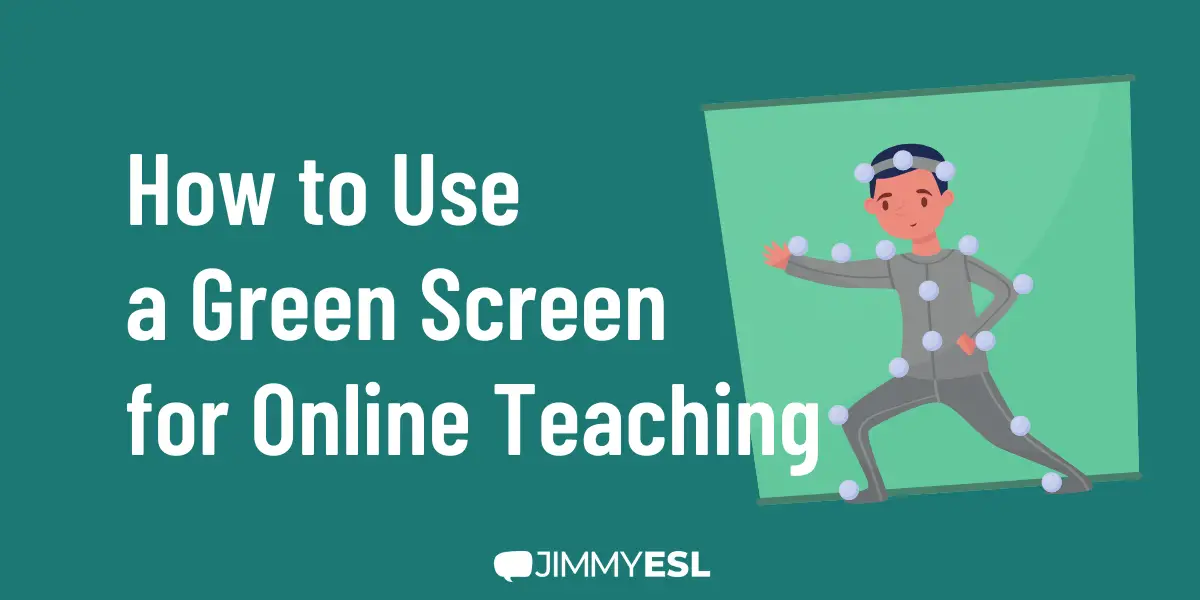
  • How to Use a Green Screen for Online Teaching (Classroom Background)

    How to Use a Green Screen for Online Teaching (Classroom Background)

    Green screening was one of the movie industry’s best kept secrets for years. With current technology, anyone can easily set up a green screen and take advantage of the benefits of using them in the online classroom. 

    There are so many ways you can use a green screen to take your lessons to the next level.

    In this extensive post, we talk about everything you need to know for using a green screen for online teaching: how it works, the equipment and software you need, and tips for setting up your teaching environment.

    And an add-on, we’ve compiled some nice classroom background you can download and use for free.

    How to Use a Green Screen for Online Teaching

    What is a Green Screen?

    A green screen is a backdrop made up of a single color (usually green, but sometimes blue). It is usually made of fabric, such as muslin cloth. You can also make it from cardboard, canvas, and even use a green painted wall.

    The green screen is used together with a technique called chroma-keying. We don’t go into the technical details here; instead, we’ll give you this to-the-point explanation from MentalFloss author Nick Keppler:

    Chroma-keying is the process of isolating a single color or brightness value in an electronic image and then making that value transparent in post-production, allowing another image or footage to be placed “beneath” the color that’s been blanked out.

    Although green is used so often that “green screen” and “chroma key” have become almost interchangeable, any color will work. Green is the go-to because it doesn’t match any natural skin tone or hair color, meaning no part of an actor will be edited out through chroma key.

    Green screens are used in a variety of photo and video shooting scenarios; one of the more well-known uses of the green screen is the weather report on television.

    The example below shows how chroma-keying with a green screen works. The green color behind the person is isolated, then replaced with another image layer:
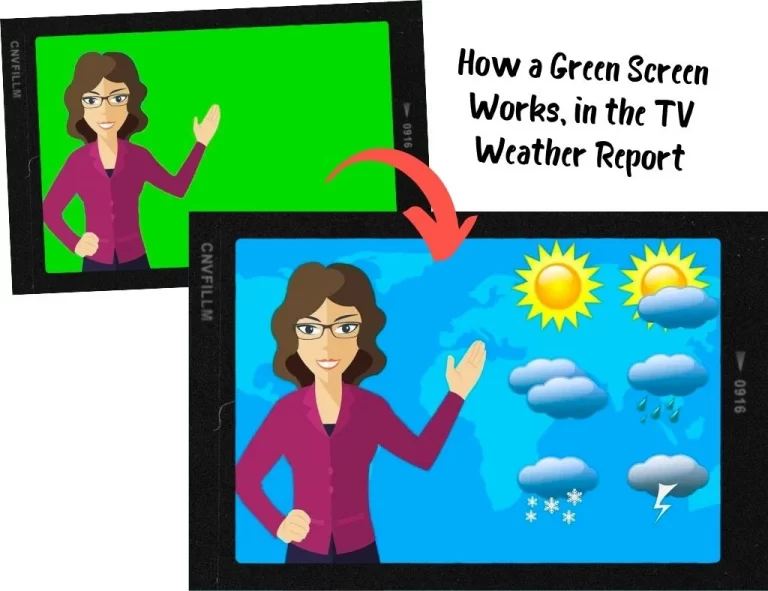
    How a Green Screen Works, in the TV Weather Report

    Why Should You Use a Green Screen in Your Online Classroom?

    Obviously, using different backgrounds during an online lesson will help you to deliver more effective and fun lessons, and compensate for the disadvantages of not being physically in the same room:

    • You can use backgrounds related to the lesson topic to create an immersive learning environment.
    • Instead of using props, you can show specific objects or situations in the background to explain concepts, elicit discussion and check comprehension; for topics such as geography, landmarks, landscapes, nature, food, and more.
    • You can make your lessons easier to follow and show videos, presentations, or exercises, while your students can still see you on the screen.

    Besides, using a green screen has some practical, not-so-obvious advantages:

    • Your students can’t see your furniture, clothes, or personal items (or mess) in your home.
    • Your family members or roommates can walk around the home without having to duck and crawl behind you while you teach online
    • You can work from almost any location without your students knowing where you are.
    • You can change up your virtual background without redecorating your actual work space.

    Overall, a green screen will let you look more professional, create better results, help you get better ratings and thus, earn more classes.

    In this article, you will find 18 best practices to increase bookings for your online lessons.

    What Equipment Do You Need to Use a Green Screen?

    Although a green screen setting is neither complicated nor expensive, you’ll need to invest in some equipment:

    A Computer with Fast CPU and Sufficient RAM

    It’s important to realize that software to use for chroma-keying your green screen background during a live online ESL lesson can be incredibly demanding on your computer’s processor and memory. You need to make sure you have a capable computer to handle the chroma-keying processes.

    Our recommendation is to have a computer with at least the previous-to-current generation Intel i5 CPU running at 3GHz with no less than 4 cores, and at least 8 GB of RAM.

    Important: With tablet computers and smartphones, you won’t be able to use a green screen.

    Check out our recommended computers for online ESL teachers, all of which have the specs to perform well when using a green screen while teaching online.

    The Green Screen

    Green screens range from very cheap, to costly. You don’t need an expensive pro-grade kit. Indeed, many online ESL teachers make do with fabric they buy from the local fabric store. You can mount them on a stand or frame, or hang them on the wall or the ceiling.

    Buy a green screen large enough to cover the area behind you adequately: It should be both wide and high enough to cover the entire area picked up by your webcam. Dimension requirements will vary for each person based on their height, work area, and whether you stand or sit while you teach online.

    Here are a couple of affordable, recommended options available on Amazon:

    Green Screen Studio Kits

    The majority of online ESL teachers will be working from home. For those who have a spare room or home office where they set up their online classrooms, green screen kits are a quick, all-in-one solution.

    JEBUTU Green Screen Backdrop Stand Kit, 5 x 6.5 feet (ca. 1.5 x 2 m)

    Portable Green Screen Stand (durable steel), washable polyester fiber screen, with carrying bag and five spring clamps

    [amazon-button link=”https://www.amazon.com/dp/B0923LJ3YL?th=1&linkCode=ll1&tag=jimmyeslus1-20&linkId=7b871065d018d7ff260a67c29990bf94&language=en_US&ref_=as_li_ss_tl”]

    Neewer Photography Backdrop Studio Lighting Kit 6 x 9 feet (ca. 1.8 x 2.7 m)

    KIT INCLUDES: Background Support System, 2x 45 W Daylight Lamps with umbrellas and stand, green muslin backdrop with clamps, 2x carry bags

    [amazon-button link=”https://www.amazon.com/dp/B07TWRNMCJ?th=1&psc=1&linkCode=ll1&tag=jimmyeslus1-20&linkId=f5342e186e7ff86272f66b7403c006ca&language=en_US&ref_=as_li_ss_tl”]

    Although the studio kits portable, they’re not really convenient when you change your teaching location frequently.

    Collapsible Backdrops for Ultra-Fast Setup

    If you teach online in your home with limited space, then your best option is to get a collapsible green screen backdrop. They can be quickly opened and closed, don’t require assembling or fudging around with separate stands, and can be stored away in a closet or in the basement when you’re not using it.

    Elgato Green Screen – Collapsible Chroma Key Backdrop, 58.3 x 70.9 inches (ca. 1.50 x 1.80 m)

    Wrinkle-Resistant Fabric and Ultra-Quick Setup

    [amazon-button link=”https://www.amazon.com/dp/B0743Z892W?th=1&linkCode=ll1&tag=jimmyeslus1-20&linkId=837293c290bc88168a3046074a9b2442&language=en_US&ref_=as_li_ss_tl”]

    Paste the Amazon image code here

    ShowMaven Green Screen Collapsible Chromakey Panel, 58.3 x 80.7 inches (ca. 1.5 x 2 m)

    Auto-Locking Frame, Chroma Key Screen with Wrinkle-Resistant Fabric, Aluminum Hard Case

    [amazon-button link=”paste the Amazon link here”]

    Portable Backdrops

    Portable green screen backdrops are different from collapsible green screen backdrops in that they can fit in a suitcase, making them the ideal option for online ESL teachers on the road. You can hang them on a stand or wall behind you, or mount them on the back of your chair.

    One major downside of portable green screens is that due to their compact size, you have to position them more precisely to fully cover your background. If you like to teach while standing, or even move around a bit, then this type of green screen backdrop is probably not the right item for you.

    Neewer Chromakey Backdrops, Double-Sided Green and Blue Screen, 5 x 6.6 inches (ca. 1.5 x 2 m)

    Write a one-line descripDurable steel frame sewn into the fabric. The steel spring frame pops open the backdrop in seconds and helps maintain its shapetion here

    [amazon-button link=”https://www.amazon.com/dp/B00E89Q5OY?th=1&psc=1&linkCode=ll1&tag=jimmyeslus1-20&linkId=ca13e0c45b8f8cc6af539a651038aaa0&language=en_US&ref_=as_li_ss_tl”]

    TARION Collapsible Webcam Background for Chair Back, diameter 55.9 inches (ca. 1.42 m)

    Fits most chairs well and just takes seconds to open up the background and attach to your chair with the belts.

    [amazon-button link=”https://www.amazon.com/dp/B095WQ6PTS?th=1&linkCode=ll1&tag=jimmyeslus1-20&linkId=4dc7a285352eb71880cc2133d44630f8&language=en_US&ref_=as_li_ss_tl”]

    Green Screen Wall Paint

    Though not for everyone, some online ESL teachers prefer not to mess about with positioning the green screen backdrop. If you have enough space and a wall you can paint, green screen paint is an excellent option. Even if you would rather not paint your wall green, you can get a wooden board, drywall or a thick sheet of cardboard to paint over.

    The great thing about green screen paint is that you don’t have to worry about creases and folds, kicking or tripping over the green screen stand, or messing about positioning it. You just paint the wall, or lean the board against the wall, and you’re good to go.

    Of course, painting a color across a wall or board means you will need to know how to paint, and to make sure the paint is consistently applied. You may also need to apply a few coats to the wall or board.

    ChromaKey Green Paint 1 gallon (3.79 l) Green Screen Equivalent

    Water-Based Latex Paint with Low reflectivity, Made in the USA, Dries in 60 mins

    [amazon-button link=”https://www.amazon.com/dp/B07TV1ZFT4?th=1&psc=1&linkCode=ll1&tag=jimmyeslus1-20&linkId=71f6cda4099db685b32564341753e344&language=en_US&ref_=as_li_ss_tl”]

    Lighting

    Many people who use green screens will tell you that your lighting setup is more important than the green screen. When using a green screen for online teaching, lights serve two purposes: Illuminating the teacher and the green screen.

    As you will discover when you set up your green screen in your work space, these two aspects will often conflict with each other.

    You might find that your face and body in the webcam view are well-lit, but there is some fuzziness around your head. On the other hand, you might find that your face and body in the webcam view are well-lit with no fuzziness around your head, but there is some fuzziness around the ends of the green screen.

    This fuzziness (often referred to as bleeding) is usually due to too much light on the green screen, causing the color to spill.

    Both the amount of lighting as well as the color tones you use will play a role in striking the right balance. Different chroma-keying apps also handle the chroma-keying process differently. Ultimately, you will need to play around with your lighting setup until you get it just right.

    Check out our recommended LED lights for online teaching to see which lighting options are best for your work space and green screen setup.

    Chroma-Key Software

    You will need an app that will chroma-key your green screen background. There are several free and paid apps available to accomplish this. What app you use will depend on your computer OS, as well as your specific needs. Some go beyond chroma-keying capabilities, like ManyCam Studio, which has an extensive set of features that enable you to show clip art, YouTube videos, add lower third text on your screen, wear a virtual mask, and much more.

    The popular videoconferencing app Zoom, includes a virtual background feature that lets you skin your background with an image or video using a green screen, and if your computer’s CPU is powerful enough, you can skin it without a green screen. Zoom is an excellent app, but it’s only useful you’re using Zoom specifically for online teaching. If you use another platform, or if the online ESL company you work with has its own proprietary platform, you will need to use an app like ManyCam Studio, which creates a virtual webcam device on your computer that you can use with a green screen and more. Some teachers even use ManyCam and Zoom to access the additional features ManyCam offers while using Zoom.

    Here is a list of apps that let you take advantage of your green screen:

    ManyCam 

    Price: starting from $39 per year or $79 lifetime for one device

    Available for Windows and macOS

    ManyCam Studio is designed to give you a suite of screen effects while live-streaming. Although ManyCam has a free version, to unlock the chroma-key feature, you will need to purchase the paid version. ManyCam has an impressive feature set that can transform how you teach online and interact with your students.

    Open Broadcaster Software

    Price: free

    Available for Windows, macOS and Linux

    OBS is a free, open-source software you can use to record and live stream your screen with a green screen background. Besides being free, OBS packs some really cool features, such as being able to set up multiple scenes, which means you can display images, videos, text, browser windows, and more, alongside yourself via your webcam.

    Free is hard to beat, but you’ll need to rely on the community and a public knowledge base to get support if you need help. It’s recommended for more advanced users.

    Video Meeting Software

    Nowadays, most software for video conferencing has already built-in background-removal functions. They work even without a green screen – of course, with one, they produce much better results.

    These software programs include the most popular ones:

    You can use all the video meeting solutions for free; however, for regular teaching, we recommend using the paid versions which offer more functionality and stable connection. Prices range from $10 to $20 per month.

    Here’s how easily it works in Google Meet:

    1. In a meeting, click on the menu item with the three dots in the bottom bar, then choose “Apply visual effects“ from the pop-up menu.
    2. In the sidebar opening on the right, simply choose one of the default backgrounds images, or upload an image.
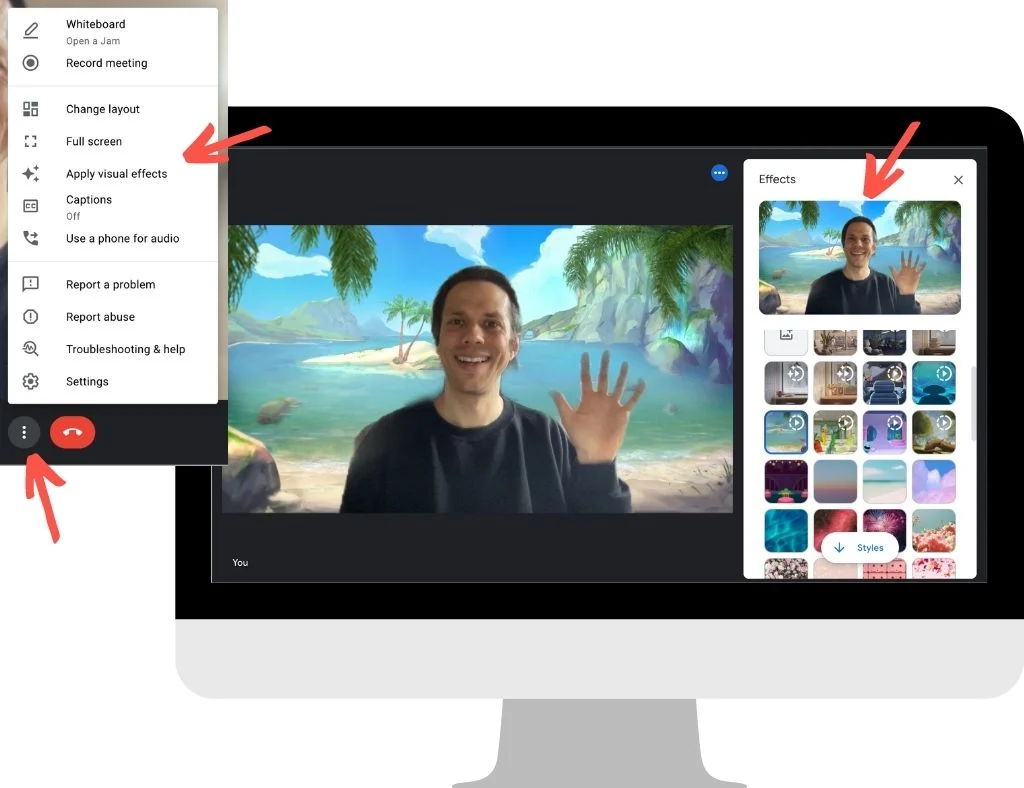
    Background effects you can use in Google Meet
    Use background images and effects in Google Meet

    Google even offers animated backgrounds with birds flying around or with different weather outside – which looks simply wow!

    You see the effect isn’t perfect in my example; I made the screenshot without using a green screen and proper lighting. (Still impressive how good it works nevertheless!)

    In MS Teams or Zoom, you’ll find the background-removal functions analogously in the settings; it’s not complicated.

    However, these video meeting tools don’t offer advanced configuration settings, so the results may not be as perfect as you expect. And you can’t use them when you need to teach with another software or with a teaching platform of your teaching company.

    That’s why buying a software like ManyCam seems like a good investment; you won’t get broke from a $79 one-time fee. You can use it with any video conferencing tool or teaching platform, and tailor it exactly to your needs.

    Setting Up Your Green Screen for Online Classes

    Video Tutorial

    In this short video, online ESL teacher Michael Wasserstein guides you through the important aspects of setting up a green screen for your online classroom.

    Install and Run Your Chroma-Key App

    The first step we recommend you take is to install and run your chroma-key app. Get familiar with the features of the app, so you can set up your green screen and lighting according to the functionality and recommended settings of the app.

    Set Up Your Green Screen

    Measure the area behind you that your webcam captures. An easy way to determine the green screen size you need is to use a spare bedsheet in place of the green screen. Use some measuring tape to measure the dimensions of the bedsheet that come into the webcam view so that you can figure out the length and width of green screen fabric you will need to buy.

    You might need some help from a family member or friend to hold the bedsheet while you measure the area. A 6 x 9 feet (ca. 1.8 x 2.7 m) muslin cloth green screen should be sufficient for most online ESL teachers.

    You also need to decide if you will be attaching or hanging the green screen to the wall, or using a frame to hold your green screen in place. We recommend using a frame, as this will make it easier to move around the green screen as needed, and won’t damage your wall.

    After you have purchased your green screen, make sure it is free of creases or wrinkles by ironing them out with an iron on low temperature. Once you’ve done that, you can attach it to the frame.

    Some green screens are set in a retractable frame, and if you are using one of these, then you can simply pull it open and lock into place.

    Make sure your green screen is correctly positioned to fill up the area behind where you will be sitting or standing while teaching online. You will need to do this with your chroma-key app open on your computer so that you can view the area your webcam displays.

    Set Up Lighting and Adjust Brightness and Positioning

    Now that you have your green screen in place, you need to determine how bright your online teaching workspace is, and how many lights you need. If possible, choose LED lights with different color temperature settings, so you can increase or decrease brightness in different spots of your work space.

    You will need to position and adjust your lighting with you standing or sitting in front of your computer with the chroma-key app open to preview yourself and your webcam.

    You’re not done with lighting just yet. Next, we need to find and insert an image layer to replace the green screen behind you to test your green screen and lighting set up with your app.

    Choosing an Image to Chroma-key

    Although you can use any image to replace the green color in your green screen, we want to start with the most basic image that will enable us to test and tweak our green screen and lighting set up. For this, we can use a plain white image because a white image is void of any color, and will reveal any issues with light spill/bleeding.

    Let’s see how to do this using ManyCam:
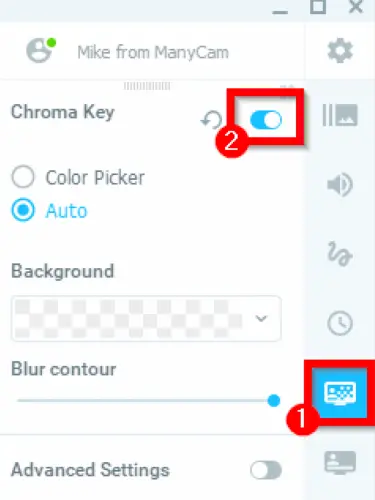
    Screenshot: MannyCam software

    Looking for a plain white image to insert into your chroma-key app? We’ve got you covered. Click this link to download a plain white image.

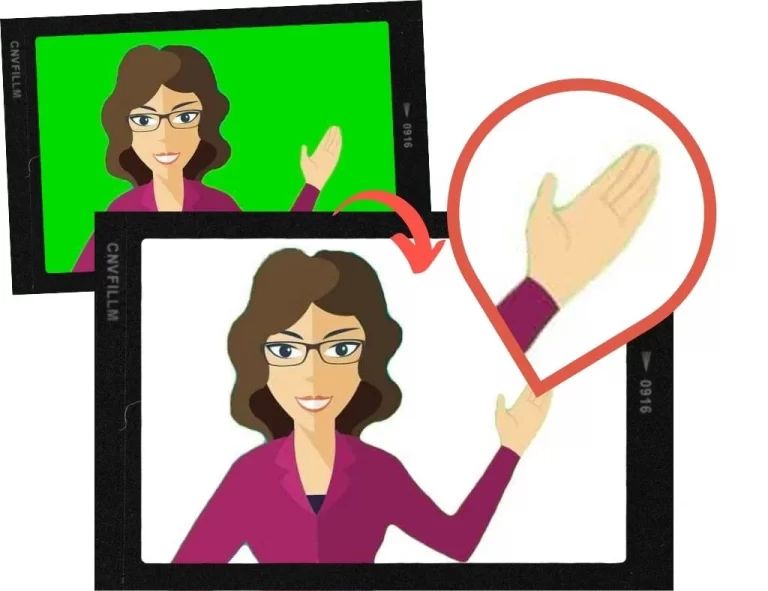
    If you see any fuzziness or bleeding around your head or on the green screen itself, you will need to check for and iron out any creases or wrinkles in your green screen, and reposition your lighting. Using the white background will also help you figure out if you need to get add lights to your setup.

    This image illustrates how the white background will replace the green screen. Notice the slight green spill around the hair, body, and hands:

    Note: If you have long hair, we recommend tying it back to reduce the green spill around your head.
    Now, you are ready to use your teaching studio. Everything you need to do now is finding great images or other media to use to “decorate” your classroom background.

    Classroom Backgrounds: Find Media to Use with Your Green Screen

    As an online ESL teacher, you will constantly be on the hunt for media to use in your online classroom. A few excellent sites where royalty-free images can be found for free are:

    These sites have a broad range of photos, illustrations, vectors, and videos to choose from, so you should have little difficulty spicing up your green screen images.

    If you need some inspiration, look at these 10 great classroom images from Pexels we’ve selected for you as a starter:


    Primary school classroom: Download

    Classroom: Download
    World map on blackboard: Download
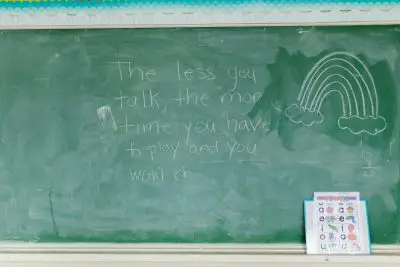
    Blackboard with writing: Download
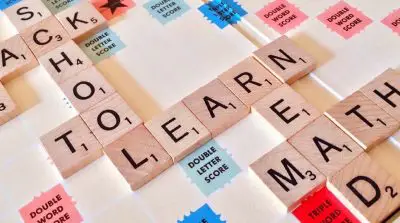
    Scrabble words: Download

    Numbers: Download
    Colored pencils: Download
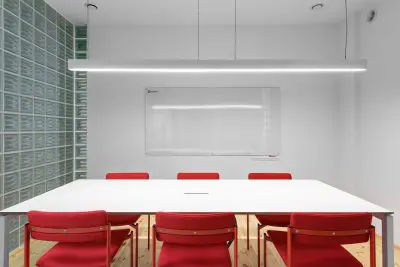
    Meeting room: Download
    Nice apartment: Download
    Sitting in the garden: Download

    Wrapping Up: Start Green Teaching

    Now that you have a good idea how to use a green screen in an online classroom, get started! It’s really not as difficult as you think, it’s very affordable, and the difference using a green screen will make to your online lessons will be dramatic.

    It might take you a bit of time to adjust your green screen and lighting to get the ideal setup. It will take you a couple of days to get comfortable using the chroma-key software. But within a month (or less), you will find green screening a cinch, and you’ll begin to wonder how you ever taught online lessons without one.
  • The Best ESL Teaching Props: For Online Teaching & Classroom

    The Best ESL Teaching Props: For Online Teaching & Classroom

    Repeat after me: “You can’t use props too much in the classroom.“

    Do you agree?

    Props – or visual teaching aids – make the learning process fun and effective for the students as well as the teacher. That’s why successful ESL teachers build their stock of props over time and use them in every lesson.

    If you are looking for inspiration, what to try out next, here is our list of the best ESL teaching props, together with tips on how and when to use them.

    The Best Teaching Props: Classroom & Online

    Why Using Props in the ESL Classroom is Important

    When young learners begin acquiring their first language, they are essentially like sponges, absorbing everything they see, hear, smell, touch, and taste.

    Toys, books, games, and activities can help to make the experience more fun, particularly if they are used in a manner that enables young learners to be physically involved in the learning process. Of course, there’s also the show and tell aspect of using these child-centered resources as part of the learning experience.

    For ESL students, especially young learners, acquiring a non-native language poses different challenges. As an ESL teacher, you will likely be using props and other teaching aids, not only to make the learning experience more fun and engaging, but also to elicit responses from students to develop their English fluency.

    For online teaching, props can even more help to focus the student’s attention. In an online lesson, you have less control of the learning environment and potential distractions.

    But you can make use of the fact that the students are used to watching videos or playing online games at home with lots of action happening on the screen. With many props (and high teacher activity), you can deliver an experience close to watching a cartoon movie and draw full attention.

    Read 8 more tips on teaching English to little children.

    What Makes a Prop Good for ESL Instruction?

    In truth, anything can be used as a prop for teaching any subject, if it is used purposefully. As ESL teachers – whether in the classroom or online – we want to get down to business quickly using ready-to-go teaching props and aids.

    We teach many students and classes throughout the day, so having a core set of props and aids can be a major time and lifesaver.

    Good props for teaching ESL are those which can be used across a broad spectrum of classes, students, and contexts. There simply isn’t enough room to fill your home or office with props for every single context.

    That’s why you want to build up an inventory of props that can cover a wide range of ESL age groups, topics, themes, and proficiency levels.

    A prop is evidently a meaningful prop, when you can you it to:

    • develop vocabulary
    • practice spelling
    • learn phonics and improve pronunciation
    • practice describing items
    • compare and contrast
    • explain cause and effect
    • role-play
    • learn and sing songs

    That said, not all props need to be multi-textual to serve a purpose. Very young learners may be more challenging to keep on point, as they have short attention spans. For these situations, noisemakers and clappers will come in handy.

    So, let’s get you set up with the right props for ESL teachers and how you can use them in the classroom.

    Recommended Props for ESL Teachers

    Let’s look into various categories of teaching props, most of them suitable for in-classroom teaching and online teaching as well.

    Hand and Finger Puppets

    Hand or finger puppets make excellent props for ESL classroom instruction. Use them to captivate your students through conversation, role-play, and other forms of engagement.

    Because they slip onto your hand or fingers, puppets can magically transform into make-believe characters your students will connect with and grow to love.

    In this video, Karen Frazier, co-author of the Let’s Go series, gives us an excellent model of how to use puppets in the ESL classroom to introduce conversation:

    As you can see, puppets are great props for ESL instruction. For young ESL learners, you can breathe some life into your puppets – and your lesson – and completely transform the learning experience for your students.

    Buy hand and finger puppets on Amazon:

    Melissa & Doug Hand Puppets: Safari Buddies

    Set of 6: Elephant, Tiger, Parrot, Giraffe, Monkey, ZebraStuffed Animals

    [amazon-button link=”https://www.amazon.com/dp/B07J6TJR2G?th=1&psc=1&linkCode=ll1&tag=jimmyeslus1-20&linkId=f8a39058e1a43c659efc75cecc205e89&language=en_US&ref_=as_li_ss_tl”]

    Melissa & Doug Animal Hand Puppets: Zoo & Farm Friends

    Set of 2, 4 animals in each: Zoo and farm animals

    [amazon-button link=”https://www.amazon.com/dp/B01CQTWNN4?th=1&psc=1&linkCode=ll1&tag=jimmyeslus1-20&linkId=90a7cb8d3909990133b21e612be2b86c&language=en_US&ref_=as_li_ss_tl”]

    Hand Puppet Set – 6 Family Members

    9” Inch Soft Plush Hand Puppets: Mother, Father, Son, Daughter and Grandparents

    [amazon-button link=”https://www.amazon.com/Hand-Puppet-Set-Storytelling-Preschool/dp/B073YKD6T8?keywords=finger+puppets&qid=1638198181&s=toys-and-games&sr=1-31-spons&psc=1&spLa=ZW5jcnlwdGVkUXVhbGlmaWVyPUEyT1hJRllJS1pENVg0JmVuY3J5cHRlZElkPUEwNTc3NjM2MVJGQzQxQjlSNUxMUyZlbmNyeXB0ZWRBZElkPUEwNjM1NzA2MTE3MEU5V0g4UFJPUyZ3aWRnZXROYW1lPXNwX2J0ZiZhY3Rpb249Y2xpY2tSZWRpcmVjdCZkb05vdExvZ0NsaWNrPXRydWU%3D&linkCode=ll1&tag=jimmyeslus1-20&linkId=066a03fd35685d1eb5024f2d5b2eccf1&language=en_US&ref_=as_li_ss_tl”]

    32 Pieces Finger Puppets: Zoo Theme

    32 pieces of zoo animal finger puppets in different styles, 2.76 inches (ca. 7 cm) in height

    [amazon-button link=”https://www.amazon.com/Puppets-Toddlers-Cartoon-Children-Stuffed/dp/B09JSJFNT4?keywords=finger+puppets&qid=1638198181&qsid=146-9466911-0352763&s=toys-and-games&sr=1-17&sres=B08KWP2BX2%2CB00VU5R8JA%2CB06XRK92KC%2CB075FRT75T%2CB08KWMLD3L%2CB08KWNN4NH%2CB07Q69S2DQ%2CB018SWAAOW%2CB08KWLG3ZZ%2CB09DVFYR7S%2CB09JSJFNT4%2CB08PV59Z22%2CB08KWLRC3V%2CB08PB33SK8%2CB01KNDFD78%2CB07PPC48FV%2CB08Z3RHWMS%2CB086XGYNP5%2CB08H843Z18%2CB09CKNXQ59&srpt=PUPPET&linkCode=ll1&tag=jimmyeslus1-20&linkId=cb06e5a72039fe4408295653586bf565&language=en_US&ref_=as_li_ss_tl”]

    Stuffed Animals

    Stuffed animals are a favorite with young ESL learners, and like puppets, they can be used in various learning contexts. Indeed, you can use puppets and stuffed toys interchangeably.

    The main difference between them is that stuffed toys are a little more challenging to bring to life, as you can’t move their parts with your hand like you would with a puppet. Still, there are many types of stuffed toys, that you’re more than likely to find a specific toy you’re looking for.

    You can set them on a table or shelf, or hold them in your hands while teaching. Most of all, stuffed animals are soft, cute, and cuddly, and kids love them.

    Use stuffed toys during warm-up activities, storytelling, or even creating an imaginary zoo, farm, or aquarium.

    Buy stuffed animals on Amazon:

    Stuffed Animals Bundle of Forest Animal Toys

    7 inches (ca. 18 cm); Lion/Elephant/Zebra/Giraffe/Tiger/Leopard

    [amazon-button link=”https://www.amazon.com/My-OLi-Stuffed-Animals-Elephant/dp/B088WGHXLV?keywords=stuffed+animal&qid=1638198933&s=toys-and-games&sr=1-13-spons&psc=1&spLa=ZW5jcnlwdGVkUXVhbGlmaWVyPUEzQzJGNUxDVzA3Ulg2JmVuY3J5cHRlZElkPUEwMjA3Njg4Tk0yMERDM0Q1S1dBJmVuY3J5cHRlZEFkSWQ9QTAyMjU2ODIxOUdXQkJaSDFLMzdQJndpZGdldE5hbWU9c3BfbXRmJmFjdGlvbj1jbGlja1JlZGlyZWN0JmRvTm90TG9nQ2xpY2s9dHJ1ZQ%3D%3D&linkCode=ll1&tag=jimmyeslus1-20&linkId=5f12314b113a9e8caabd977a53244ae6&language=en_US&ref_=as_li_ss_tl”]

    Pink Rainbow Unicorn Stuffed Animal

    8 inches (ca. 20 cm)

    [amazon-button link=”https://www.amazon.com/Stuffed-Unicorn-Plush-Unicornio-Birthday/dp/B08NTBPHZ6?keywords=unicorn+stuffed+animal&qid=1638198756&qsid=146-9466911-0352763&s=toys-and-games&sr=1-18&sres=B088DFWWTZ%2CB08YP73M1B%2CB089F7YR1T%2CB07J6B7BZ4%2CB01BVTKFOO%2CB01MUANJGE%2CB07595QXGP%2CB08C21LJBF%2CB078SW1HFS%2CB08Y1L5H7F%2CB07SG779SB%2CB08NTBPHZ6%2CB095KCMF79%2CB076FB1679%2CB08RHH1LGX%2CB012507Q8Q%2CB08PNXLSBJ%2CB0921WC73M%2CB07M5CB2FQ%2CB07465WWNX&srpt=TOY_FIGURE&linkCode=ll1&tag=jimmyeslus1-20&linkId=bff50b222a50d467e0437c56654a5a9a&language=en_US&ref_=as_li_ss_tl”]

    DOLDOA 5 Packs Soft Stuffed Animals Plush

    Cute Teddy Bear/Monkey/Panda/Rabbit; 12.5 inches (ca. 32 cm)

    [amazon-button link=”https://www.amazon.com/dp/B082NYBBLP?_encoding=UTF8&aaxitk=b1acd80216f4c2b4f36540d6bc8a5945&hsa_cr_id=8394661820601&pd_rd_plhdr=t&pd_rd_r=1cf76db0-dbad-4ce2-a109-bfe1bc44387b&pd_rd_w=TSAux&pd_rd_wg=o4ZMx&linkCode=ll1&tag=jimmyeslus1-20&linkId=06532f6a1a0dda1b8c7e5b47342ee3c5&language=en_US&ref_=as_li_ss_tl”]

    T-Rex Dinosaur Stuffed Animal, Filled with 5 Cute Little Baby Dinosaur Hatchlings Inside

    15 inches (ca. 38 cm); with 5 Cute Little Baby Dinosaur Hatchlings Inside its Zippered Tummy

    [amazon-button link=”https://www.amazon.com/Prextex-Dinosaur-Carrier-Hatchlings-Zippered/dp/B081263TJM?keywords=stuffed+animal+dinosaur&qid=1638198950&qsid=146-9466911-0352763&s=toys-and-games&sr=1-5&sres=B08WTCT7SM%2CB081263TJM%2CB08WTJSNVH%2CB073ZLVWW5%2CB08SWNJ35M%2CB01M0GX0M3%2CB07GBKD38R%2CB097R757YJ%2CB077PR8DX6%2CB07BMJ2BSP%2CB08S9GTRRY%2CB08C7BNF5V%2CB095NR94Y5%2CB08J87LJG3%2CB08Y8CNW9V%2CB07N369ZCR%2CB093GFT24P%2CB00021HB9K%2CB08N679FGC%2CB08GSS945H&srpt=TOY_FIGURE&linkCode=ll1&tag=jimmyeslus1-20&linkId=cc779930574f9fabfa86288c37dccb2a&language=en_US&ref_=as_li_ss_tl”]

    Or just search for “stuffed animals“ on Amazon and look for other options.

    Play Food

    Food is a popular topic with ESL students, and play food is a great way to get students talking about food.

    Use play food to describe food groups, colors, shapes, and tastes. You can also use play food to talk about more complex topics like healthy vs unhealthy food, popular food around the world, or meals of the day.

    So, go ahead and use play food to engage your students in fun, interactive activities. Make a picnic. Have lunch. Cook dinner. Order a meal. Dig in!

    You can find lots of play food on Amazon:

    axoJoy 122-Piece Deluxe Pretend Play Food Set

    BPA-free plastic; bold colors, realistic design

    [amazon-button link=”https://www.amazon.com/dp/B073SDKTL5?th=1&psc=1&linkCode=ll1&tag=jimmyeslus1-20&linkId=fab0bda18d497314e1cb3cf3b0fd77f0&language=en_US&ref_=as_li_ss_tl”]

    70 PCS Cutting Play Food Toy

    Including a toy grocery basket, 2 cutting boards, 2 kitchen knives, and 4 dinner plates. Foods are put together with Velcro and can be repeatedly “cut and sliced“

    [amazon-button link=”“]

    Melissa & Doug Wooden Snacks and Sweets Food Cart

    40+ Play Food pcs; durable, wooden construction

    [amazon-button link=”https://www.amazon.com/dp/B00P4CF59U?th=1&linkCode=ll1&tag=jimmyeslus1-20&linkId=8e5c3dd90885996f4e7166e4a36e2855&language=en_US&ref_=as_li_ss_tl”]

    Balls

    Which child doesn’t love to hit, kick, throw, or catch a ball? We can’t think of one.

    If you’ve never used balls for props in the ESL classroom, you’ll soon realize how much fun they can inject. Use a ball to assign student turns during any activity. There are no limits to the kind of activities you can do in the ESL classroom with a ball.

    Here’s an example of Jenny White using a ball to effectively engage her students in a vocabulary game:

    What’s remarkable about using a ball while teaching is that you can get your students on their feet and physically active during the activity. And if you’re already rethinking how students move in your classroom, it’s worth considering how the layout itself affects participation — here’s how seating arrangement shapes ESL learning.That not only improves their concentration and participation, but also adds elements of competitiveness, teamwork, and coordination between thoughts and actions.

    If you teach ESL online, you can use a ball for talking about sports, colors, and shapes.

    Your ESL students will have a ball learning English – seriously!

    Needless to say, you can find many balls on Amazon:

    beetoy Inflatable Sport Toddler Balls Set

    6 balls: Football, Basketball, Volleyball, Baseball, Rugby, Spike ball; includes bag and pump

    [amazon-button link=”https://www.amazon.com/dp/B08NSQWP27?th=1&psc=1&linkCode=ll1&tag=jimmyeslus1-20&linkId=cd0269aa3c7c0b844f8ade056abc5010&language=en_US&ref_=as_li_ss_tl”]

    Toysmith Get Outside GO! Pro-Ball Set

    Pack of 3 (5-inch soccer ball,6.5-inch football and 5-inch basketball)

    [amazon-button link=”https://www.amazon.com/dp/B000PXP3DQ?th=1&linkCode=ll1&tag=jimmyeslus1-20&linkId=ded9716cd2bd93bcffa84b1b2d1af6fe&language=en_US&ref_=as_li_ss_tl”]

    KLT Sensory Stress Ball Set

    12 Pack Stress Relief Fidget Balls/Squishy Balls, 2.5 inches (6.35 cm)

    [amazon-button link=”https://www.amazon.com/KLT-Sensory-Autistic-Children-Stretchy/dp/B08HN1QPW1?keywords=balls&qid=1638200246&s=toys-and-games&sr=1-42&linkCode=ll1&tag=jimmyeslus1-20&linkId=cdd91eb590202257be12bfabfdaf71db&language=en_US&ref_=as_li_ss_tl”]

    Flash Cards

    Every ESL teacher should be equipped with flash cards for all occasions. Whether teaching in the classroom or online, flash cards are nifty because you can use them in so many contexts to enhance the learning experience.

    Use them for activities and games, drilling vocabulary, pronunciation, conversation, and role-plays. Though most stock flash cards are geared towards young learners, you’ll find a wide variety of flash cards that cover more complex concepts such as nouns and prepositions, and themes such as emotions.

    Flash cards are also easy to pack and carry, they make an excellent teaching aid for traveling ESL teachers. So, if you’re planning a family vacation but plan to teach ESL online during your travels, flash cards will fit neatly into your suitcase.

    Here are some ideas for using flash cards for teaching primary children, by Carol Read of Macmillan Spain:

    These flashcards are available on Amazon:

    Star Right Numbers & Sight Words Flash Cards Set of 4

    144 Sight Words Flash Cards: Numbers, First Words, Colors, Shapes, and Alphabet; with binder rings

    [amazon-button link=”https://www.amazon.com/dp/B073GBDFWN?th=1&psc=1&linkCode=ll1&tag=jimmyeslus1-20&linkId=db6b872eafda21eb0e8817a986fa6478&language=en_US&ref_=as_li_ss_tl”]

    GAMENOTE Dry Erase Alphabet and Number Flash Cards

    Write and Wipe Laminated ABC Letter Tracing Practice Card for Kindergarten (47 Flashcards with 2 Rings and Marker)

    [amazon-button link=”https://www.amazon.com/dp/B08LCZ4THX?psc=1&pd_rd_i=B08LCZ4THX&pd_rd_w=f42XC&pf_rd_p=54ed5474-54a8-4c7f-a88a-45f748d18166&pd_rd_wg=0meHE&pf_rd_r=RT4GE5JSX25DFVEE2H5Q&pd_rd_r=d0dab414-e1ac-4cbe-a54d-4220d5552fe6&spLa=ZW5jcnlwdGVkUXVhbGlmaWVyPUFRMDkySzRGSlMxUk8mZW5jcnlwdGVkSWQ9QTA5MzA4NzgzRFY2WDRSSVNVS1BMJmVuY3J5cHRlZEFkSWQ9QTA0NzAxNTNLQjRFSTZKTTdTSVkmd2lkZ2V0TmFtZT1zcF9kZXRhaWxfdGhlbWF0aWMmYWN0aW9uPWNsaWNrUmVkaXJlY3QmZG9Ob3RMb2dDbGljaz10cnVl&linkCode=ll1&tag=jimmyeslus1-20&linkId=fb5b543be27ec1c21e6d7f963c295355&language=en_US&ref_=as_li_ss_tl”]

    Teacher Rachel’s Educational Flash Cards for Toddlers – Set Of 5

    182 Cards Pre K-K Mega Flashcards Set with First Words, Alphabet, Colors, Shapes, Numbers, Manners, Greetings, Feelings, and Weather

    [amazon-button link=”https://www.amazon.com/dp/B08WJ1XP2L?psc=1&pd_rd_i=B08WJ1XP2L&pd_rd_w=f42XC&pf_rd_p=54ed5474-54a8-4c7f-a88a-45f748d18166&pd_rd_wg=0meHE&pf_rd_r=RT4GE5JSX25DFVEE2H5Q&pd_rd_r=d0dab414-e1ac-4cbe-a54d-4220d5552fe6&spLa=ZW5jcnlwdGVkUXVhbGlmaWVyPUFRMDkySzRGSlMxUk8mZW5jcnlwdGVkSWQ9QTA5MzA4NzgzRFY2WDRSSVNVS1BMJmVuY3J5cHRlZEFkSWQ9QTA2NzYxMTcyUElMOFZJMENTSUxTJndpZGdldE5hbWU9c3BfZGV0YWlsX3RoZW1hdGljJmFjdGlvbj1jbGlja1JlZGlyZWN0JmRvTm90TG9nQ2xpY2s9dHJ1ZQ%3D%3D&linkCode=ll1&tag=jimmyeslus1-20&linkId=522fe985181720989cd8c4e941d3e120&language=en_US&ref_=as_li_ss_tl”]

    Dry-Erase Boards

    There isn’t much we could say about dry-erase boards that ESL teachers don’t already know. Dry-erase boards are an English teacher’s biggest asset in the classroom.

    But what many ESL teachers may not realize is that smaller dry-erase boards (primarily designed for children) are compact enough to hold in your hands. This makes them useful teaching aids for demonstrating grammar, vocabulary, assessments, or keeping scores during a class activity.

    Get a magnetic dry-erase board and use it with magnetic letters and numbers!

    These are great options on Amazon:

    U Brands Contempo Magnetic 11″ x 14″ Dry Erase Board

    Magnet, marker, and double-sided Velcro mounting strips included

    [amazon-button link=”https://www.amazon.com/dp/B00PRYQQES?th=1&psc=1&linkCode=ll1&tag=jimmyeslus1-20&linkId=77fcf815b8996619686a87ddcbc0af17&language=en_US&ref_=as_li_ss_tl”]

    GMAOPHY Dry Erase White Board, 16″ x12″ Large Magnetic Desktop Whiteboard with Stand

    Including 10 Markers, 4 Magnets, 1 Eraser, Portable Double-Sided White Board Easel (12″ x 12″ also available)

    [amazon-button link=”https://www.amazon.com/dp/B08R3V1YTB?th=1&linkCode=ll1&tag=jimmyeslus1-20&linkId=c2e1ccd8a2a3b7dc845b60e94019139c&language=en_US&ref_=as_li_ss_tl”]

    Dry Erase Lapboards (30 Pack) DOUBLE SIDED, 9″ x 12″

    Mini White Dry Erase Boards for Students, including markers and erasers

    [amazon-button link=”https://www.amazon.com/Classroom-ClearWipe-Coating-Lapboards-Whiteboard/dp/B075NQR45W?keywords=small+whiteboard&qid=1638202458&s=office-products&sr=1-13-spons&psc=1&spLa=ZW5jcnlwdGVkUXVhbGlmaWVyPUFIVEMwRTU5NjJOVUImZW5jcnlwdGVkSWQ9QTA2OTkxNTgxVFdFVUVUUEpVRFRaJmVuY3J5cHRlZEFkSWQ9QTAwNDczNDMyQTA2TzFJOENKSDFGJndpZGdldE5hbWU9c3BfbXRmJmFjdGlvbj1jbGlja1JlZGlyZWN0JmRvTm90TG9nQ2xpY2s9dHJ1ZQ%3D%3D&linkCode=ll1&tag=jimmyeslus1-20&linkId=3cee9bcf6fcb61826ea8c907ecd369eb&language=en_US&ref_=as_li_ss_tl”]

    Also read: How to use interactive whiteboards in the classroom

    Magnetic Letters and Numbers

    Magnetic letters and numbers are extremely useful for teaching ESL to young learners, and go well with a magnetic dry-erase board. They can be used in numerous ways, especially for learning the alphabet, counting numbers, spelling, practice phonics, and do math.

    You can also use scrabble letters in place of magnetic ones, though scrabble letters would be better suited for the classroom than online instruction.

    This set has all you need:

    253 pieces Magnetic Foam Letters and Numbers Kit, with Double-Sided Magnetic Board and Storage Box

    52 uppercase letters,156 lowercase letters, 20 numbers, 14 math symbols, 5 cartoon refrigerator magnets, 1 double-sided magnetic writing board, 3 marker, 1 eraser and 1 sturdy storage box

    [amazon-button link=”https://www.amazon.com/Magnetic-Alphabet-Refrigerator-Educational-Children/dp/B07SKFNCYV?__mk_de_DE=%C3%85M%C3%85%C5%BD%C3%95%C3%91&keywords=253+PCS+Magnetic+Letters&qid=1638541715&refresh=1&sr=8-5&linkCode=ll1&tag=jimmyeslus1-20&linkId=2c1316a2bed3f706902642e1ff31ec14&language=en_US&ref_=as_li_ss_tl”]

    Hand Clappers/Noisemakers

    Though hand clappers are not so useful for instruction, they can be useful teaching aids during activities, or simply to keep young learners attentive and focused. You can even use them to celebrate student birthdays during class.

    If you teach online, you probably just need one hand clapper; since they usually come in inexpensive packs, you may as well have an assortment of hand clappers on hand, and use them to practice language skills such as identifying colors.

    Other options to hand clappers are maracas and squeaky rubber chickens.

    Let’s make some noooooise with these hand clappers:

    Kicko Hand Clapper Noisemakers, 12 pieces

    7.5 inches (ca. 19 cm); different colors

    [amazon-button link=”https://www.amazon.com/Kidsco-7-5-Hand-Clappers-Accessories/dp/B06VV91FNJ?crid=3LQIB2FZBWMSK&keywords=kicko+hand+clapper+noisemakers&qid=1638541975&sprefix=Kicko+Hand+Clapper+Noisemakers+%2Caps%2C269&sr=8-2&linkCode=ll1&tag=jimmyeslus1-20&linkId=ae9015a22ff0753a3b8e9bafd4ba9988&language=en_US&ref_=as_li_ss_tl”]

    Giant Hand Shaped Clapper

    1 piece; available in 4 colors; 18.5 inches (ca. 47 cm)

    [amazon-button link=”https://www.amazon.com/dp/B001EIBTJS?th=1&linkCode=ll1&tag=jimmyeslus1-20&linkId=de34ab21aab4f5e1782b04ae82883098&language=en_US&ref_=as_li_ss_tl”]

    24 Mini Wooden Fiesta Maracas

    6 colorful designs; 10.2 inches (ca. 26 cm)

    [amazon-button link=”https://www.amazon.com/Maracas-Designs-Noisemaker-Birthday-Carnivals/dp/B08TMJPYYV?keywords=maracas&qid=1638542163&s=home-garden&sr=1-5&linkCode=ll1&tag=jimmyeslus1-20&linkId=cb81afcf3df57f9ca49569874984707a&language=en_US&ref_=as_li_ss_tl”]

    Wrapping Up

    Our focus in this post was to reach both teachers who teach in the classroom as well those who teach online. We’ve given you some pretty awesome examples of props you can use in the ESL classroom.

    There are undoubtedly more teaching aids than we could possibly cover here. You can use everyday items and almost anything as a prop or teaching aid, as long as you use it in ways that are meaningful to learning and the learning experience.

    Just be creative!

    Many online ESL teachers use green screening as a teaching aid, which is great because you can easily share images, animations, and do other neat stuff on-screen.

  • What Internet Speed Is Needed for Online Teaching? (+Backups)

    What Internet Speed Is Needed for Online Teaching? (+Backups)

    Almost needless to say: Internet speed and reliability are vital for online teaching.

    As an online teacher, you’ll likely lose the fee for any lesson during which your Internet was the reason to cancel or substitute the lesson. You may be penalized monetarily. Your popularity and ratings may take a hit. You may see lessons pulled from your schedule.

    Certainly, the last thing an online ESL teacher wants to do is lose time, income, effort, and stress due to their Internet connection being slow or unreliable.

    So, fast, reliable Internet should be at the top of your list of technical requirements. This guide explains the minimum speed requirements for online teaching, as well as the best options for backup connections.

    What's the minimum speed for online teaching?

    The Minimum Internet Speed for Online Teaching

    Most online ESL companies have prescribed minimum Internet speeds to work with them as an online ESL teacher. Here are some examples of requirements from some top online ESL employers:

    CompanyRequired Internet Speed
    VIPKidWired High Speed Internet at least 25Mbps
    ALO74Mbps/8Mbps (upload/download) and Ping at most 100ms
    Magic Ears10Mbps (upload/download)

    As you can see, the Internet speed requirements differ between each of these companies. However, none of these companies’ Internet speed requirements are difficult to satisfy.

    Still, online ESL teachers live across the globe, and ensuring you can achieve these speeds consistently is paramount. To be on the safe side, we recommend subscribing to an Internet package that exceeds the minimum requirements:

    Recommended Internet speed

    • High-Speed Internet at least 50Mbps
    • Ping rate less than 100ms (less than 50ms is ideal)

    Why Ping Rate is also Important

    Ping rate, or latency, is the delay in how long it takes for traffic to get from a device to its destination. Ping rate is measured in milliseconds, and the lower the number, the better.

    If you have a high-speed connection, but your ping rate is slow, that means the time it takes for your video, audio, and other packets of data to reach your users at the other end.

    Every device connecting in between will also add delays according to their ping rates, as will the ping rate of your end user (your online ESL students).

    Ideally, you want a combination of high-speed Internet and low ping rate.

    Wired or Wireless Connection?

    Some companies, like VIPKid, require a wired connection, which means your computer is connected to the router via an Ethernet cable, and not through a wireless connection, or Wi-Fi. A wired connection is generally faster, more stable, more reliable and more secure than a wireless connection, so using a wired connection will be more advantageous.

    Some modern notebook computers now have a reduced number of ports as a result of their slimmer, lighter designs. For example, recent models of Macs come with USB-C ports only, meaning you will need an adapter to use a wired connection.

    Here are some excellent USB-C multiport hubs you can get on Amazon to get a wired connection, as well as add more ports to your computer:

    Anker USB-C Hub for MacBook

    PowerExpand Direct 7-in-2 USB-C Adapter Compatible with Thunderbolt 3 USB-C Port, 100W Power Delivery, 4K HDMI, USB-C and 2 USB A Data Ports, SD and microSD Card Reader

    [amazon-button link=”https://www.amazon.com/dp/B07YZ48HCT?th=1&psc=1&linkCode=ll1&tag=jimmyeslus1-20&linkId=64431365a9e771f1a89e798ac8a0118d&language=en_US&ref_=as_li_ss_tl”]

    Totu USB-C Hub, 9-in-1

    9-in-1 Type C Hub with Ethernet Port, 4K USB-C to HDMI, 2 USB 3.0 Ports,1 USB 2.0 Port, SD/TF Card Reader, USB-C Power Delivery, Portable for Mac Pro and Other Type

    [amazon-button link=”https://www.amazon.com/dp/B07YZ48HCT?th=1&https://www.amazon.com/dp/B07FX2LW35?th=1&psc=1&linkCode=ll1&tag=jimmyeslus1-20&linkId=d3ad3fc516512735c86769bf359924f6&language=en_US&ref_=as_li_ss_tl”]

    How to Test Your Internet Connection Speed

    You can use speedtest.net to test your Internet speed and ping (latency) rate. The speed test takes about a minute, and you’ll see something like this:

    Internet speed test results on speedtest.net (Screenshot)
    Speed test results on speedtest.net (Screenshot)

    Have a Backup Internet Connection

    Why? Because, at some point, things will go wrong. Your electricity could go out due to weather conditions. Your Internet might be disconnected due to service disruptions in your area.

    Whatever the reason, you can count on the day arriving when you will show up for work and find yourself without an Internet connection. Online ESL teachers who live in geographic areas where such outages are common can relate.

    Here are different options for your backup connection:

    Use Your Mobile Carrier Data Plan

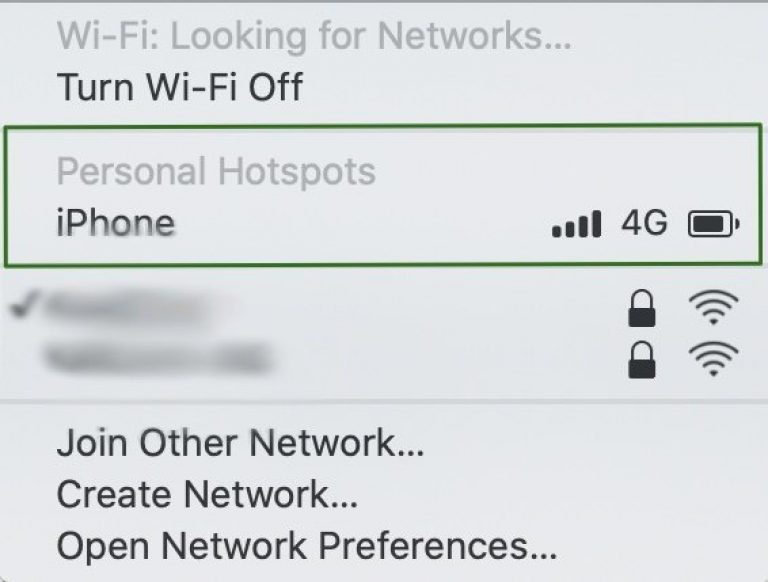
    The good news is you probably already have that backup Internet connection right on your smartphone. Most modern smartphones can double up as Wi-Fi hotspots, so you can connect to the Internet on your computer using your phone’s data connection.

    Enabling the personal hotspot on your iPhone.
    Use your phone to connect if your primary Internet connection isn’t available. (Screenshot from Mac)

    This might not be an option if your mobile data carrier does not support tethering. If this is the case for you, consider switching to another carrier, or think about buying a portable router or mobile hotspot.

    Be sure to test your phone’s data connection speed with a free service like Fast.com.

    Use a Mobile Router

    Mobile routers are excellent backup devices because they operate like a wireless router, except using a data SIM.

    Mobile routers are affordable, compact, and easy to operate, so if you need to connect when other Internet connectivity options are not available, a portable hotspot device can be a lifesaver. Plus, you can travel with them, and share the data connection with multiple devices. You will need to purchase a Data SIM plan to use a portable hotspot.

    Here are two bestselling routers available on Amazon:

    GL.iNet GL-AR750S-Ext Gigabit Travel AC VPN Router

    300Mbps(2.4G)+433Mbps(5G) Wi-Fi, 128MB RAM, MicroSD Support, Repeater Bridge, OpenWrt/LEDE pre-Installed, Cloudflare DNS

    [amazon-button link=”https://www.amazon.com/dp/B07GBXMBQF?th=1&psc=1&linkCode=ll1&tag=jimmyeslus1-20&linkId=a1f053cbac76d7751ceda80e26717cbd&language=en_US&ref_=as_li_ss_tl”]

    GL.iNet GL-AR750 (Creta) Travel AC VPN Router

    300Mbps(2.4G)+433Mbps(5G) Wi-Fi, 128MB RAM, MicroSD Storage Support, Repeater Bridge, OpenWrt/LEDE pre-Installed, Power Adapter and Cables Included

    [amazon-button link=”https://www.amazon.com/dp/B07712LKJM?th=1&psc=1&linkCode=ll1&tag=jimmyeslus1-20&linkId=044cee85a248e965135226b7be520792&language=en_US&ref_=as_li_ss_tl”]

    International Data SIMs

    One way to ensure you have fast, reliable backup Internet on a consistent basis, especially while traveling, is to get an International Data SIM, which you can use with a smartphone, tablet or portable router.

    An International Data SIM gives you the flexibility of adding pre-paid credit and using it for emergencies only, without having to pay monthly fees or additional fees for tethering. Since this is intended to be used as a backup to your main broadband connection, you’re only going to pay for the data you use when your primary Internet connection goes offline, or when you travel, for example.

    Popular International Data SIM Providers are:

    Both providers give you a range of Data SIM card options based on how and where you plan to use data, so it’s best to check both out and decide which provider has the right SIM solution for your needs. Data SIMs are affordable, can be used in many countries, and are thus ideal for online teachers who frequently travel.

    Portable Wi-Fi Hotspots

    Mobile hotspots are great for traveling online ESL teachers because they offer fast, reliable Internet connectivity in many countries across the globe that are popular among ESL teachers.

    One of the advantages of using these devices is you can opt for a pay-as-you-go plan, either paying per day or per gigabyte of used data.

    The other advantage is that you can rent these devices instead of owning them, so if you plan to use one while traveling, you only pay for the number of days you rent them. If you are a regular or long-term traveler, it is better to own than rent one, but they are currently a little expensive to buy upfront, especially if you will only be using one to teach online ESL.

    You can also keep one around at home as a backup device in case your home Internet connection drops. But for that, if you can tether your phone data, we think it’s better to use your phone’s personal hotspot feature or go with a portable router, as both options are less expensive.

    Check out the plans from SOLIS Wi-Fi; you can buy a monthly plan or buy data volume which does not expire.

    These are our 6 recommended computers for online teaching.

    The Wrap-up

    Your Internet connection needs to be both fast and reliable to teach ESL online. Speed should not be much of an issue for most people these days, but reliability is still something of an issue for online ESL teachers. Slow speed and frequent disruptions to your connectivity most likely impact your online teaching schedule, and thus, your income.

    Be sure to choose a provider that offers Internet speeds above the requirements of the companies you intend to work with. Always have a decent backup plan for those rainy days when your Internet connection might not be on your side.

    Read our guide on teaching English online through Skype.